78
Controls Controls overview
Displays on the Control Display
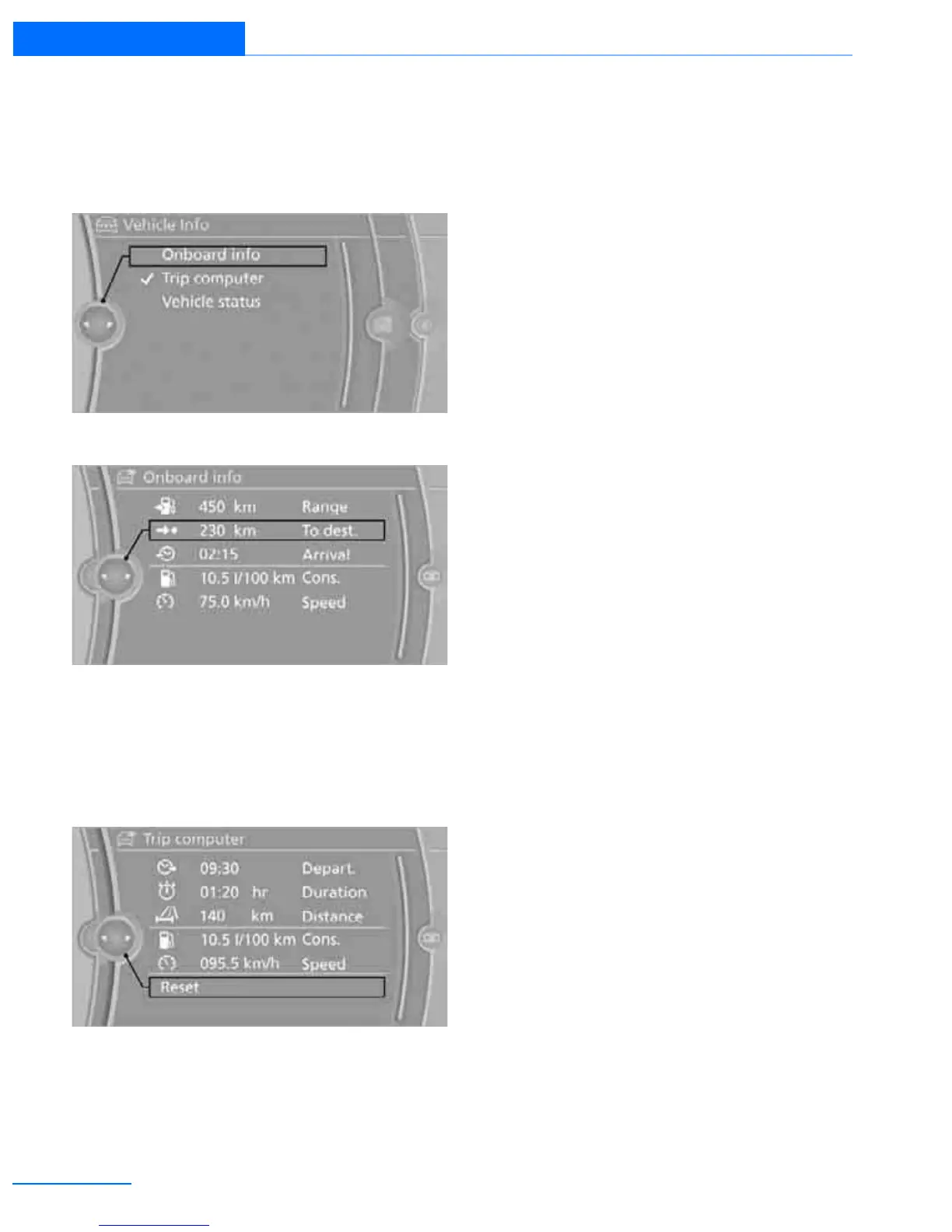
The computer can also be opened via iDrive.
1. "Vehicle Info"
2. "Onboard info" or "Trip computer"
Displaying "Onboard info":
> Cruising range
> Distance from destination
> Estimated time of arrival if a destination has
been entered in the navigation system.
Displaying "Trip computer":
> Departure time
> Trip duration
> Trip distance
Both displays show:
> The average speed and
> the average fuel consumption.
Resetting the fuel consumption and
speed
You can reset the values for average speed and
average consumption:
1. Select the respective menu entry.
2. Press the controller again to confirm your
selection.
Resetting the trip computer
You can reset all values:
1. "Vehicle Info"
2. "Trip computer"
3. "Reset"
Online Edition for Part no. 01402911223 - © 06/13 BMW AG


 To Next Page
 Loading...