To Next PageTo Next Page
 Need help?
Do you have a question about the CashTester CT 332 SD and is the answer not in the manual?
Thank you for purchasing the CT 332 SD counterfeit detector.
Use only the provided power adapter; device opening by qualified technicians only.
Lists the items included in the box with the CT 332 SD.
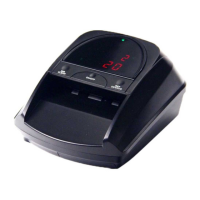
Details the physical components and indicators of the CT 332 SD unit.
Instructions on turning on the CT 332 SD and its automatic banknote detection process.
Configure hold function, sleep mode, and auto clearance preferences.
Access and manage stored data on counted genuine notes and their values.
Information on charging the optional rechargeable battery and low voltage alerts.
Guide on updating the CT 332 SD software via SD card or computer.
Procedures for periodic maintenance of sensors and rubber belts.
Contacting support for unresolved issues and warranty information.
Key specifications including dimensions, power, temperature, and weight.
Details self-test error codes and their descriptions for troubleshooting.
Thank you for purchasing the CT 332 SD counterfeit detector.
Use only the provided power adapter; device opening by qualified technicians only.
Lists the items included in the box with the CT 332 SD.
Details the physical components and indicators of the CT 332 SD unit.
Instructions on turning on the CT 332 SD and its automatic banknote detection process.
Configure hold function, sleep mode, and auto clearance preferences.
Access and manage stored data on counted genuine notes and their values.
Information on charging the optional rechargeable battery and low voltage alerts.
Guide on updating the CT 332 SD software via SD card or computer.
Procedures for periodic maintenance of sensors and rubber belts.
Contacting support for unresolved issues and warranty information.
Key specifications including dimensions, power, temperature, and weight.
Details self-test error codes and their descriptions for troubleshooting.
 General
| Power Supply | 12VDC |
|---|---|
| Interface | RS-232 |
| Counterfeit detection | UV, MG, IR |
| Communication Interface | RS-232 |
| Operating Temperature | 0°C |
| Storage Temperature | -20°C |