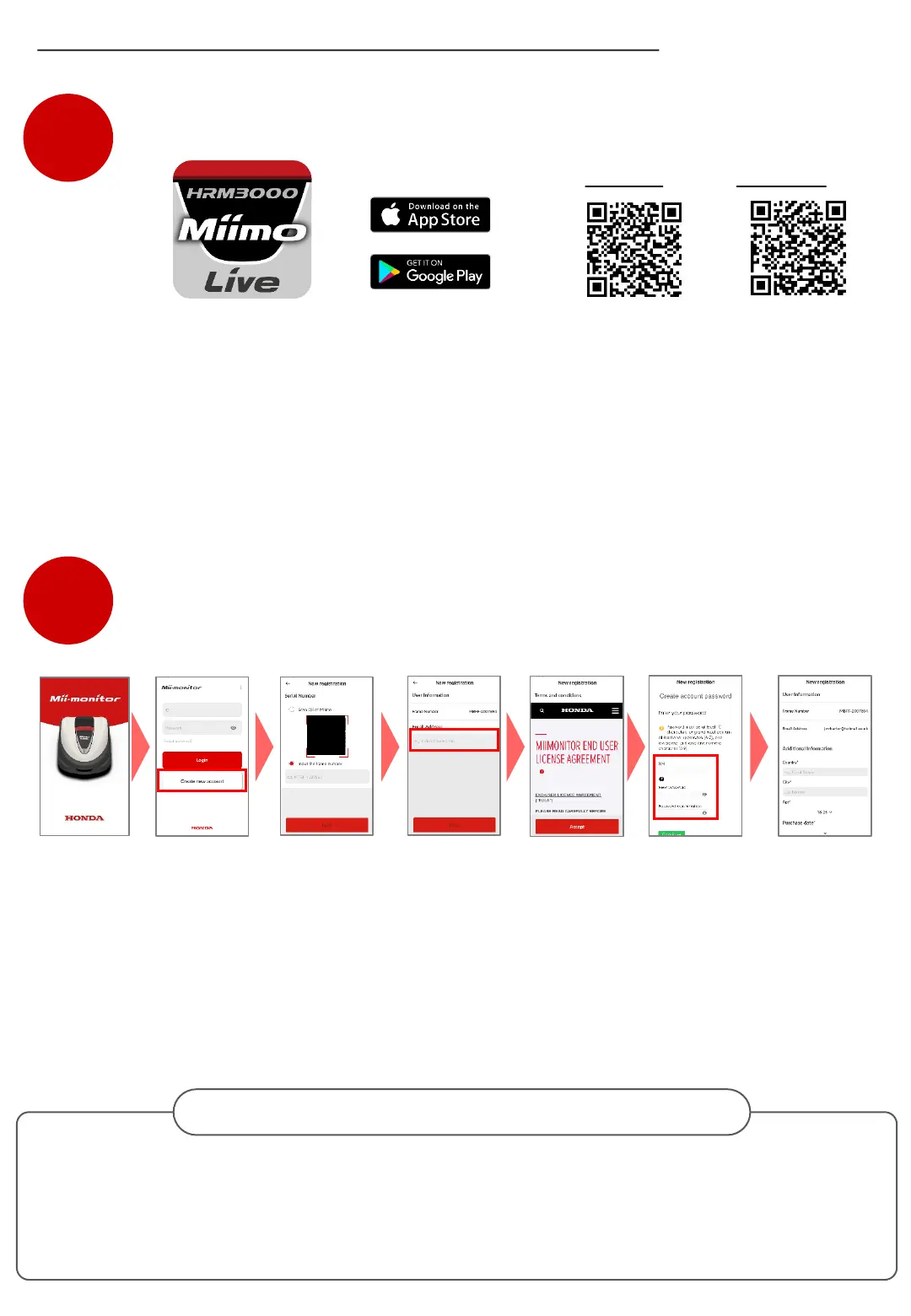
Search for “Mii-monitor - HRM3000 Live” in the Apple Store, Google Play or scan the QR to
install.
Download Mii-monitor app for HRM3000 Live
*1 This app is only for HRM3000 Live
Create a new account
Once registered, the email address cannot be changed by the user.
If you need to change your email address, delete your account, or confirm your ID and
email address, please contact your dealer for support.
Change email address / Delete account
*2 If you do not receive the authorization code due to the incorrect email address entered,
please restart the app and create a new account again.
iPhone
Android
② Click [Create
new account] on
the login screen.
③ Register the
serial number of
your Miimo.
④ Register your
email address as
ID.
⑤ Confirm the
terms of use and
click [Accept].
⑥ An authorization
code will be sent to the
registered email
address. Use it to set a
new password.(*2)
⑦ Enter additional
user information and
click [Next] to
complete the new
registration.
STEP
1
STEP
2
(※1)
The app will be updated, so please always use the latest app version.
It is recommended to set the automatic update setting of the app.
It is also recommended to enable the screen lock function of the smartphone.
① Launch the Mii-
monitor app.
Mii-monitor app installation and new registration



 To Next Page
 Loading...