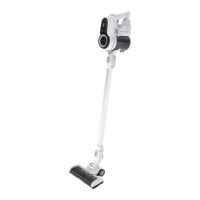
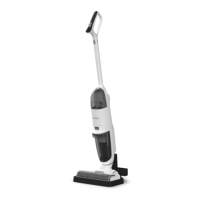
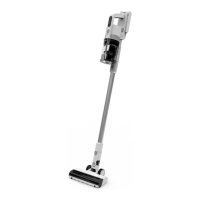
The iHome STICKVAC SV6 is a versatile and lightweight stick vacuum cleaner designed for dry floor use in indoor environments. It offers both handheld and stick configurations, providing flexibility for various cleaning tasks. The vacuum is powered by a rechargeable battery, making it cordless and easy to maneuver around the home without being tethered to an outlet.
Function Description:
The primary function of the iHome STICKVAC SV6 is to efficiently clean dry floors by vacuuming up dust, debris, and other small particles. It features a motorized floor brush that aids in effective cleaning across different floor types. The vacuum operates with a suction control button, allowing users to toggle between ECO and MAX suction modes to suit different cleaning needs and optimize battery life. The dustbin is designed for easy emptying with a "one touch to empty" mechanism, simplifying the disposal of collected dirt. The device also incorporates a multi-stage filtration system, including a HEPA filter, to capture fine dust and allergens, contributing to cleaner air in the home.
Usage Features:
The iHome STICKVAC SV6 is designed for user convenience and ease of use.
- Assembly: The vacuum can be easily assembled into either a handheld or stick configuration. For stick assembly, the metal tube and motorized floor brush click into place, and the rechargeable battery slides into grooves until it clicks.
- Battery Charging: The battery can be recharged whether it is connected to the vacuum or removed. The charging connection is located on the top of the main battery. A blinking LED indicates that the battery is charging, and a solid LED signifies a full charge. It is recommended to fully charge the battery for 4-5 hours before the first use to ensure optimal performance. Only the supplied power adapter should be used for recharging.
- Operation: To turn on the vacuum, users press the Power Button. The suction control button allows switching between ECO mode for longer battery life and MAX mode for more powerful cleaning, though MAX mode will deplete the battery more rapidly. The vacuum is specifically designed for dry floor use and should not be used to vacuum liquids.
- Accessories: The SV6 comes with several accessories to enhance its versatility. These include a 2-in-1 small brush and a crevice tool, which can be stored on the wall mount bracket.
- Wall Mount: A wall mount bracket is provided for convenient storage and organization of the vacuum and its accessories. The wall mount has self-adhesive tape for initial placement, but for supporting the weight of the vacuum, it should be securely installed with screws and anchors. Users are advised to ensure the mounting area is free of obstructions like gas, water pipes, or electrical cables.
Maintenance Features:
Regular maintenance is crucial for the optimal performance and longevity of the iHome STICKVAC SV6.
- Dustbin Emptying: The dustbin should be emptied regularly. This is made easy with a "one touch to empty" button that releases the dustbin contents.
- Filter Cleaning: The filters, including the inner filter, HEPA filter, and sponge filter, require regular cleaning.
- To access the filters, the stick is removed from the main unit, and the dustbin is lifted away by pressing its release button.
- The inner filter is then lifted out, and the HEPA housing is rotated clockwise to remove the HEPA and sponge filters.
- These filters can be tapped to dislodge fine dust and rinsed under cold water for a deeper clean. It is essential to allow them to fully dry for 24 hours before reassembling to prevent damage and maintain suction.
- The outlet HEPA filter can also be pulled down with fingers for cleaning.
- When reinstalling the dustbin, it's important to align the lock first and then press the front end of the dustbin until it clicks into place. The HEPA housing should be turned counter-clockwise until it locks.
- Floor Brush Cleaning: The motorized floor brush also requires periodic cleaning to remove entangled hair and debris.
- The brush is removed from the metal tube by pressing a release button.
- A release tab on the side of the floor brush housing allows the brushroll to be slid out.
- Any debris or hair wrapped around the roller should be removed, and the inside of the housing wiped down.
- It's important to ensure no debris is lodged in the neck of the brush assembly or the metal tube before reinstalling the brushroll and reattaching the brush to the tube.
Troubleshooting:
The manual provides guidance for common issues:
- Vacuum not powering on: This could be due to a depleted battery, or the battery being connected to the adapter or the vacuum being on the charging mount in standby mode. Solutions include charging the battery or disconnecting it from the adapter/charging mount.
- Weak suction power: Possible causes include a full dust canister, clogged filters, a brush roller entangled with hair/debris, improper filter installation, or a blocked tube/attachment. Solutions involve emptying the dust canister, cleaning/replacing filters, cleaning the brush, inspecting filter alignment, and clearing blockages.
- Abnormal motor noise/volume: This may indicate a blockage overworking the motor, requiring inspection and removal of debris from the dust canister, filters, metal tube, brush roller, or attachments.
- Battery not charging: This could be due to the power source not providing electricity, a faulty adapter, or a faulty battery. Solutions include checking the power source, purchasing a new adapter if faulty, or contacting customer support for a replacement battery.
Overall, the iHome STICKVAC SV6 is designed as a user-friendly and maintainable cordless vacuum cleaner, offering efficient cleaning for everyday household needs with its adaptable design and straightforward maintenance procedures.


 To Next Page
 General