52
Setting up the DVD Preferences
■ Setting the TV screen size
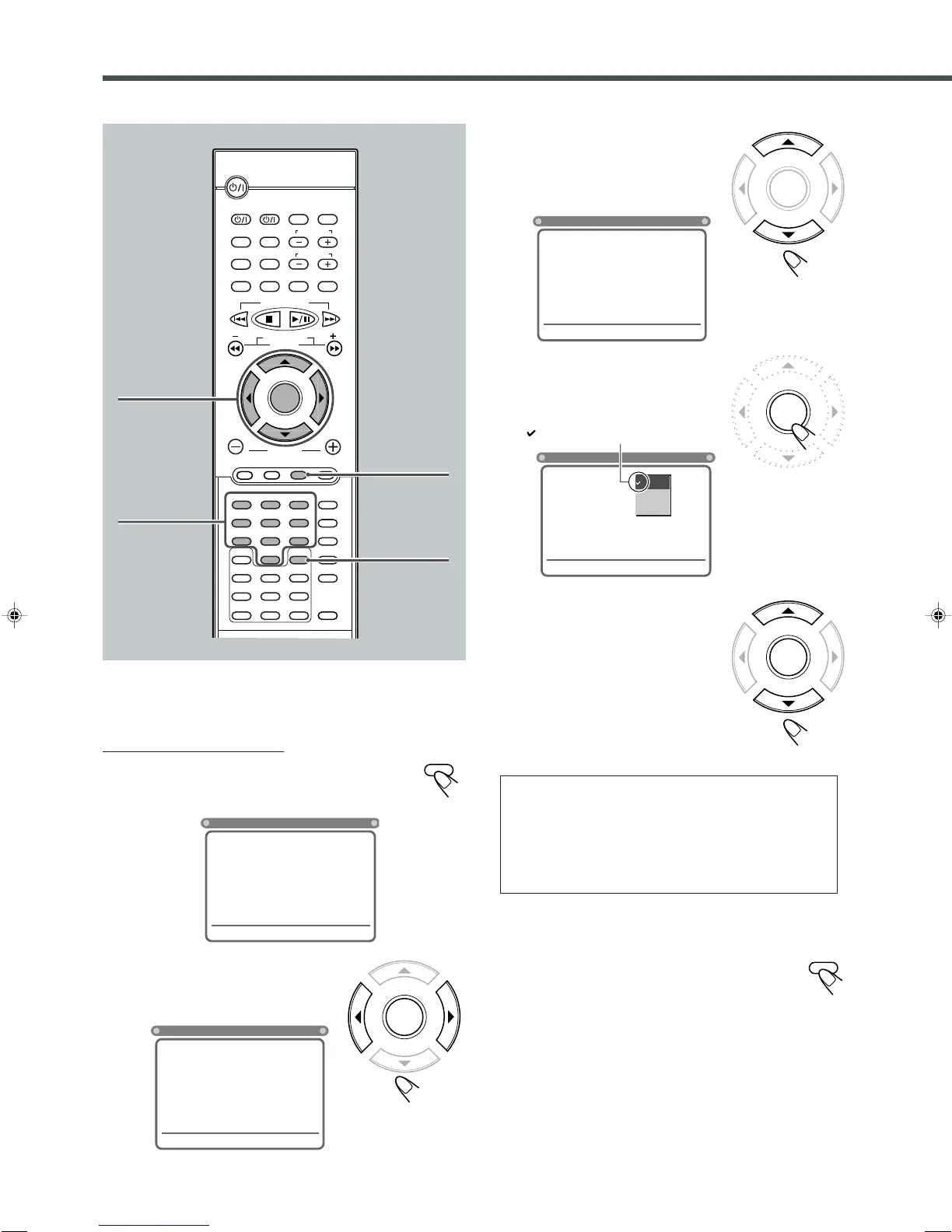
From the remote control ONLY:
1
Press SETUP.
Language selection menu of the setup menu appears on
the TV screen.
2
Press ENTER (or 3/2) to
select (highlight) the system
setting menu.
3
Press ∞ (or 5) to select
(highlight) one of the system
setting items listed on the
menu.
4
Press ENTER.
Pop-up window appears (where the
selectable settings are listed).
5
Press ∞ (or 5) to select
(highlight) the proper setting,
then press ENTER.
The setting is stored (and the pop-up
window goes off).
• When you want to cancel the setting
you have just made, press RETURN
without pressing ENTER. (Pop-up
menu also goes off.)
• Even if “4:3 PS” is selected, the screen size may become
“4:3 LB” while playing some DVDs. This depends on how
the DVD is programed and recorded.
• If a disc (or some portions of the disc) is recorded with
the video signals of 4:3 aspect ratio, this setting does not
take effect. The pictures are displayed with full 4:3 aspect
ratio or with 4:3 Letter Box.
To erase the Setup menu
Press SETUP.
indicates the current setting.
SYSTEM
LANGUAGES
TV SCREEN
RATING LEVEL
4:3 LB
OFF
» « | \
: Move Setup : Exit
4 : 3 LB
4 : 3 PS
16 : 9
SYSTEM
LANGUAGES
TV SCREEN
RATING LEVEL
4 : 3 LB
OFF
» « | \
: Move Setup : Exit
SYSTEM
LANGUAGES
TV SCREEN
RATING LEVEL
4 : 3 LB
OFF
» « | \
: Move Setup : Exit
SYSTEM
LANGUAGES
OSD LANGUAGE
AUDIO
SUBTITLE
MENU LANGUAGE
ENGLISH
ENGLISH
ENGLISH
ENGLISH
» « | \
: Move Setup : Exit
3/2/5/∞
ENTER
SETUP
DISPLAY
B.SEARCH
DOWN
REW
UP
FF
F.SEARCH
RETURN
STEP
TV/VIDEO
TV VOLUME
TV CHANNEL
SUBTITLE
TOP MENU
TV
STANDBY/ON
AUDIO
VCR
VCR
CONTROL
TUNER PRESET
ENTER
VOLUME
MENU
AUDIO/
FM MODE
VCR CHANNEL
TUNING
DVD FM/AM AUX
MUTING
REMAIN
PROGRAM
D.R.CZOOM
SETUP
DSP MODE
SLEEP
TEST
PRO LOGIC
SETTING
SOUND
CLEAR
REPEAT
ANGLE
SLOW
SEARCH
A-B REPEAT
123
45
6
78
9
0
PTY – PTY +PTY SEARCH
RDS
DISPLAY
Number
buttons
RETURN
EN50-53TH-A30R[B]ff.pm6 02.7.2, 9:50 PM52



 To Next Page
 Loading...