4.2. EDID(The Extended Display Identification
Data)/DDC(Display Data Channel) download
4.2.1 Overview
It is a VESA regulation. PC or a MNT will display an
optimal resolution through information sharing without any
necessity of user input. It is a realization of “Plug and Play”.
4.2.2 Equipment
- Adjust remocon
4.2.3 Download method
1) Press ADJ key on the adjustment R/C and select [EZ
ADJUST]. Select [8.EDID D/L] and access to the items
with using the ENTER key.
2) Press the OK key on the [Start] menu, HDMI1 / HDMI2 /
HDMI3 / HDMI4 / RBG inputs are selected on the
Media-Box and HDMI5 input on the TV. When the
process is completed, the message 'NG' is changed to
'OK'.
* You can download this with using JIG or the equipment
on the HDMI5 / RGB input.
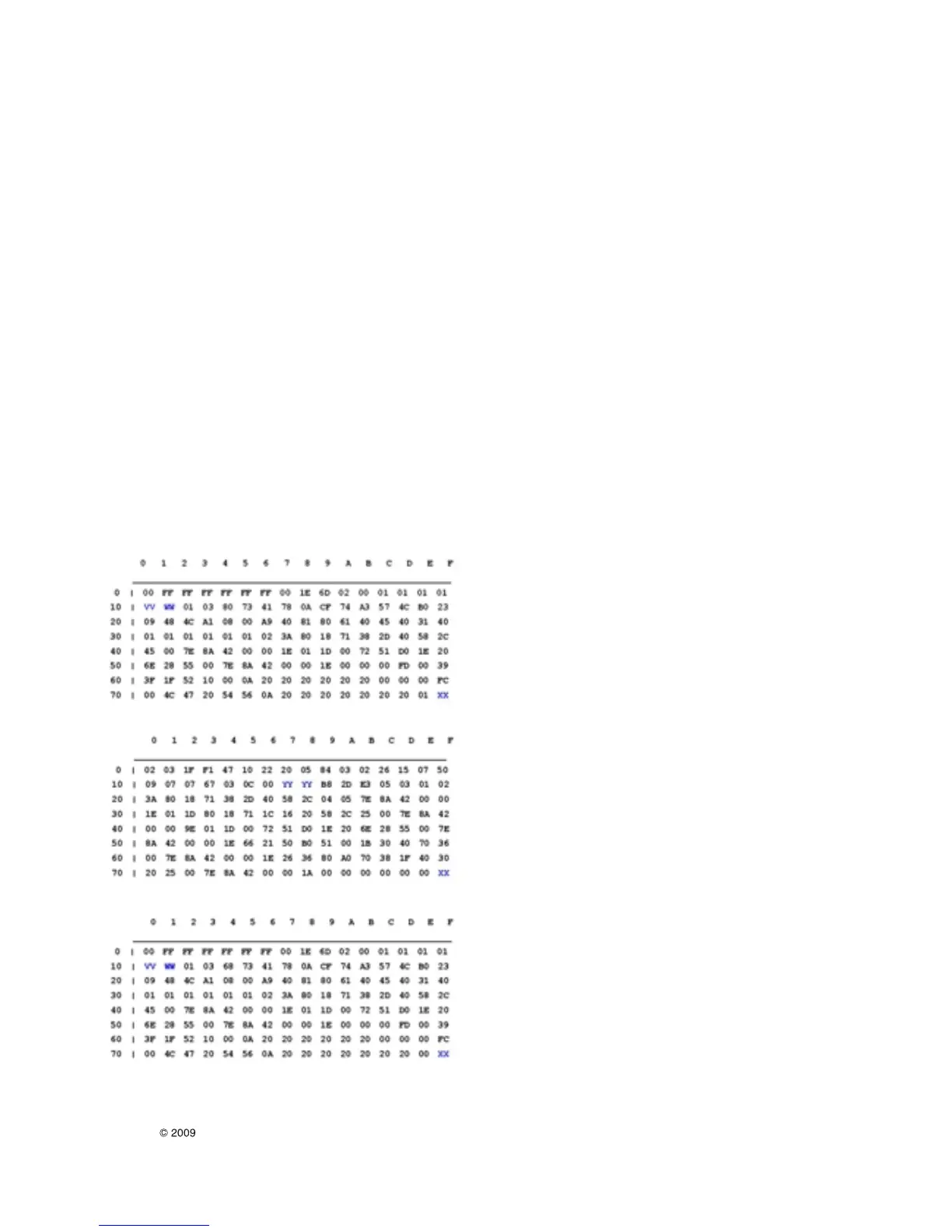
4.2.4 EDID DATA
- HDMI
EDID Block 0 table =
EDID Block 1 table =
EDID Block 1 table =
* Notice
- HDMI1 ~ HDMI4 / RGB : Media-Box, Hdmi5 : TV
- The items below of the EDID datas can be changed
according to the S/W and input.
=> VV:Week Manufacture
=> WW: Year Manufacture
=> XX:C/S
=> YY : Physical address
5. Total Assembly Adjustment
• The Wireless model can be added the pairing work with the
Media-Box besides the existing test and can be changed
the process and the test method.
• Total Assembly process
- TV Tool option check
- Connect the TV and Media-Box wireld with the HDMI
cable. (TV: HDMI5 port / Media-Box: Service port)
- Wireless Pairing
- Media-Box Tool option check
- Media-Box AC power off
- Remove the HDMI cable
- Adjust the White Balance
- Media-Box AC power on (Access to Wireless mode)
- Check the Display and press the Bluetooth key (send the
TV W/B data to Media-Box)
- Connect the RF / HDMI1 to Media-Box and check.
- Shipping
* The Media-Box is the main equipment and the TV is after on
the Wireless/Wired connection and the Media-Box can
adjust all of the OSD)
(exception: Select the HDMI5 on the Wireless connection)
5.1 Wireless Pairing
5.1.1 Overview
To set 1:1 connection from selecting the same Wireless
channel on the TV and Media-Box, and fixing Mac
address.
* Set this on the Wired (HDMI cable connection) state.
5.1.2 Method
1) Press one of the OP1(Channel1) / OP2(Channel2) /
OP3(Channel3) key on the adjustment R/C and check
the Paring information OSD that is displayed
2) Use these method if the upper method can not be
processed
- 12 -
LGE Internal Use OnlyCopyright LG Electronics. Inc. All right reserved.
Only for training and service purposes


 To Next Page
 Loading...