To Next PageTo Next Page
 Need help?
Do you have a question about the Nikon AF DC-Nikkor 105mm f/2 D and is the answer not in the manual?
Detailed list and explanation of physical parts and controls on the lens.
Instructions for switching between autofocus and manual focus modes on the lens.
Steps to lock the lens aperture at f/16 for specific exposure modes.
Instructions on how to extend and retract the integrated lens hood.
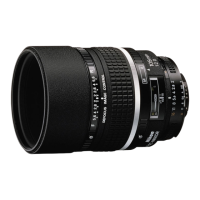
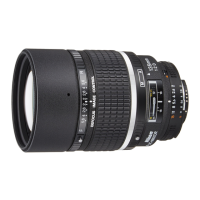
The Nikon AF DC-Nikkor 105mm f/2 D lens is a specialized optical instrument designed to offer photographers unique creative control over image blur, in addition to standard autofocus and manual focusing capabilities. Its primary function is to enable "Defocus image Control" (DC), allowing users to intentionally blur either the background or foreground of an image, creating a soft-focus effect that enhances subject isolation and artistic expression.
The core functionality of this lens revolves around its Defocus image Control (DC) feature. This is achieved through a dedicated DC ring on the lens barrel. By rotating the DC ring towards the "R" (rear) side, the background of the image is blurred, while rotating it towards the "F" (front) side blurs the foreground. The degree of blur can be controlled by aligning the f-number on the DC ring with the aperture in use; turning the ring beyond the current aperture setting can produce an even softer focus effect. This control is particularly useful for portraiture, still life, and other genres where selective focus and aesthetic blur are desired. The lens also incorporates a rounded diaphragm opening, which contributes to a more natural and pleasing appearance of out-of-focus elements, often referred to as bokeh.
Beyond its unique DC capabilities, the lens functions as a high-quality autofocus (AF) and manual focus (MF) lens. It utilizes Nikon's Rear Focusing (RF) system, where only the rear lens elements move during focusing. This design prevents the overall length of the lens from changing during focusing, which contributes to quicker AF operation and improved durability. The lens transmits distance information to compatible camera bodies, enabling advanced metering modes such as 3D Matrix Metering and 3D Multi-Sensor Balanced Fill-Flash, ensuring accurate exposure and flash control.
Operating the AF DC-Nikkor 105mm f/2 D involves several key steps and considerations:
Defocus Image Control: To use the DC feature, the DC ring lock release button must be pressed while rotating the DC ring. It is crucial to perform defocus control before focusing. Adjusting the DC ring after focusing or during autofocus lock will result in an out-of-focus subject. The effect of the defocus control is influenced by factors such as subject-to-background and subject-to-foreground distances. Since the image blur cannot be accurately verified through the viewfinder, it is recommended to take a series of shots at various DC ring settings to achieve the desired effect.
Focusing: The lens supports both autofocus and manual focus. To select autofocus, the A-M ring lock release button must be pressed, and the A-M ring turned until "A" aligns with the A-M index. Concurrently, the camera's focus mode selector must be set to autofocus. For manual focus, the A-M ring is turned to align "M" with the A-M index, and the camera's focus mode selector is set for manual focus. Improperly matching the lens's A-M ring setting with the camera's focus mode selector on a Nikon autofocus camera can potentially damage the camera body.
Minimum Aperture Lock: For programmed auto or shutter-priority auto exposure shooting, the lens features a minimum aperture lock lever. To engage this, the aperture ring is turned so that f/16 aligns with the white aperture index dot. The lock lever is then slid in the direction of the aperture ring until its white dot aligns with the orange dot. To release the lock, the lever is slid in the reverse direction.
Built-in Lens Hood: The lens includes a built-in lens hood designed to minimize flare when shooting in bright sunlight. To deploy the hood, it is pulled out and turned counterclockwise for two rotations. To store it, the hood is turned clockwise and pushed back into the lens barrel.
Recommended Focusing Screens: For optimal performance with various Nikon cameras, specific focusing screens are recommended. The manual provides a table detailing compatible screens for cameras like the F5 and F4, along with notes on excellent or acceptable focusing, potential vignetting, and necessary exposure compensation for certain camera models.
Proper care and maintenance are essential to ensure the longevity and performance of the AF DC-Nikkor 105mm f/2 D lens:
Cleaning: The lens surface should be cleaned with a blower brush to remove dust. For dirt or smudges, a soft, clean cotton cloth or lens tissue moistened with ethanol (alcohol) or lens cleaner should be used. Wiping should be done in a circular motion from the center to the outer edge, taking care not to leave traces or touch other lens parts. Thinner or benzine should never be used for cleaning.
Protection: To protect the lens surface from dirt or damage, the use of an NC filter is recommended at all times. The built-in lens hood also offers an additional layer of protection. When the lens is not in use, it should be covered with its lens cap. Both front and rear caps should be attached when the lens is stored separately.
Storage: For long-term storage, the lens should be kept in a cool, dry place to prevent rust and mold. It should not be stored in direct sunlight or near naphthalene or camphor.
Handling Precautions: Care must be taken to avoid getting the lens wet or dropping it, as water can cause malfunction. The exterior of the lens unit is made of reinforced plastic, so extra caution is advised to prevent damage from excessively hot environments.
CPU Contacts: The CPU contacts on the lens are delicate and must not be soiled or damaged. Certain accessories, such as older Auto Extension Rings (PK-1, PK-11), K1 Ring, Auto Ring BR-4, Macro Adapter Ring BR-2, or K2 Ring, should not be attached directly to the lens as they can damage the CPU contacts. Instead, alternative versions like PK-11A, BR-6, or BR-2A should be used.
Compatibility: It is important to note that this lens cannot be used with the AF finder DX-1 (designed for the Nikon F3AF).
 Optical Specifications
| focal length | 105 mm |
|---|---|
| maximum aperture | f/2 |
| lens construction | 6 elements in 6 groups |
| picture angle | 23°20' |
| aperture scale | f/2 to f/16 |
| diaphragm | Fully automatic |
Focusing and Exposure| distance scale | 0.9 m to infinity |
|---|---|
| focusing system | Nikon Rear Focusing (RF) system |
| exposure measurement | Via full-aperture method for Al cameras or cameras with CPU interface system |
Physical Dimensions| attachment size | 72 mm |
|---|---|
| dimensions | Approx. 79 mm dia. x 111 mm extension |
| weight | Approx. 620 g |