Related information
Establishing a Bluetooth connection manually
Charging the headset
Wearing the headset
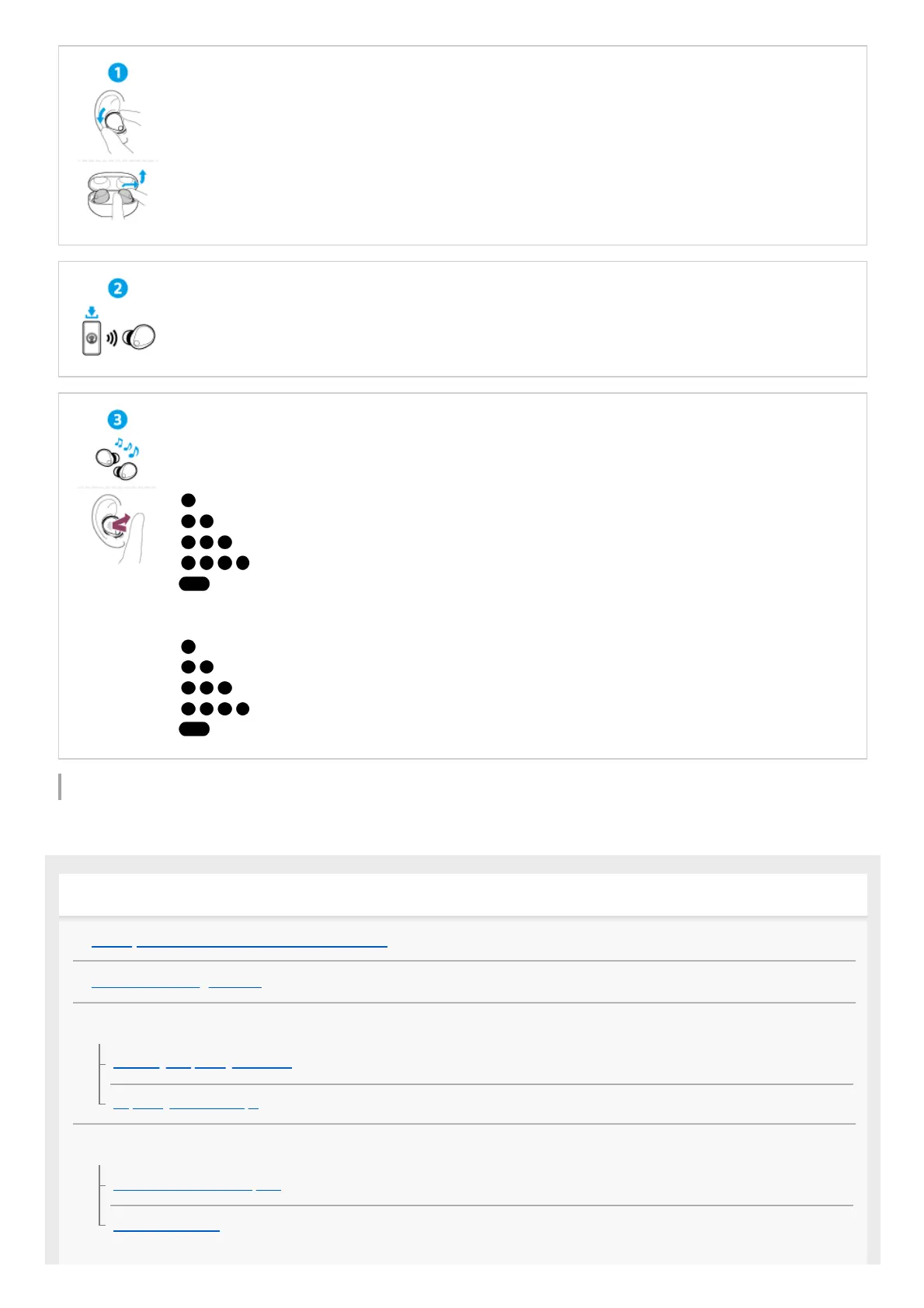
Simply turn the headset units on their sides to take them out of the charging case.
Put on the headset units by twisting them as you insert earbud tips deep into your ear canals.
Establishing a BLUETOOTH® connection
The headset is turned on when the headset units are removed from the charging case.
Follow the downloaded “Sony | Headphones Connect” app instructions.
Operating the headset
Tap the center of the touch sensor with the pad of your index finger.
Left
: To switch the noise canceling function and Ambient Sound Mode
: Quick Access (requires settings with the “Sony | Headphones Connect” app)
: Quick Access (requires settings with the “Sony | Headphones Connect” app)
...: To decrease the volume
: To activate the Quick Attention Mode
Right
: To play or pause music
: To skip to the beginning of the next track
: To skip to the beginning of the previous track (or the current track during playback)
...: To increase the volume
: To use or cancel the voice assist function (Google™ app/Siri)
Getting started
What you can do with the Bluetooth function
About the voice guidance
Supplied accessories
Checking the package contents
Replacing the earbud tips
Parts and controls
Location and function of parts
About the indicator


 To Next Page
 Loading...




