16
EN
3-7 Manual
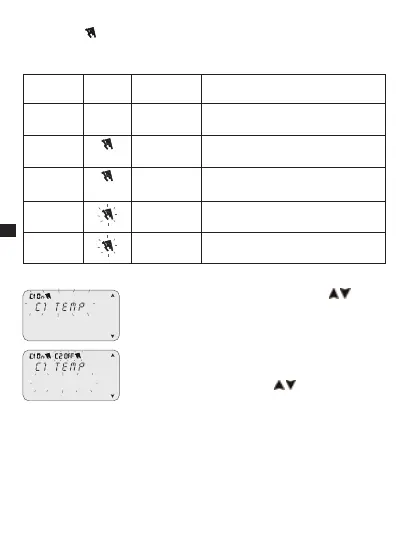
This enables the status of the outputs to be forced manually regardless of active
program. Possible settings:
Forcing
mode
Display
symbol
Channel-
Condition
Forcing function
auto c1
c2
No forcing on channel; management
from program.
Perm
c1 On
c2 On
Permanent channel activated.
PERM
c1 OFF
c2 OFF
Permanent channel de-activated.
TEMP
c1 On
c2 On
Channel activated until next program
activity.
TEMP
c1 OFF
c2 OFF
Channel de-activated until next program
activity.
Activate a forcing
c2 Perm
Select sub-menu “OVERRIDE” using keys 1. .
Press2. OK to confirm.
Press combined keys (ref. subsection 1-6) to select 3.
channel (only twin channel models).
The display shows information on channel(s) »
(ref. table above).
Set type of forcing using keys 4.
.
Press5. OK to confirm selection.
It returns to the main screen.»
The display shows the type of forcing on the »
channel.
De-activate a forcing
Press combined keys of the channel to be de-activated (ref. subsection 1-6) for 1.
approx. 2 secs.


 To Next Page
 Loading...