OPERATION
Combitherm® CT PROformance™ Series ? Operator’s Manual ? MN-35948 ? Rev 0 ? 3/17
20
Continued from previous page
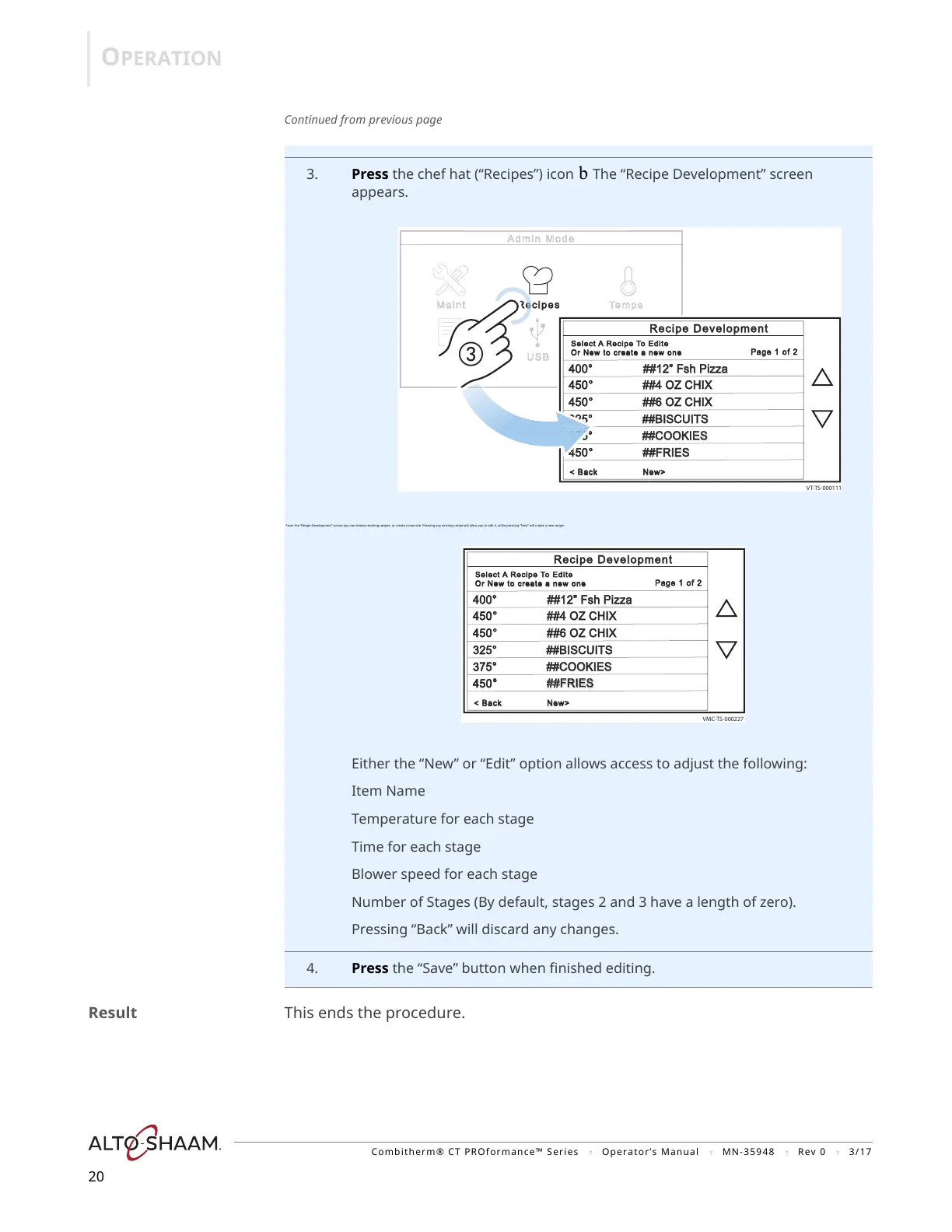
3. Press the chef hat (“Recipes”) icon b The “Recipe Development” screen
appears.
From the “Recipe Development” screen you can browse existing recipes, or create a new one. Pressing any existing recipe will allow you to edit it, while pressing “New” will create a new recipe.
Either the “New” or “Edit” option allows access to adjust the following:
Item Name
Temperature for each stage
Time for each stage
Blower speed for each stage
Number of Stages (By default, stages 2 and 3 have a length of zero).
Pressing “Back” will discard any changes.
4. Press the “Save” button when finished editing.
Result This ends the procedure.
VT-TS-000111
400°00° ##12” Fsh Pizza ##12” Fsh Pizza
450° ##4 OZ CHIX° ##4 OZ CHIX
450° ##6 OZ CHIX° ##6 OZ CHIX
3
25° ##BISCUITS
375° ##COOKIES
450° ##FRIES° ##FRIES
Page 1 of 2age 1 of 2
< Back New> Back New>
Select A Recipe To Editeelect A Recip e To Edi te
Or New to create a new one
Or Ne w to cre ate a new one
Recipe Developmentecipe Development
VMC-TS-000227
4400°00° ##12” Fsh Pizza ##12” Fsh Pizza
450° ##4 OZ CHIX° ##4 OZ CHIX
450° ##6 OZ CHIX° ##6 OZ CHIX
325° ##BISCUITS25° ##BISCUITS
375° ##COOKIES75° ##COOKIES
450° ##FRIES° ##FRIES
Page 1 of 2age 1 of 2
< Back New> Back New>
Select A Recipe To Editeelect A Recip e To Edi te
Or New to create a new one
Or Ne w to cre ate a new one
Recipe Developmentecipe Development
https://appliancetechmanuals.com


 To Next Page
 Loading...