EasyManua.ls Logo

Aprilaire 8910W - User Manual

Aprilaire 8910W
21 pages
Print Icon
To Next Page IconTo Next Page
Loading...
Owner’s Manual
Includes Operating
Instructions and
Warranty Information
READ AND SAVE THESE INSTRUCTIONS
Home Comfort Control
with Wi-Fi
Model 8910W

Other manuals for Aprilaire 8910W

Question and Answer IconNeed help?

Do you have a question about the Aprilaire 8910W and is the answer not in the manual?

Summary

About Your New Home Comfort Control

Controls & Display Overview

Overview of the Home Screen and Main Menu displays for the Home Comfort Control device.

Equipment Control Module LEDs

Explanation of the status indicators on the equipment control module of the Home Comfort Control.

Wi-Fi Setup & Remote Access

Wi-Fi Setup and Remote Access

Instructions for connecting the Home Comfort Control to a Wi-Fi network and accessing it remotely.

Operation

System Mode and Temperature Settings

How to select system modes and adjust temperature set points.

Fan Setting and Screen Cleaning

Details on fan settings, and procedures for cleaning the screen.

Maintenance and Screen Lockout

Information on maintenance reminders and how to use screen lockout features.

Indoor Air Quality Functions

Event-Based Air Cleaning

Details on activating and configuring the air cleaning function in various modes.

Humidity Control

Guide to managing humidification and dehumidification settings in automatic and manual modes.

Fresh Air Ventilation

Information on operating the Fresh Air ventilation in different modes like Off, Automatic, and Events.

Program Schedule and Holds

Setting Time and Date

Instructions for setting the current time and date on the Home Comfort Control.

Understanding Program Schedules

Explanation of the four daily schedule events: Wake, Leave, Return, and Sleep.

Progressive Recovery Feature

Details on how Progressive Recovery activates heating/cooling prior to scheduled events.

Changing Program Schedules

Step-by-step guide on how to modify event times and temperature setpoints.

Program Schedule Holds

Information on Temporary, Permanent, Away, and Vacation program holds.

Wi-Fi Maintenance and Troubleshooting

Clearing Router Settings

Procedure to clear existing Wi-Fi router settings on the thermostat.

Managing Wi-Fi Account Registration

Steps to unregister the Home Comfort Control from an Aprilaire account.

Wi-Fi Radio Control and Troubleshooting

Instructions for disabling Wi-Fi radio and troubleshooting connection issues.

Setup Menu and User Settings

Entering the Setup Menu

How to access the setup menu for changing various system settings.

User System Settings Explained

Detailed explanation of user system settings and their default configurations.

Warranty and Compliance

Five Year Limited Warranty

Details of the limited warranty for the Home Comfort Control product.

Warranty Registration

Instructions on how to register the Aprilaire product online or by mail.

FCC and IC Compliance Statements

Statements regarding FCC and IC compliance, warnings, and interference.

Summary

About Your New Home Comfort Control

Controls & Display Overview

Overview of the Home Screen and Main Menu displays for the Home Comfort Control device.

Equipment Control Module LEDs

Explanation of the status indicators on the equipment control module of the Home Comfort Control.

Wi-Fi Setup & Remote Access

Wi-Fi Setup and Remote Access

Instructions for connecting the Home Comfort Control to a Wi-Fi network and accessing it remotely.

Operation

System Mode and Temperature Settings

How to select system modes and adjust temperature set points.

Fan Setting and Screen Cleaning

Details on fan settings, and procedures for cleaning the screen.

Maintenance and Screen Lockout

Information on maintenance reminders and how to use screen lockout features.

Indoor Air Quality Functions

Event-Based Air Cleaning

Details on activating and configuring the air cleaning function in various modes.

Humidity Control

Guide to managing humidification and dehumidification settings in automatic and manual modes.

Fresh Air Ventilation

Information on operating the Fresh Air ventilation in different modes like Off, Automatic, and Events.

Program Schedule and Holds

Setting Time and Date

Instructions for setting the current time and date on the Home Comfort Control.

Understanding Program Schedules

Explanation of the four daily schedule events: Wake, Leave, Return, and Sleep.

Progressive Recovery Feature

Details on how Progressive Recovery activates heating/cooling prior to scheduled events.

Changing Program Schedules

Step-by-step guide on how to modify event times and temperature setpoints.

Program Schedule Holds

Information on Temporary, Permanent, Away, and Vacation program holds.

Wi-Fi Maintenance and Troubleshooting

Clearing Router Settings

Procedure to clear existing Wi-Fi router settings on the thermostat.

Managing Wi-Fi Account Registration

Steps to unregister the Home Comfort Control from an Aprilaire account.

Wi-Fi Radio Control and Troubleshooting

Instructions for disabling Wi-Fi radio and troubleshooting connection issues.

Setup Menu and User Settings

Entering the Setup Menu

How to access the setup menu for changing various system settings.

User System Settings Explained

Detailed explanation of user system settings and their default configurations.

Warranty and Compliance

Five Year Limited Warranty

Details of the limited warranty for the Home Comfort Control product.

Warranty Registration

Instructions on how to register the Aprilaire product online or by mail.

FCC and IC Compliance Statements

Statements regarding FCC and IC compliance, warnings, and interference.

Overview

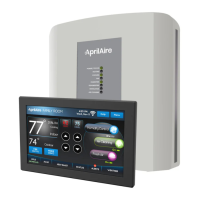
The Aprilaire Home Comfort Control™ with Wi-Fi, Model 8910W, is an advanced thermostat designed to manage various aspects of indoor air quality and temperature for optimal home comfort. This device offers remote access and control capabilities via Wi-Fi, allowing users to manage their home environment from anywhere using web and mobile applications.

Function Description

The primary function of the Home Comfort Control is to provide comprehensive management of a home's heating, cooling, and indoor air quality systems. It integrates temperature control with humidification, dehumidification, ventilation, and air cleaning functionalities.

  • Temperature Control: The device allows users to set and adjust desired heating and cooling temperatures. It supports various system modes including EM HEAT (for heat pumps with auxiliary heat), HEAT, OFF, COOL, and AUTO (which automatically selects heating or cooling based on indoor temperature). The thermostat features a "Heat Blast®" function that can quickly raise the room temperature by 3°F to 5°F.
  • Humidification Control: The system can automatically or manually control humidification levels in the home. In automatic mode, it adjusts the home's relative humidity (RH) based on outdoor temperature to prevent excessive condensation or low humidity during heating seasons. Users can set an initial humidity level and make minor adjustments for personal comfort. In manual mode, users are advised to anticipate drops in outdoor temperature and reduce the RH setting accordingly to avoid condensation, with a provided table guiding proper RH settings based on outdoor temperature.
  • Dehumidification Control: If installed, the device can control dehumidification using either a whole-home dehumidifier or the air conditioner (cooling unit). Users can set a desired relative humidity level and turn dehumidification on or off. The system can cool up to 3°F beyond the cooling setpoint for dehumidification purposes. Energy-saving tips are provided, such as adjusting the setting to be as high as comfortable to reduce run time and turning off the control when windows are open.
  • Ventilation (Fresh Air) Control: The Fresh Air function, if installed, allows for controlled ventilation in four different modes: Off, Automatic (cycles based on installer-set parameters), 3 Hour Event (constant ventilation for 3 hours, then returns to previous mode), and 24 Hour Event (constant ventilation for 24 hours, then returns to previous mode). These event modes are useful for situations requiring a large amount of fresh air, such as after cooking or during days with desirable outdoor conditions.
  • Air Cleaning (Event-Based™ Air Cleaning): The device supports five air cleaning modes: Off, Constant Clean (active 24/7 for maximum cleaning), Automatic (runs a minimum of 30 minutes every hour, turning on automatically if heating/cooling run time doesn't meet this minimum), Event Clean (runs for 3 hours continuously, then returns to previous mode, useful after vacuuming), and Allergies (runs continuously for 24 hours during peak allergy seasons). The system manages fan and air cleaning selections to prevent overlaps.

Usage Features

The Home Comfort Control features a large touch screen with an adjustable backlight for easy interaction.

  • Touch Screen Interface: The device is operated using a touch screen, with clear buttons and a message center that provides feedback, instructions, and service reminders. Users are cautioned to use only fingertips, not sharp instruments, to avoid damage.
  • Programmable Schedules: It offers 7-day programmability, allowing users to set distinct schedules for different times of the day (WAKE, LEAVE, RETURN, SLEEP) with specific temperature and fan settings. The "Progressive Recovery" feature ensures the desired temperature is reached by the start of a scheduled event.
  • Program Schedule Holds:
    • Temporary Hold: Allows users to temporarily adjust the temperature, holding it until the next scheduled event or a user-defined end time.
    • Permanent Hold: Maintains a set temperature and fan mode indefinitely until manually cancelled, overriding all programmed schedules.
    • Away Mode: If enabled, sets the thermostat to predefined energy-saving setpoints for heating, cooling, and fan mode when the user is away, which can be activated via the mobile app.
    • Vacation Hold: Suspends the programmed schedule for extended periods, maintaining specific temperature and dehumidification setpoints until a set end date and time. This is useful for energy savings while away from home.
  • Fan Control: Users can select fan settings (ON, AUTO, CIRC). ON runs the fan continuously for maximum air circulation/filtering. AUTO runs the fan only when heating or cooling is active. CIRC ensures the fan runs for at least 30 minutes per hour, balancing energy savings with air circulation.
  • Screen Lockout: Certain features can be disabled or locked out at the thermostat, with options for "None," "Partial," or "Full" lockout types, providing control over who can modify settings.
  • Wi-Fi Connectivity: Enables remote access and control via the my.aprilaire.com web portal and mobile apps. The device automatically updates time and date, including daylight savings, once connected to the cloud.

Maintenance Features

The Home Comfort Control includes features to assist with system maintenance and troubleshooting.

  • Maintenance Reminders: The installer can set up reminders for equipment service (e.g., air filter, HVAC, dehumidifier, water panel). When a reminder is displayed, users are prompted to contact their HVAC dealer for service and can reset the reminders through the menu.
  • Clean Screen Function: A dedicated "Clean Screen" button temporarily disables the touch screen for 30 seconds, allowing users to clean it with a soft, damp cloth and water or household glass cleaner without accidentally changing settings.
  • Wi-Fi Maintenance:
    • Clearing Router Settings: If a user changes their Wi-Fi router or its security settings, the device's stored router settings can be cleared through the setup menu, allowing it to connect to the new network.
    • Removing from Account: The thermostat can be unregistered from a my.aprilaire.com account via the setup menu, which is useful if the device is transferred to a new owner.
    • Disabling Wi-Fi Radio: The Wi-Fi radio can be turned off through the setup menu while maintaining network settings.
  • Troubleshooting Wi-Fi Connection: The device provides a Wi-Fi connection status indicator (radio strength bars) and messages in the message center to help diagnose connectivity issues, such as "WiFi Connection Lost," "Internet Connection Lost," or "Radio Error." The equipment control module also has LEDs that indicate power/status, heating, cooling, fan, humidifier, dehumidifier, ventilation, and air cleaning activity, aiding in system diagnosis.

Aprilaire 8910W Specifications

General IconGeneral
ConnectivityWi-Fi
Humidity ControlYes
ProgrammableYes
Remote AccessYes
Energy Star CertifiedYes
Power Source24V AC
CompatibilityWorks with most HVAC systems
DisplayColor touchscreen
Mobile AppYes, Aprilaire Healthy Air App
Stages2 Heat / 2 Cool

Related product manuals