A-22
Notebook PC User Manual
Creating a RAID set
To create a RAID set:
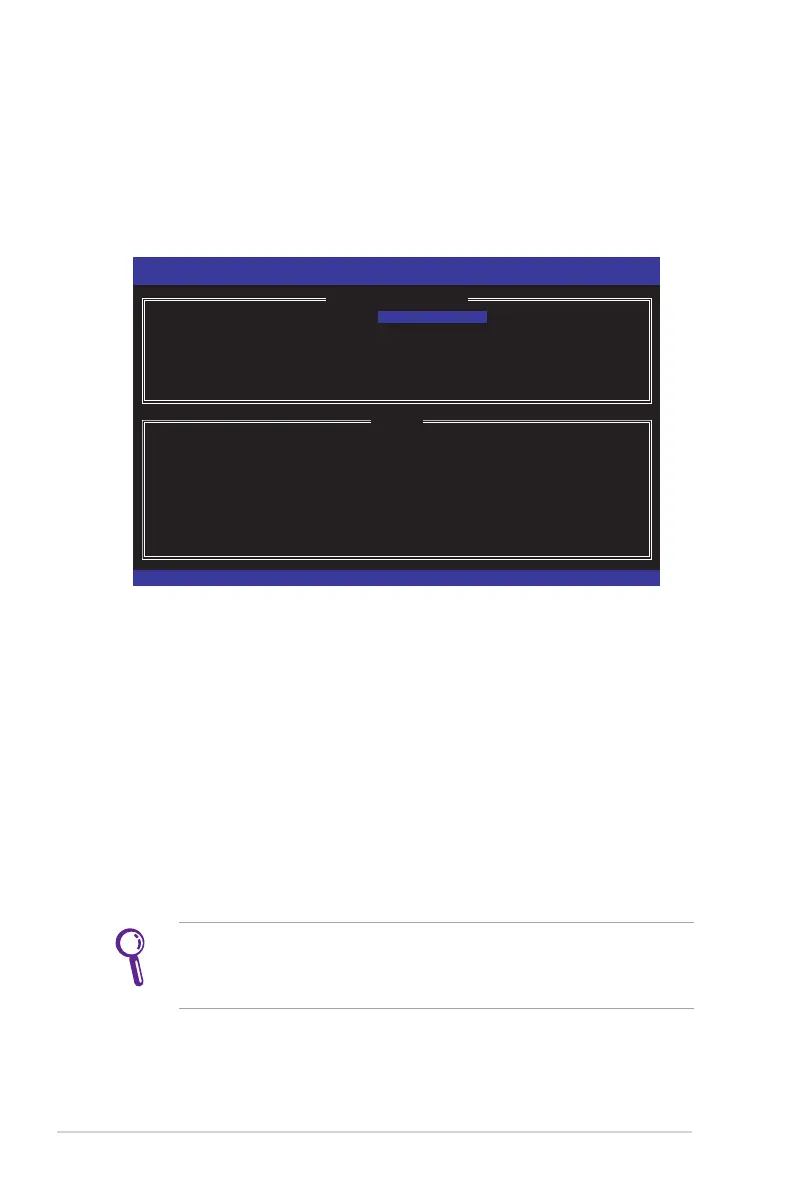
1. From the utility main menu, select 1. Create RAID Volume and
press <Enter>. The following screen appears:
2. Enter a name for the RAID set and press <Enter>.
3. When the RAID Level item is highlighted, press the up/down
arrow key to select a RAID level to create, and then press
<Enter>.
4. Use the up/down arrow key to select the stripe size for the
RAID array (for RAID 0 and 1 only),and then press <Enter>.
The available stripe size values range from 4KB to 128KB. The
following are typical values:
RAID 0: 16KB
RAID 1: NA
We recommend a lower stripe size for server systems, and a
higher stripe size for multimedia computer systems used mainly
for audio and video editing.
Intel(R) Rapid Storage Technology - Option ROM - 11.5.0.1232
Copyright(C) 2003-10 Intel Corporation. All Rights Reserved.
[ CREATE VOLUME MENU ]
[ HELP ]
Enter a unique volume name that has no special characters and is
16 characters or less.
[
↑↓
]Change [TAB]-Next [ESC]-Previous Menu [ENTER]-Select
Name:
RAID Level: RAID0(Stripe)
Disks: Select Disks
Strip Size: 16KB
Capacity: 1397.3 GB
Sync: N/A
Create Volume


 To Next Page
 Loading...