
 Need help?
Do you have a question about the Asus PRIME Z270-K and is the answer not in the manual?
Manual introduction, safety precautions, and motherboard overview.
Diagrams and descriptions of motherboard components and layout.
Instructions for installing the CPU and system memory modules.
Details on supported operating systems and using the support DVD.
Managing and updating the motherboard BIOS using utilities.
Using EZ Update, EZ Flash 3, and CrashFree BIOS for BIOS updates.
Navigating and understanding BIOS setup modes (EZ and Advanced).
Configuring CPU and chassis fan speeds for optimal cooling.
Saving favorite BIOS settings and configuring RAID volumes.
Setting BIOS language and configuring system security.
Configuring CPU and DRAM overclocking settings.
Platform, CPU, and graphics configuration settings.
Configuring boot order, fast boot, and CSM support.
Accessing utilities like EZ Flash 3 and Overclocking Profiles.
Options for loading defaults, saving, discarding changes, and exiting.
FCC, Canadian, and other regulatory compliance information.
Contact details and technical support resources for ASUS.
Manual introduction, safety precautions, and motherboard overview.
Diagrams and descriptions of motherboard components and layout.
Instructions for installing the CPU and system memory modules.
Details on supported operating systems and using the support DVD.
Managing and updating the motherboard BIOS using utilities.
Using EZ Update, EZ Flash 3, and CrashFree BIOS for BIOS updates.
Navigating and understanding BIOS setup modes (EZ and Advanced).
Configuring CPU and chassis fan speeds for optimal cooling.
Saving favorite BIOS settings and configuring RAID volumes.
Setting BIOS language and configuring system security.
Configuring CPU and DRAM overclocking settings.
Platform, CPU, and graphics configuration settings.
Configuring boot order, fast boot, and CSM support.
Accessing utilities like EZ Flash 3 and Overclocking Profiles.
Options for loading defaults, saving, discarding changes, and exiting.
FCC, Canadian, and other regulatory compliance information.
Contact details and technical support resources for ASUS.
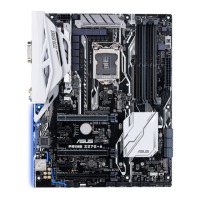
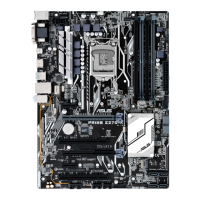
 General
| Form Factor | ATX |
|---|---|
| Chipset | Intel Z270 |
| CPU Socket | LGA 1151 |
| Memory Slots | 4 x DIMM |
| Maximum Memory | 64GB |
| Memory Type | DDR4 |
| PCIe x16 Slots | 2 |
| PCIe x1 Slots | 4 |
| PCI Slots | 0 |
| SATA Ports | 6 x SATA 6Gb/s |
| Audio | Realtek ALC887 8-Channel High Definition Audio CODEC |
| Supported CPUs | 6th/7th Gen Intel Core i7/i5/i3/Pentium/Celeron |
| Memory Speed | 3866(O.C.)/3733(O.C.)/3600(O.C.)/3466(O.C.)/3400(O.C.)/3300(O.C.)/3200(O.C.)/3000(O.C.)/2800(O.C.)/2666/2400/2133 MHz |
| Multi-GPU Support | AMD CrossFireX |
| M.2 Slots | 1 x M.2 Socket 3 |
| USB 3.1 Gen 1 Ports | 6 (4 at back panel, 2 at mid-board) |
| USB 2.0 Ports | 6 (2 at back panel, 4 at mid-board) |
| LAN | Realtek RTL8111H, 1 x Gigabit LAN |
| Back Panel I/O Ports | 1 x PS/2 keyboard/mouse combo port, 1 x DVI-D, 1 x HDMI, 1 x LAN (RJ45) port, 2 x USB 2.0, 4 x USB 3.1 Gen 1, 3 x Audio jacks |
| Internal I/O Ports | 1 x USB 3.1 Gen 1 connector (supports 2 USB 3.1 Gen 1 ports), 2 x USB 2.0 connectors (supports 4 USB 2.0 ports), 1 x M.2 Socket 3, 6 x SATA 6Gb/s connectors, 1 x CPU Fan connector, 2 x Chassis Fan connectors, 1 x 24-pin EATX Power connector, 1 x 8-pin ATX 12V Power connector, 1 x Front panel audio connector, 1 x S/PDIF Out header, 1 x COM port header |






 To Next Page