EasyManua.ls Logo

Casio FX-7400GII - SOFTWARE VERSION 2-00 User Manual

Casio FX-7400GII - SOFTWARE VERSION 2-00
412 pages
To Next Page IconTo Next Page
To Previous Page IconTo Previous Page
Page #329 background image
14-2
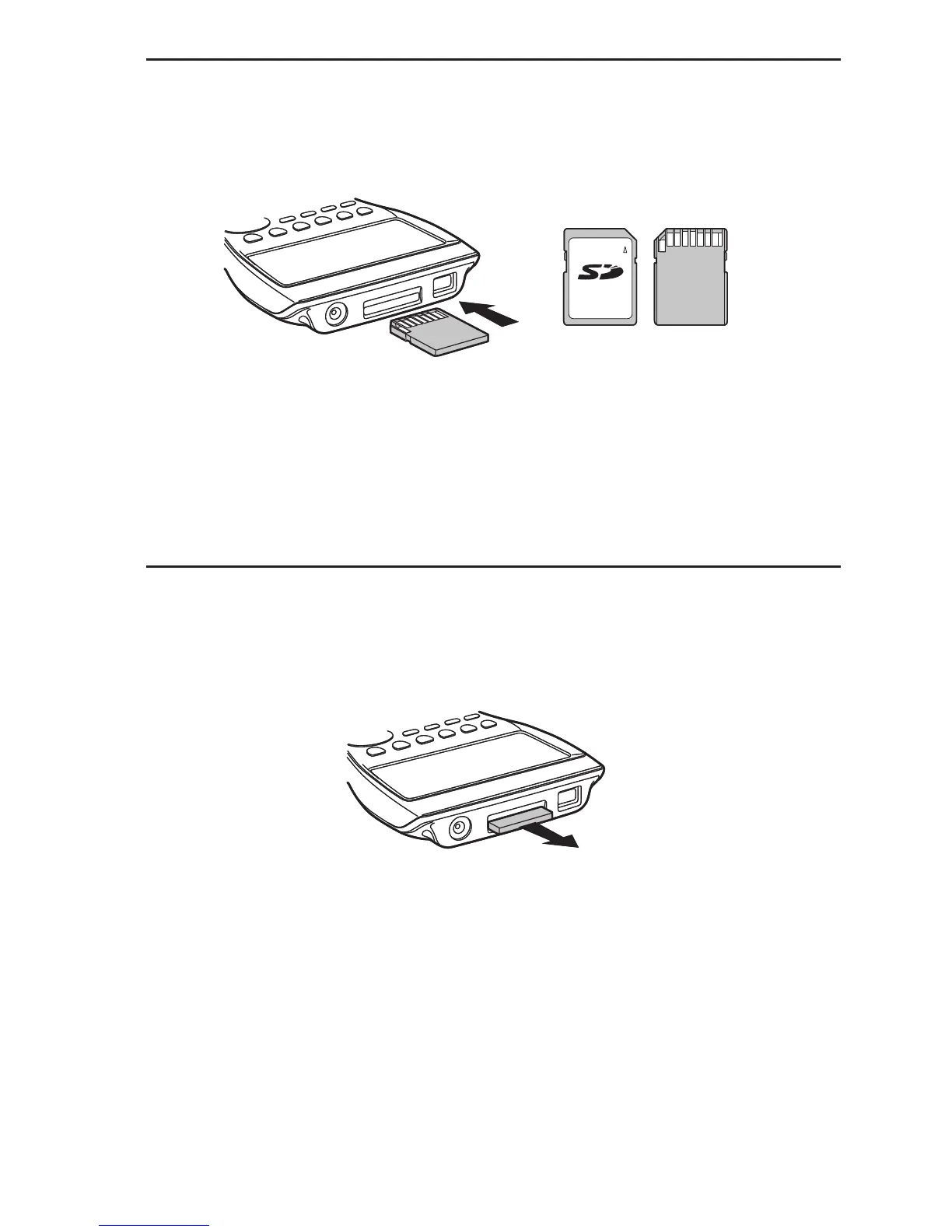
S To insert an SD card
1. Orient the SD card so its back is facing upwards (in the same direction as the calculator
keyboard).
2. Carefully insert the SD card into the calculator’s SD card slot.
Important!
Never insert anything other than SD cards into the SD card slot. Doing so can damage the
calculator.
Should water or any foreign matter ever get into the SD card slot, immediately turn off
the calculator, remove its batteries, and contact your original retailer or nearest CASIO
authorized service center.
S To remove the SD card
1. Press in on the SD card and then release it.
This will cause the card to pop part way out of the slot.
2. Grasp the SD card with your fingers and pull it out of the slot.
Important!
Never remove the SD card while data is being transferred to it. Doing so not only stops the
data you are transferring to the card from being saved, it can also corrupt SD card contents.
Exerting undue force when removing an SD card can damage the card slot or the card.
Front BackFront Back

Table of Contents

Question and Answer IconNeed help?

Do you have a question about the Casio FX-7400GII - SOFTWARE VERSION 2-00 and is the answer not in the manual?

Casio FX-7400GII - SOFTWARE VERSION 2-00 Specifications

General IconGeneral
ModelFX-7400GII
CategoryCalculator
Software Version2-00
Display Size128 x 64 Pixels
Graphing CapabilityYes
ProgrammingYes
DisplayLCD
Power SupplyAAA batteries
Memory28 KB
Weight200 g (including batteries)

Summary

Chapter 1 Basic Operation

1. Keys

Overview of calculator keys and their functions, including key markings and color coding.

3. Inputting and Editing Calculations

Covers entering, editing, correcting calculations, using replay memory, and clipboard functions.

Chapter 2 Manual Calculations

1. Basic Calculations

Covers arithmetic calculations, order of operations, decimal places, significant digits, and display range.

Chapter 3 List Function

1. Inputting and Editing a List

Guide to entering and modifying data in lists using the List Editor, including batch input and cell editing.

Chapter 4 Equation Calculations

1. Simultaneous Linear Equations

Explains solving simultaneous linear equations with two to six unknowns using coefficient input.

2. High-order Equations from 2nd to 6th Degree

Details solving polynomial equations up to the sixth degree by inputting coefficients.

Chapter 5 Graphing

Chapter 6 Statistical Graphs and Calculations

2. Calculating and Graphing Single-Variable Statistical Data

Explains plotting and calculating statistics for single-variable data using various graph types.

3. Calculating and Graphing Paired-Variable Statistical Data

Details scatter diagrams, regression graphs, and paired-variable calculations.

5. Tests

Details Z Tests, t Tests, χ² Tests, F Tests, and ANOVA calculations.

Chapter 7 Financial Calculation (TVM)

3. Compound Interest

Explains formulas and calculations for compound interest, including PV, PMT, FV, and n.

Chapter 8 Programming

1. Basic Programming Steps

Covers entering PRGM mode, registering file names, inputting, and running programs.

Chapter 9 Spreadsheet

Chapter 10 eActivity

Chapter 11 Memory Manager

Chapter 12 System Manager

Chapter 13 Data Communications

Chapter 14 Using SD Cards

E-CON2 Application

8 Starting a Sampling Operation

Guide to initiating sampling operations with EA-200 using configured setups.

Related product manuals