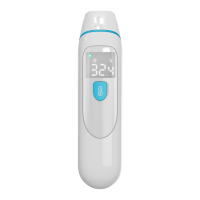
The DIGOO DG-PC809 is a medical infrared thermometer designed for measuring human body temperature by detecting infrared energy emitted from the forehead or the eardrum. This versatile device offers two primary measurement modes: forehead mode, suitable for people of all ages, and ear mode, recommended for individuals over three months old. The thermometer is designed for quick and accurate readings, providing results in approximately one second.
Function Description
The thermometer operates on the principle of collecting infrared energy emitted from either the eardrum in the ear canal or the skin of the forehead. This infrared energy is then focused by a lens and converted into a temperature reading by thermopiles and measurement circuits.
The DG-PC809 model provides a 'beep' cue at the end of a temperature measurement. The DG-PC809E model broadcasts the temperature in English via speakers, while the DG-PC809V model emits vibration feedback at the end of a measurement. Beyond these specific feedback mechanisms, the intended use and core functionality of all three models are identical.
The device is equipped with an intelligent alarm system. An orange LED lights up to indicate a low fever, while a red LED illuminates for a high fever. These thresholds are preset but can be adjusted by the user to suit individual needs after consulting a doctor. The low fever alarm is initially set at 37.5°C/99.5°F, with an adjustable range from 37.5°C/99.5°F to 37.9°C/100.2°F. The high fever alarm is preset at 38.0°C/100.4°F, with an adjustable range from 38.0°C/100.4°F to 38.9°C/102.0°F.
Usage Features
The DG-PC809 is designed for ease of use with a one-button interface for power, measurement, and settings.
To take a forehead temperature:
- Press the Power button to turn on the device.
- Keep the probe cover touching the middle of the forehead.
- Press and release the button.
- After approximately 1 second, a 'beep' will be heard (or spoken temperature/vibration feedback, depending on the model), and the reading will be displayed. The symbol will appear on the screen in Forehead Mode.
It is important to ensure the forehead is not covered by hair, sweat, or dirt for improved accuracy. The probe sensor should be clean before use. For stable readings, both the user and the thermometer should remain in a room with stable airflow and a temperature between 10.0°C/50.0°F and 40.0°C/104.0°F for at least 30 minutes.
To take an ear temperature:
- Press the Power button to turn on the device.
- Remove the probe cover.
- Fit the probe snugly into the ear canal.
- Press and release the button.
- After approximately 1 second, a 'beep' will be heard (or spoken temperature/vibration feedback), and the reading will be displayed. The symbol will appear on the screen in Ear Mode.
Ensure the ear is clean and free of earwax or obstructions. Avoid forcing the probe into the ear canal to prevent injury. For children, extra care should be taken due to smaller ear canals. For children over 1 year old and adults, gently pull the ear up and back to straighten the ear canal, allowing the probe to receive infrared rays from the eardrum. It is advisable to measure temperature in the same ear each time, as there can be slight differences between left and right ear readings.
The thermometer can store up to 32 sets of measurement data. When the memory is full, the oldest reading is replaced by the newest. To recall memories, press and hold the setting button for about 3 seconds from shutdown until the 'M' symbol flickers. Subsequent presses of the button will cycle through the stored temperature values.
The device supports conversion between Celsius (°C) and Fahrenheit (°F). From shutdown, press and hold the Setting button for about 6 seconds until the 'C' or 'F' symbol flickers. Releasing and pressing the button again will toggle between the units.
Users can turn the buzzer, speaker, or vibration function on or off. From shutdown, press and hold the setting button for about 9 seconds until 'ON' or 'OFF' appears on the screen. Release and press the button again to toggle the function.
The thermometer automatically shuts down after 30 seconds of inactivity to conserve energy. Alternatively, it can be manually turned off by holding the Power button for 5 seconds.
The device is powered by two AAA dry batteries. A low battery indicator will appear on the screen when the voltage drops below 2.6V±0.1V, signaling that the batteries need replacement. To replace them, slide off the battery cover, remove the old batteries, and insert two new AAA batteries according to the marked polarity.
Maintenance Features
Regular cleaning and disinfection are crucial for maintaining the thermometer's accuracy and hygiene.
For cleaning the thermometer body:
- Wipe with a slightly damp soft cloth.
- Gently dry with a piece of tissue paper, being careful not to scratch the LED display screen.
For cleaning the infrared sensor lens:
- Use only cotton swabs dipped in anhydrous ethanol.
- Avoid getting water on the infrared sensor lens, as this can damage it.
- Do not use tissue paper to clean the lens, as it may scratch the surface and lead to inaccurate readings.
- Do not touch the infrared sensor lens with hard objects.
- Never use abrasive cleaning agents, thinners, or benzene.
- Do not immerse any part of the thermometer in liquid.
For disinfection:
- Disinfect the thermometer body and the area around the probe with a soft cloth slightly moistened with 75% medical alcohol.
- Do not use 75% medical alcohol on the infrared sensor lens, as it contains water which can cause damage.
- Avoid using hot steam or ultraviolet radiation for disinfection, as this can damage or prematurely age the thermometer.
Storage guidelines:
- Store the thermometer in a dry, dust-free, and well-ventilated place.
- Ensure it is not exposed to direct sunlight.
- Remove the batteries if the thermometer will not be used for more than one month.
The device is designed with high-precision parts, so it should be protected from severe impact or shock. Do not twist the instrument or the infrared sensor. If any signs of damage appear on the infrared sensor lens or the instrument itself, do not attempt to repair it; contact the dealer or manufacturer.


 To Next Page
 General