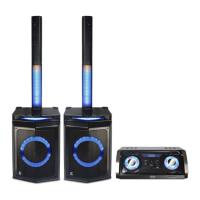
Need help?
Do you have a question about the Edison PARTY SYSTEM 1220 and is the answer not in the manual?
 General
| Type | Karaoke System |
|---|---|
| Power Output | 120W |
| Frequency Response | 40Hz - 20kHz |
| Display | LED |
| Connectivity | Bluetooth, USB, SD Card |
| Microphone Input | 2 x 6.3mm |
| Power Source | AC Power |
| Inputs | AUX, USB |
Essential safety guidelines for operating the apparatus, covering water, cleaning, ventilation, and power.
Instructions on power connection, handling, ventilation, liquids, and repairs to prevent hazards.
Details the buttons and functions located on the front panel of the system.
Identifies all input/output jacks and switches on the rear of the unit.
Diagram and list of all buttons and their functions on the remote control.
Guidelines for using the remote control, including battery replacement and avoiding interference.
Illustrates how to connect speakers, antenna, and audio sources to the main unit.
Important notes to follow before and during making connections to the apparatus.
Details supported CD formats, including CD-R/RW and CD-TEXT discs.
Lists supported bitrates, sampling frequencies, and file limits for MP3 and WMA files.
Provides instructions on how to handle optical discs to prevent scratches and damage.
Steps for basic operation, selecting audio sources, and adjusting volume.
Explains how to control the LED light modes on the speaker panels.
Instructions for using the FM radio tuner and the karaoke microphone features.
Instructions for connecting and playing music files from a USB drive.
Steps for pairing and connecting Bluetooth devices for wireless audio streaming.
Details power consumption, frequency response, distortion, and other technical data.
Lists the items included with the product, such as the manual, remote, and antenna.
Details the warranty period, coverage, and how to contact for service or replacement.
Information regarding FCC compliance, interference, and radiation exposure limits.

 To Next Page