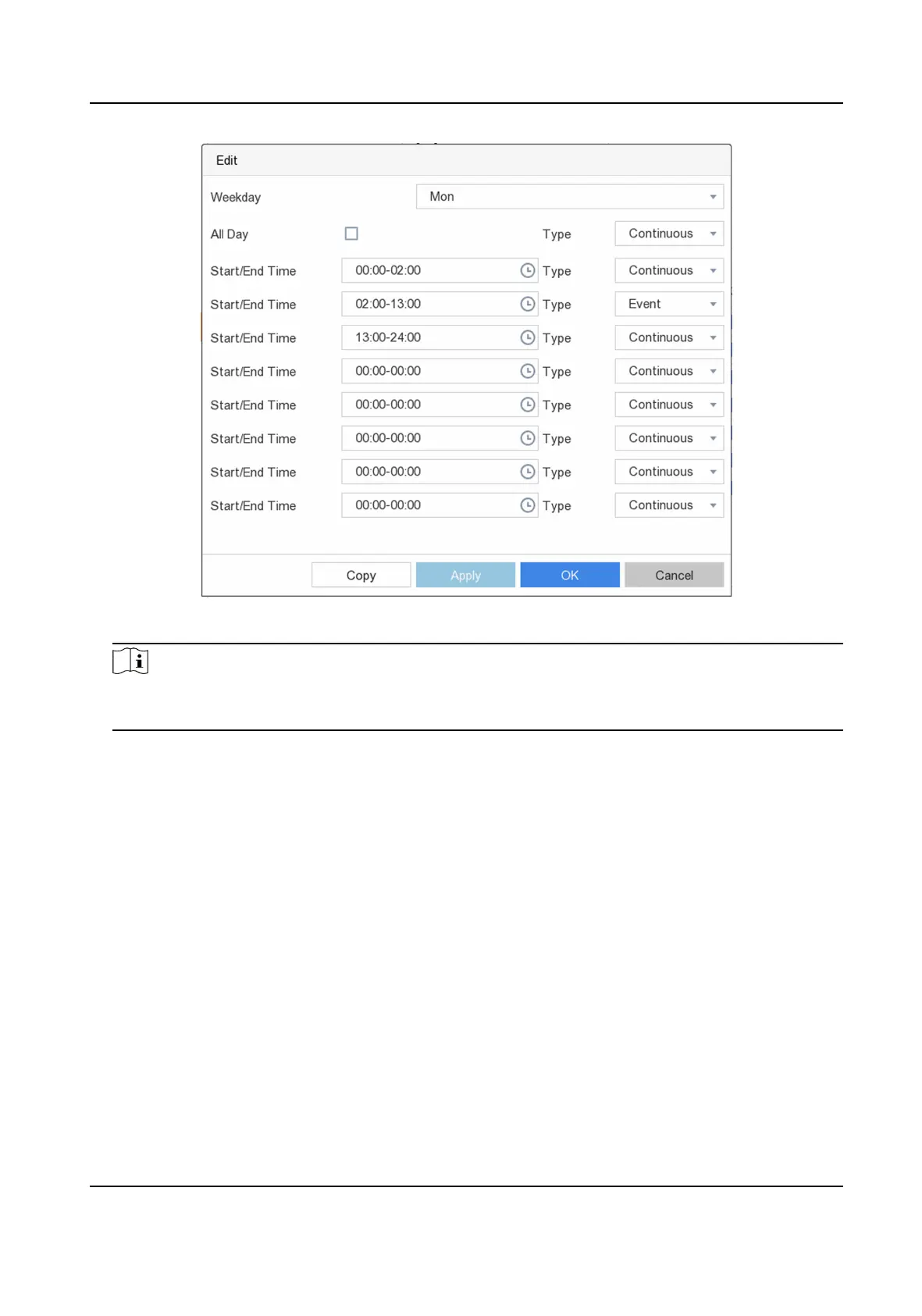
Figure 6-23 Edit Schedule
Note
You can also Click to select schedule type as ConnuousorEvent.and On the table, drag the
mouse on the desired period to draw a colored bar.
5. Click Apply.
6.5.2
Congure Recording Parameter
Main stream refers to the primary stream that aects data recorded to the hard disk drive and will
directly determine your video quality and image size. Comparing with the sub-stream, the main
stream provides a higher quality video with higher
resoluon and frame rate.
Sub-stream is a second codec that runs alongside the mainstream. It allows you to reduce the
outgoing internet bandwidth without
sacricing your direct recording quality. Sub-stream is oen
exclusively used by smartphone applicaons to view live video. Users with limited internet speeds
may
benet most from this seng.
Steps
1. Go to
Conguraon → Record → Parameter to congure camera main stream and sub-stream
parameters.
2.
Congure recording parameters.
Digital Video Recorder User Manual
71


 To Next Page
 Loading...