12 | English
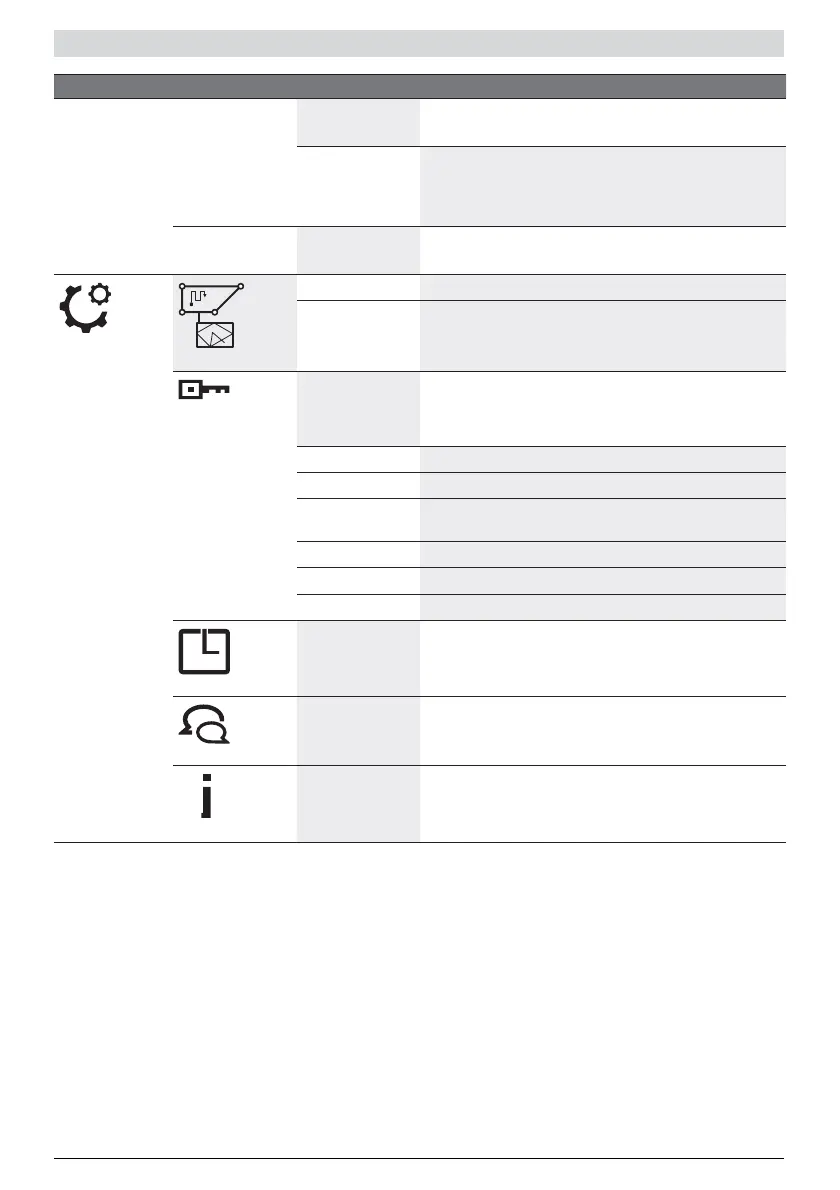
Main Menu Sub-menu 1 Sub-menu 2 Explanation
Schedule Edit (selected
day)
Program a mowing schedule by setting individual mowing
days and slots (up to 2 per day).
Don’t mow/Delete
slot
This will delete the corresponding slot for the selected
day.
The number of full cuts per week for the actual schedule
are shown at the bottom of the display.
Off/Manual Choose this option when no schedule should be used.
The mower starts mowing only by activating "Mow now".
Settings
Mowing mode
Place & Mow Select between a size of 2 m x 2 m and 3 m x 3 m.
Mow without
docking station-
Mower will mow in the additional lawn area without
docking station in random mode until it runs out of
battery.
Security
Auto Lock If buttons are not pressed for 3 min. they will be
automatically locked.
Recommended for safety reasons and protection against
theft.
– On PIN code is required for reactivation after Auto Lock.
– Off The buttons are always ready for input.
Change PIN Changing of a PIN code requires entering of existing PIN
code first.
Alarm
– On Alarm is activated.
– Off Alarm is deactivated and it will not sound.
Date & Time
Change the time and date.
Set Language
Change the display language.
Info
System status Information on battery charge, system information and
operating and charging time for the mower.


 To Next Page
 Loading...