DRIVING
QUICK REFERENCE GUIDE
I 31
30 I
QUICK REFERENCE GUIDE
Distance 2
To Set vehicle distance
3.
Press button
.
Three distances
are available:
Distance 3 – 180 feet
Distance 2 – 130 feet
Distance 1 – 85 feet
Distances are approximate.
When there is a vehicle ahead in
the lane
4.
The vehicle will accelerate or
decelerate to maintain the selected
distance.
Refer to your Owner’s Manual for
additional operational instructions
and other cautionary advisories on
Smart Cruise Control.
Distance 1
Distance 3
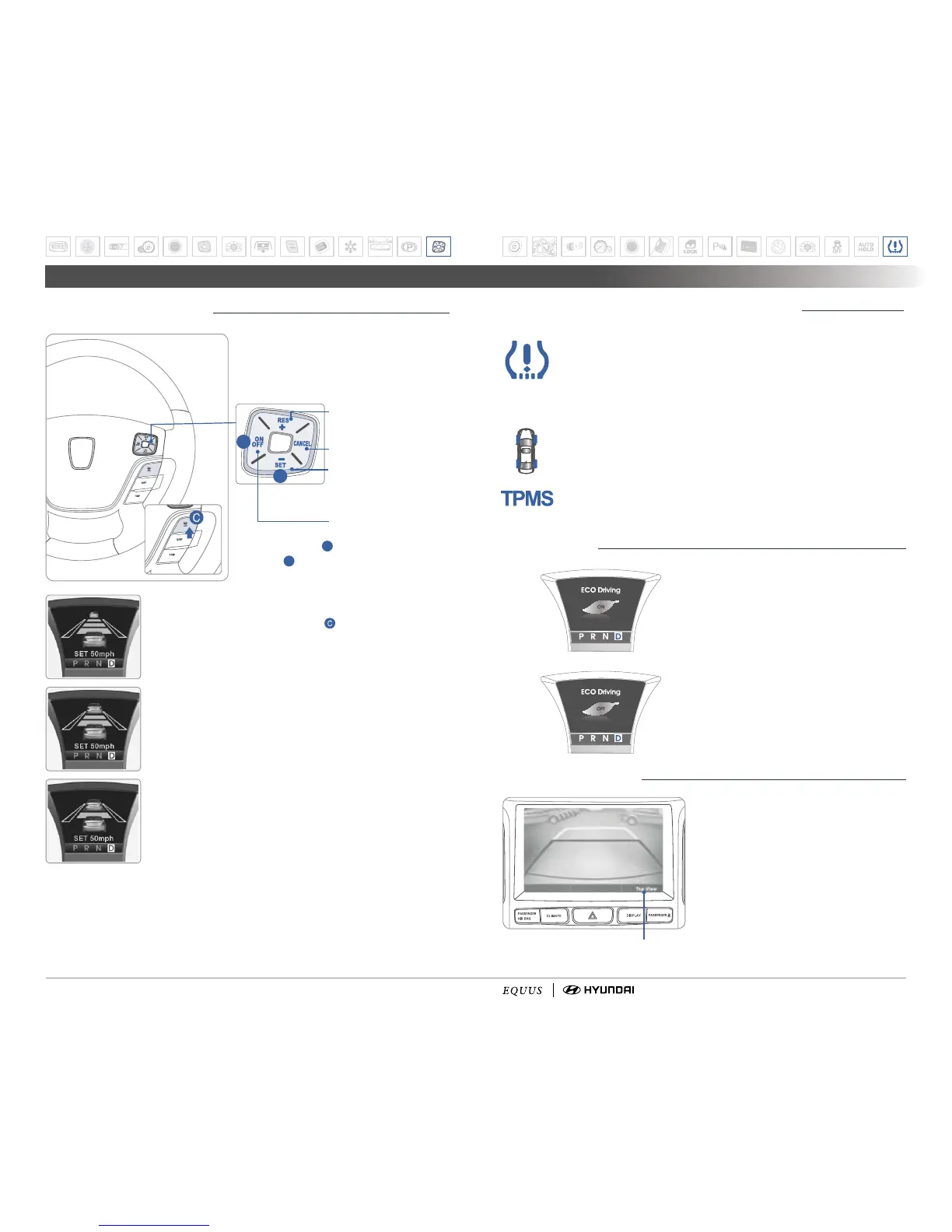
SMART CRUISE CONTROL
To Cancel the cruise control
To Resume or Increase
the cruise control speed
To turn cruise control On/Off
To Set or Decrease
the cruise control
speed
1. Press button
A
to turn on.
2. Press
B
to set the speed.
Smart Cruise Control system allows you to
set the distance from the vehicle ahead and
maintain the selected distance even if you
do not press the accelerator or brake pedal.
B
A
TIRE PRESSURE MONITORING SYSTEM (TPMS)
LOW TIRE PRESSURE INDICATOR:
Illuminates if one or more of your
tires is significantly under-inflated. Safely park the vehicle and check your
tires as soon as possible, and inflate them to proper pressure.
NOTE:
Tire pressure may vary in colder temperatures causing
the low tire pressure light to illuminate. Inflate tires according to
the Tire Pressure Label located on the driver's side door pillar.
LOW TIRE PRESSURE POSITION INDICATOR:
Indicates which tire
is significantly under-inflated by illuminating the corresponding postion.
TPMS MALFUNCTION INDICATOR:
Illuminated when there is a
malfunction with the TPMS system. Have the system checked by an
authorized Hyundai Equus dealer as soon as possible.
ECO SYSTEM
ECO indicator
The ECO indicator light will illuminate
when you drive with the high efficiency.
The ECO indicator can be turned off
by selecting the function through the
trip computer and pressing the DISP
button for over 1 second; ECO OFF
will then appear.
REARVIEW CAMERA
When transmission is shifted into R
(Reverse), rearview camera displays
the area behind the vehicle.
Use DIS controller to select rear view.
)(*2¶]PL^Z[YHPNO[IHJR
(default setting)
;67¶[PS[ZJHTLYH]PL^KV^U[V
see directly behind rear bumper
Select by using DIS toggle switch.


 To Next Page
 Loading...