12
NS-WC14SS9
www.insigniaproducts.com
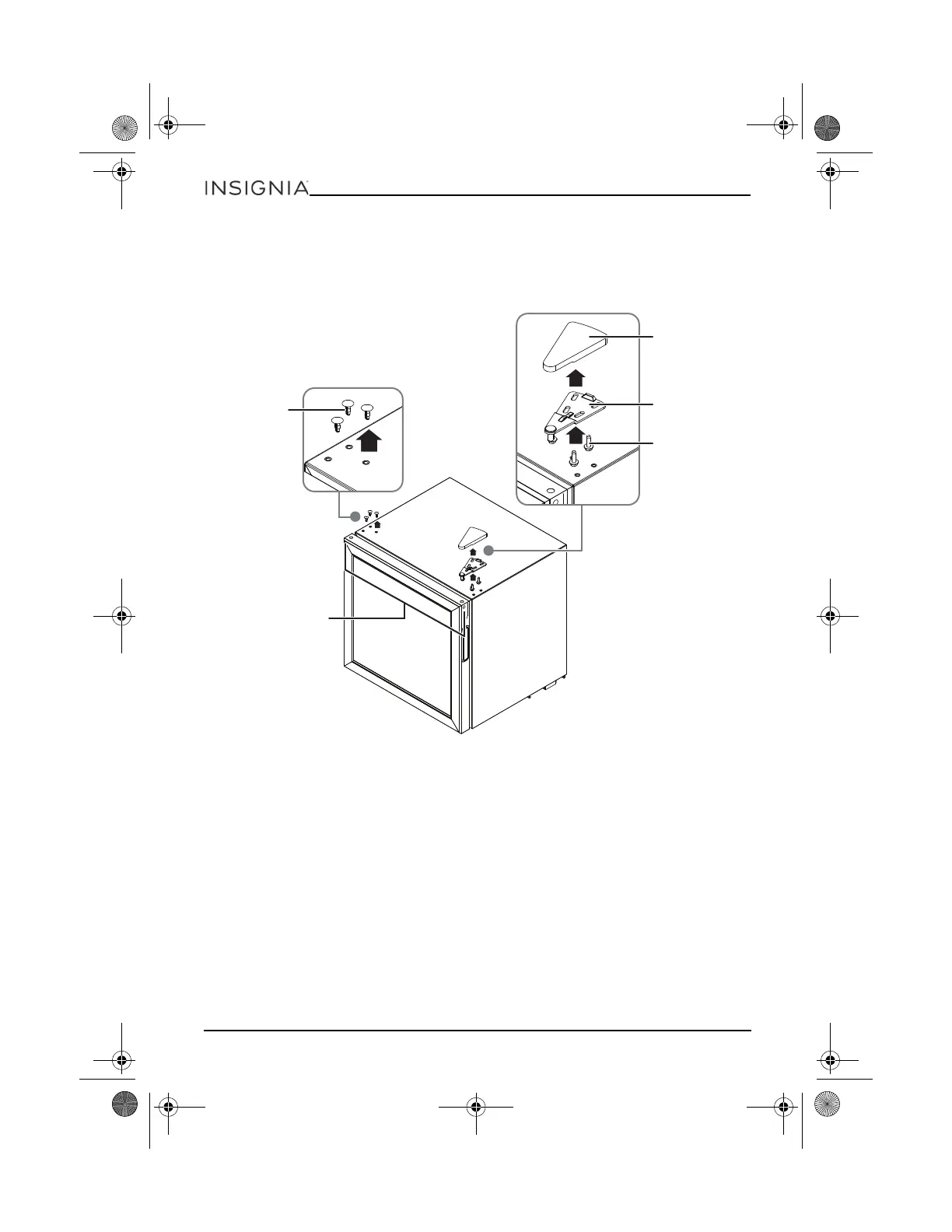
1 Make sure that your wine cooler is unplugged and empty.
2 Make sure that the door is closed.
3 Use a cutting blade to remove the bearing bushing and plastic hole covers on the left
side of your cooler.
4 Pry up and remove the hinge cover on the right side of your cooler.
5 Remove the three bolts that secure the hinge, then remove the hinge.
6 Use a cutting blade to remove the bearing bushing on the right side of your cooler.
Plastic hole
covers
Hinge cover
Top hinge
Bolts
Bearing bushing
NS-WC14SS9_18-0059_MAN_V3_ENG.fm Page 12 Wednesday, February 7, 2018 9:12 AM


 To Next Page
 Loading...