7
Playing Music
Press Source button to select the source (iPod/iPhone, AM, FM, Aux).1.
Press “+” button to increase volume.2.
Press “–” button to decrease volume.3.
Radio Tuning
If AM or FM radio is already selected and playing, use Up/Down arrows to 1.
tune frequency; hold either button and release to scan for the next station.
Otherwise, press Source until FM or AM is selected.2.
Tune to the desired frequency using Up/Down arrows; hold either button and 3.
release to scan for the next station.
Setting Presets
While listening to AM/FM radio, press and hold Preset for 2 seconds. 1.
The Radio Preset screen will be displayed.
Use Up/Down arrows to select slot to store preset. Press Enter to confirm. 2.
Preset is stored!
To Select a Preset for Listening
Press Preset once at any screen to display the Preset list. 1.
Use Up/Down arrows to highlight Preset. Press Enter to confirm. Preset station will begin playing!2.
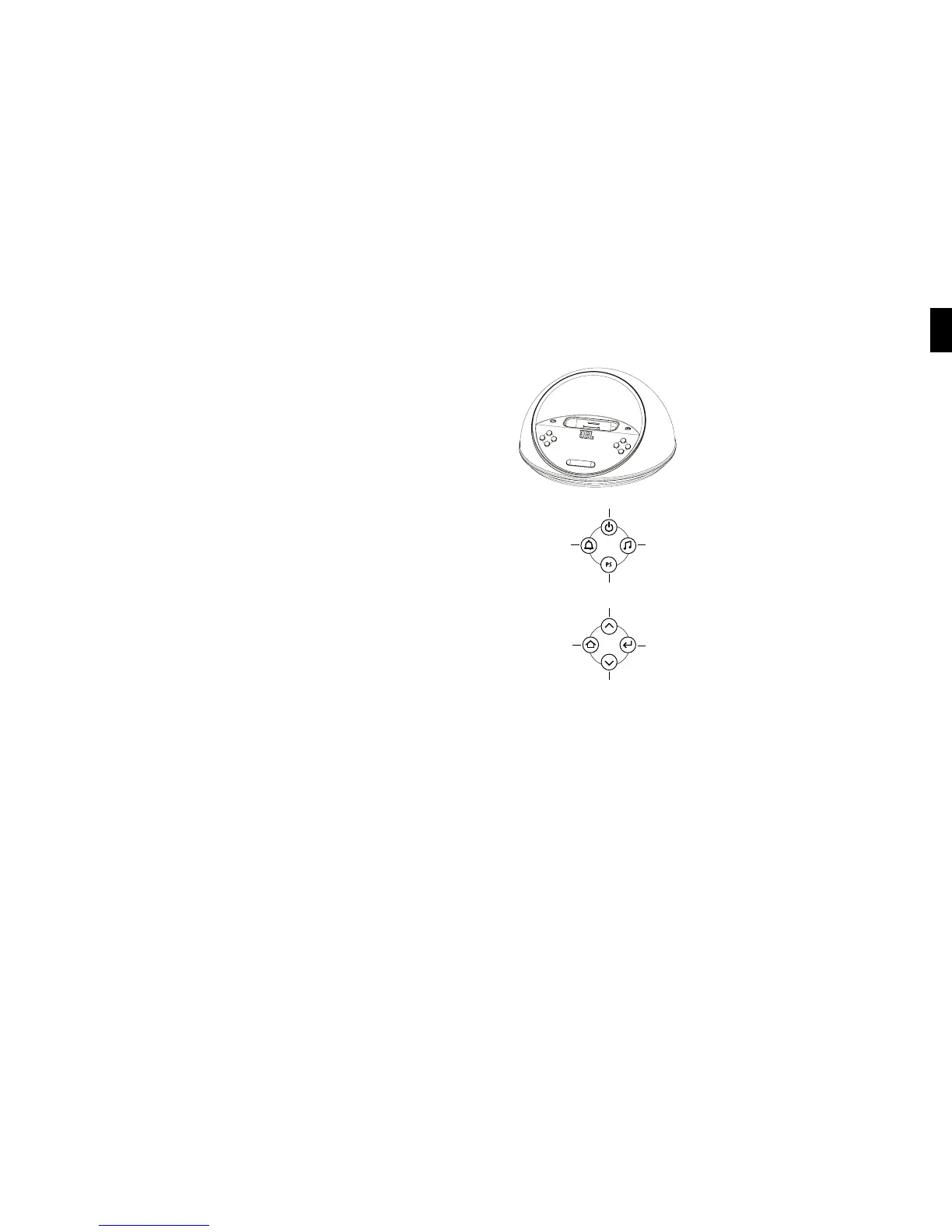
Power
Select Up
Preset
Select Down
Alarm
Menu/Up Level
Source
Enter
WWW.jbl.cOM
English
Languages/Region
Press the Menu/Up Level button until you reach the Top Menu screen. 1.
Use Up/Down arrows to select Region and press Enter. 2.
Use Up/Down arrows to select language. Press Enter.3.
Use Up/Down arrows to select radio band region type. Press Enter. 4.



 To Next Page
 Loading...