To Next PageTo Next Page
 Need help?
Do you have a question about the JBL TUNE125 and is the answer not in the manual?
 General
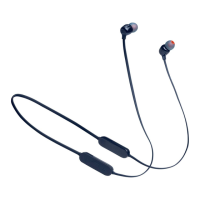
| Type | In-ear |
|---|---|
| Frequency Response | 20 Hz - 20 kHz |
| Charging Time | 2 hours |
| Bluetooth Version | 5.0 |
| Impedance | 16 ohms |
| Bluetooth transmitter frequency range | 2.402 GHz - 2.480 GHz |
| Bluetooth transmitter modulation | GFSK, π/4 DQPSK, 8DPSK |
| Wireless Range | 10 m |
| Water Resistance | IPX4 |
| Battery Life | 8 hours |
| Bluetooth profiles | A2DP, AVRCP, HFP |
| Driver Size | 5.8 mm Dynamic Driver |
| Microphone Sensitivity | -38dBV/Pa |
Choose the correct size ear tips (S, M, L) for a secure and comfortable fit.
Insert the earbuds into your ears, ensuring the 'L' and 'R' indicators match.
Ensure earbuds are worn correctly for optimal sound and stability.
Attach the earbuds together magnetically when not in use.
The earbuds automatically enter pairing mode when powered on.
Select 'JBL TUNE125BT' on your Bluetooth device to establish a connection.
Press and hold the power button for over 2 seconds to turn the device on or off.
Press the center button once to play or pause music.
Use the '+' and '-' buttons to adjust the volume.
Double-press the center button to activate your device's voice assistant.
Press the center button once to answer/end calls, or press for 2 seconds to reject.
Press the center button twice to skip to the next track.
Enter pairing mode with the second device to establish a multi-point connection.
Pause music on the current device and play on the second device.
Phone calls will always take priority over music playback.
Manually reconnect devices if they go out of range or power off.
Select 'Forget This Device' on your Bluetooth devices to disconnect.
Full charge takes approximately 2 hours.
15 minutes of charging provides approximately 1 hour of music playtime.
LED blinks twice to indicate power on or off.
A steady light indicates no Bluetooth device is connected.
A flashing blue light signifies that the device is connecting via Bluetooth.
A solid blue light indicates a successful Bluetooth connection.
A red indicator signals that the battery is low.
A solid red light indicates the headphones are currently charging.
A solid blue light indicates that the headphones are fully charged.