This document is an owner's manual and safety instructions for the Jumbo Universal Remote Control, Item 61959. It provides information on how to set up, operate, and maintain the remote control, along with important safety warnings.
Function Description:
The Jumbo Universal Remote Control is designed to control multiple electronic devices, including TVs, VCRs/DVDs/DVRs, satellite receivers, cable boxes, and audio equipment. It features a comprehensive set of buttons for various functions, allowing users to consolidate control of their home entertainment systems into a single remote. The remote supports direct code setting, brand name code search, manual code search, and auto code search to find and program the correct codes for different devices. Once programmed, it can perform functions such as power on/off, volume control, channel changing, menu navigation, input selection, and playback controls (reverse, play, forward, record, stop, pause) for compatible devices.
Important Technical Specifications:
- Batteries Required: (2) AA Batteries
- Dimensions: 11" L x 5" W x 0.96" Thick
- FCC Compliance: The device complies with Part 15 of the FCC Rules, ensuring it does not cause harmful interference and accepts any interference received.
Usage Features:
Controls:
The remote features a variety of buttons, each with a specific function:
- MUTE (1): Mutes volume on TV.
- LED INDICATOR LIGHT (2): Flashes to show proper remote operation and blinks during code entry.
- ON/OFF (3): Turns the controlled device on or off.
- SLEEP (4): Sets sleep timer/auto shutoff on compatible devices.
- GUIDE (5): Displays satellite or cable on-screen program guide.
- MENU (6): Displays the main menu of devices with a built-in menu system; may also exit a menu.
- REPEAT (7): Returns to the last channel in TV mode.
- TV/VCR (8): Switches between available viewing sources on older devices (Cable, TV, VCR, DVD, DTC, SAT).
- DEVICE SELECT CONTROLS (9): Buttons for selecting the device to control: STB/DTC, TV, VCR/DVR, DVD, SAT/CABLE.
- 0–9 NUMBER BUTTONS (10): Used to enter channel numbers or device codes.
- NAVIGATION BUTTONS (11): Used to move through on-screen menus and guides (UP ▲, DOWN ▼, LEFT ◄, RIGHT ►).
- CHANNEL CONTROLS (12): Used for changing channels.
- VOLUME CONTROLS (13): Used to raise or lower volume.
- ENTER (14): Completes channel selection after numeric entry.
- DIGITAL(-) (15): Selects digital sub-channels (e.g., CH 15.1).
- DEVICE CONTROLS (16): Playback buttons for DVD/VCR/DVR (REVERSE ◄◄, PLAY ►, FORWARD ►►, RECORD ●, STOP ■, PAUSE II).
- OK (17): Selects menu items.
- INPUT (18): Switches between available viewing sources on some newer devices.
- DISP (19): Displays information.
- QUIT (20): Exits menu functions.
Setup Instructions:
- Battery Installation: Requires two AA batteries, installed according to polarity. Reprogramming may be needed after battery replacement.
- Direct Code Setting: Users find a 4-digit code for their device/brand from the provided code lists (starting on page 10). The remote is aimed at the device, the corresponding Device Select Control button is held until the LED Indicator Light turns solid red, and then the 4-digit code is entered. The LED blinks with each digit and turns off if the code is recognized. If the code is not recognized or doesn't work, users are instructed to try other codes or search methods.
- Brand Name Code Search: For brands listed in the "Brand Name Chart" (Figure A, page 7), users hold the Device Select Control button and the appropriate digit number. The remote searches for the code, and when the device shuts off, both buttons are released to save the code.
- Manual Code Search: Users manually turn on the device, hold the Device Select Control button until the LED is solid red, then repeatedly press "CH+" to search through codes. When the device shuts off, "ENTER" is pressed to save the code.
- Auto Code Search: Users manually turn on the device, hold the Device Select Control button until the LED is solid red, then press the ON/OFF button. The remote automatically searches for codes, and when the device shuts off, "ENTER" is pressed to save the code.
- Code Display and Recall: To identify a stored 4-digit code, users turn on the device, hold the Device Select Control button until the LED is solid red, then press "DISP." The LED flashes as number buttons are pressed, indicating the digits of the code.
Operation:
- To control a specific device, its corresponding Device Select Control button must be pressed first (e.g., "TV" for TV mode). The remote remains in the selected mode until changed.
Maintenance Features:
- Safety Warnings: Emphasizes maintaining labels and nameplates, not allowing children to play with the item, proper battery polarity, using as intended, inspecting before use, avoiding liquids, and keeping away from direct sunlight or heat sources.
- Troubleshooting: The manual implies troubleshooting by suggesting users try multiple codes or different search methods if the remote does not function correctly with a device.
- Recording Codes: A "Personal Code Reference Chart" is provided at the back of the manual for users to record the codes found for their devices for future reference, especially useful if batteries are replaced and reprogramming is needed.
The manual includes a "WARNING" section emphasizing the importance of reading all safety warnings and instructions to prevent electric shock, fire, and serious injury. It also highlights that common sense and caution are essential for safe operation.
Warranty:
A Limited 90 Day Warranty is provided, covering defects in materials and workmanship. It specifies conditions under which the warranty applies and the process for making a claim.

 Need help?
 General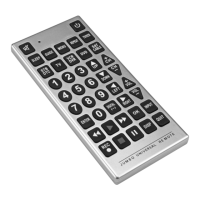

 To Next Page