4
Preparation
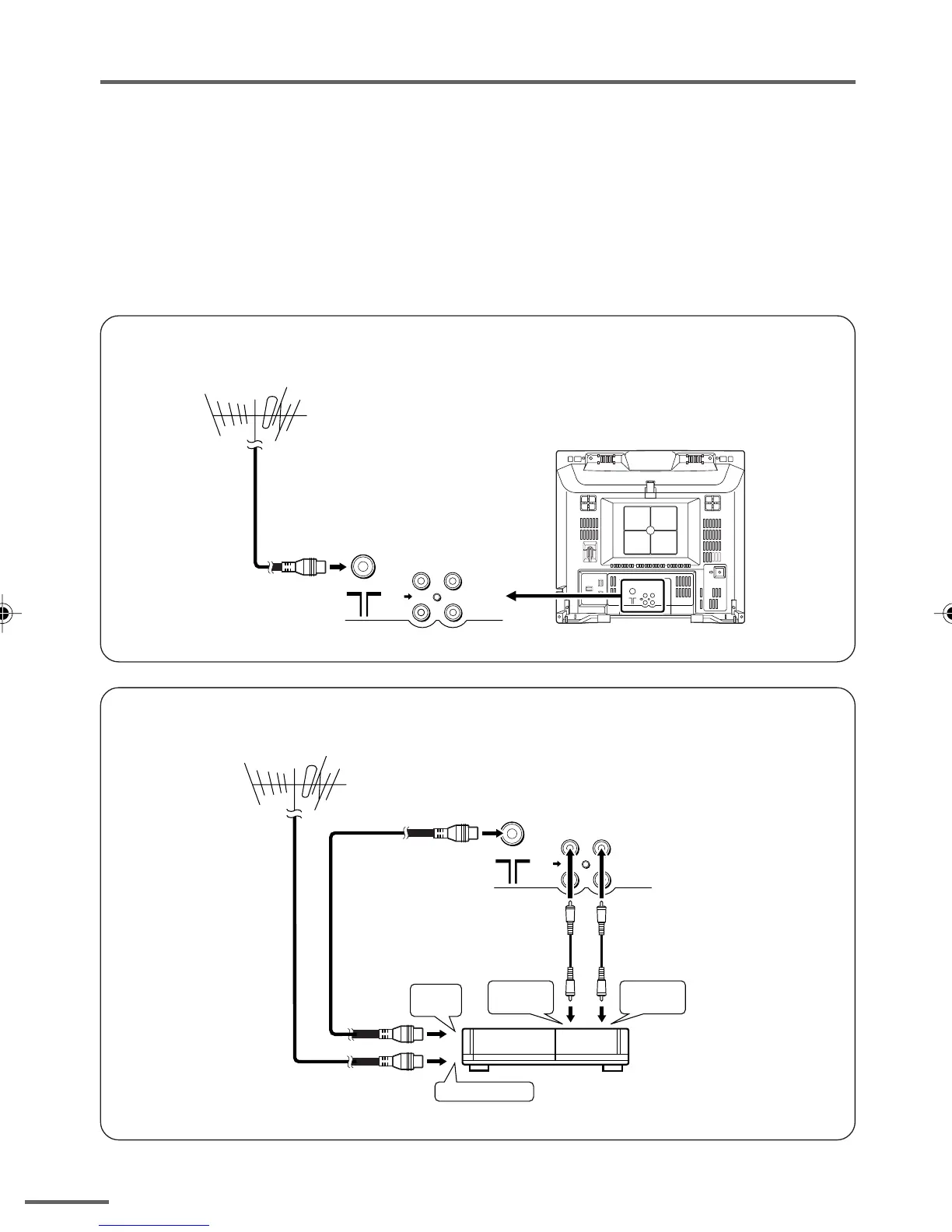
3 Connecting the aerial and external devices
•For further details, refer to the manuals provided with the devices you are connecting.
• Connecting cables are not supplied.
• The front and rear AUDIO/VIDEO input jacks are directly connected so that input to either jack
is output through both. You cannot provide input to both the front and rear jacks at the same
time. Disconnect one input, or use one of the jacks as an output jack only (for monitoring or
recording).
■ Connecting the aerial and VCR
Connecting the aerial
• Illustration of AV-14A16.
• Illustration of AV-14A16.
Connecting the aerial and VCR
VIDEO
AUDIO
IN
OUT
(VIDEO - 1)
VHF/UHF outdoor aerial
VIDEO
AUDIO
IN
OUT
(VIDEO - 1)
To RF
output
To video
output
To aerial input
To audio
output
3
2
VCR
VHF/UHF outdoor aerial
1
GGT0106-001B-H_P02-05 16/3/06, 9:55 AM4


 To Next Page
 Loading...