EasyManua.ls Logo

JVC GR-AX880 User Manual

JVC GR-AX880
32 pages
To Next Page IconTo Next Page
To Previous Page IconTo Previous Page
Page #10 background image
10
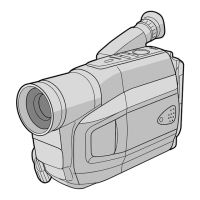
1 MENU Wheel [, +] ................................ pg. 18
TRACKING Wheel [, +] ........................ pg. 14
2 5-Second Recording Button
[5 SEC. REC]...........................................
pg. 12
3 Power Zoom Lever [T/W]......................... pg. 13
4 Manual Focus Button [ FOCUS]........ pg. 12
Time Base Corrector Button [TBC] ........ pg. 14
5 Audio Output Connector [A]..................... pg. 15
6 Video Output Connector [V]..................... pg. 15
7 Battery Release Switch
[BATTERY RELEASE] ...............................
pg. 6
8 DC IN Connector ....................................... pg. 6
9 Recording Start/Stop Button ..................... pg. 11
0 Lock Button............................................... pg. 11
! Power Switch [PLAY, OFF, , ]........... pg. 11
@ POWER Lamp ........................................... pg. 6
# Digital Effect Button [DIGIFECT] ............. pg. 24
$ Programme AE Button [P.AE] .................. pg. 24
% Play/Pause Button .................................... pg. 11
^ Retake Forward Button [RETAKE F] ..... pg. 13
Fast-Forward Button [F] .......................... pg. 11
& EJECT Switch ............................................ pg. 8
* CHARGE Lamp ......................................... pg. 6
( REFRESH Button ...................................... pg. 6
) Fade/Wipe Button [FADE/WIPE] ........... pg. 23
Counter Reset/Memory Button
[COUNTER R/M] ...................................
pg. 14
q Retake Rewind Button [RETAKE R] ...... pg. 13
Quick Review Button [
R] ................. pg. 13
Rewind Button [R] ...................................
pg. 11
w Stop Button [STOP] ................................ pg. 11
Backlight Compensation Button
[BACK LIGHT] .......................................
pg. 12
e Shoulder Strap Eyelets .............................. pg. 8
r Battery Pack Mount ................................... pg. 6
t Close Button .............................................. pg. 8
y Dioptre Adjustment Control........................ pg. 8
u Camera Sensor
Be careful not to cover this area; a sensor
necessary for shooting is built-in here.
i Grip Strap .................................................. pg. 8
o Tripod Mounting Socket............................. pg. 8
p Tape Remaining Time .............................. pg. 21
Q Recording Mode Indicator ....................... pg. 20
W Backlight Compensation Indicator ........... pg. 12
E Digital Effect Indicator ............................ pg. 24
Programme AE Indicator .......................
pg. 24
Fade/Wipe-Standby Indicator ................
pg. 23
R Tape Length Indicator .............................. pg. 20
T Zoom Indicator Bar .................................. pg. 13
Zoom Level Indicator
Approximate Zoom Ratio
Y Recording Indicator .................................. pg. 11
U Digital Effect Indicator.............................. pg. 24
I Programme AE Indicator ......................... pg. 24
O Fade/Wipe-Standby Indicator .................. pg. 23
P Picture Stabilizer Indicator ....................... pg. 18
a Interval Time/Recording Time Indicator .... pg. 21
5 Sec. Rec Mode Indicator .................... pg. 12
s Instant Title Display ................................. pg. 19
d Date/Time Display ................................... pg. 20
f Focus Indicator ........................................ pg. 12
g Exposure Control Level Counter ............. pg. 18
h White Balance Mode Indicator................. pg. 19
j Record-Standby Mode Indicator ............... pg. 11
k : Cassette Indicator ............................. pg. 8
l TBC Indicator........................................... pg. 14
; Tape Counter ........................................... pg. 14
A Recording Mode Indicator (SP/EP) ......... pg. 20
S Tape Running Indicator
4
: Playback
3
: Fast-Forward/Shuttle Search
2
: Rewind/Shuttle Search
6 : Pause
D Tracking Indicator .................................... pg. 14
GR-AX880 3/11/03, 10:16 AM10

Other manuals for JVC GR-AX880

Question and Answer IconNeed help?

Do you have a question about the JVC GR-AX880 and is the answer not in the manual?

JVC GR-AX880 Specifications

General IconGeneral
Camcorder Media TypeVHS-C
Microphone Operation ModeStereo
Viewfinder TypeElectronic
Display TypeLCD
Display Size2.5 inches
Battery TypeLithium-ion
Low Light PerformanceGood
TypeCamcorder
Focus AdjustmentAuto/Manual
White BalanceAuto
Power SupplyAC adapter

Summary

AUTOMATIC DEMONSTRATION

PROVIDED ACCESSORIES

PRECAUTIONS

SAFETY PRECAUTIONS

General safety warnings and cautions for the camcorder and its use.

IMPORTANT SAFETY INSTRUCTIONS

GETTING STARTED

USING THE BATTERY PACK

Instructions on how to charge and use the camcorder's battery pack.

USING AC POWER

Instructions on connecting and using the AC adapter for power.

STORE BATTERY

Date/Time Settings

Guide to setting the camcorder's date and time for recording.

Basic Operations

Ergonomics and Adjustments

Adjusting grip, viewfinder, and strap for comfortable operation and handling.

Tripod Mounting

Instructions for securely attaching the camcorder to a tripod.

Loading/Unloading A Cassette

Procedures for inserting and removing VHS-C cassettes.

CONTROLS, CONNECTORS AND INDICATORS

Viewfinder Indications

Explanation of symbols and information displayed in the viewfinder.

RECORDING

PLAYBACK

BASIC FEATURES

5Sec. Rec (5-sec. Recording)

How to use the 5-second recording feature for scene transitions.

Backlight Compensation

Adjusting brightness for subjects against bright backgrounds.

Auto/Manual Focus

Guide to achieving sharp focus using auto or manual modes.

Advanced Recording Features

Zooming

How to use optical and digital zoom functions for magnification.

Quick Review

Checking the end of the last recorded segment.

Retake

Re-recording specific segments of video footage.

Tape Management Features

Tracking

Adjusting tracking to eliminate noise bars during playback.

TBC (Time Base Corrector)

Correcting video signal jitter for stable playback.

Counter Memory

Using the counter memory function to locate tape segments.

Connectivity and Dubbing

Connections To A TV/VCR

How to connect the camcorder to TVs and VCRs.

Tape Dubbing

Instructions for copying tapes from camcorder to VCR.

Using The Cassette Adapter

MENU SETTINGS

CAMERA MENU

Accessing and adjusting camera-specific settings.

SYSTEM MENU

Accessing and adjusting system-wide settings for the camcorder.

CAMERA MENU Settings

M.W.B. (White Balance)

Adjusting white balance for accurate color reproduction in different lighting.

TITLE

Superimposing preset titles onto video footage.

TITLE SETUP

Customizing title settings like size, scroll, and language.

SYSTEM MENU - Recording, Tape & Display Settings

Recording Modes and Settings

Configuring recording mode, digital zoom, S.LX, and wide-screen effects.

Tape and Display Configuration

Setting tape length, display options, and date/time display.

SYSTEM MENU - Output and Special Recording

OSD Output and Recording Time

Managing on-screen display output and setting recording time for animation.

Time-Lapse and Tele Macro

Using time-lapse recording and tele macro for close-up shots.

DEMO MODE

DATE/TIME

Setting the current date and time for the camcorder.

ADVANCED FEATURES

Fade/Wipe Effects

Applying fade-in/out and wipe effects to video transitions.

Special Effects

Programme AE and Digital Effects

Using automatic exposure programs and various digital image effects.

TROUBLESHOOTING

Warning Indications

Understanding and responding to camcorder warning messages.

CAUTIONS

General Battery Precautions

Safety guidelines for handling and using batteries.

Battery Packs

Specific cautions and handling advice for rechargeable battery packs.

Cassettes

Guidelines for proper use and storage of VHS-C cassettes.

Main Unit

Safety instructions related to the camcorder's main unit.

Maintenance and Troubleshooting

Serious malfunctioning

What to do if the camcorder experiences severe operational issues.

For Your Maintenance

Steps for post-use maintenance and care of the camcorder.

Cleaning The Camcorder

Instructions on how to clean the exterior and lens of the camcorder.

SPECIFICATIONS

General Camcorder Specifications

Technical details about the camcorder's format, power, and physical attributes.

Connectors and AC Adapter

Information on video/audio connectors and AC adapter power requirements.

Optional Accessories

List of compatible optional accessories for the camcorder.

Related product manuals