EasyManua.ls Logo

JVC KD-AR400 User Manual

JVC KD-AR400
111 pages
To Next Page IconTo Next Page
To Previous Page IconTo Previous Page
Page #91 background image
19
FRANÇAIS
Pour arrêter la lecture et éjecter le disque
Appuyez sur 0.
La lecture sarrête que le panneau de commande
souvre. Le disque est éjecté automatiquement de
la fente dinsertion.
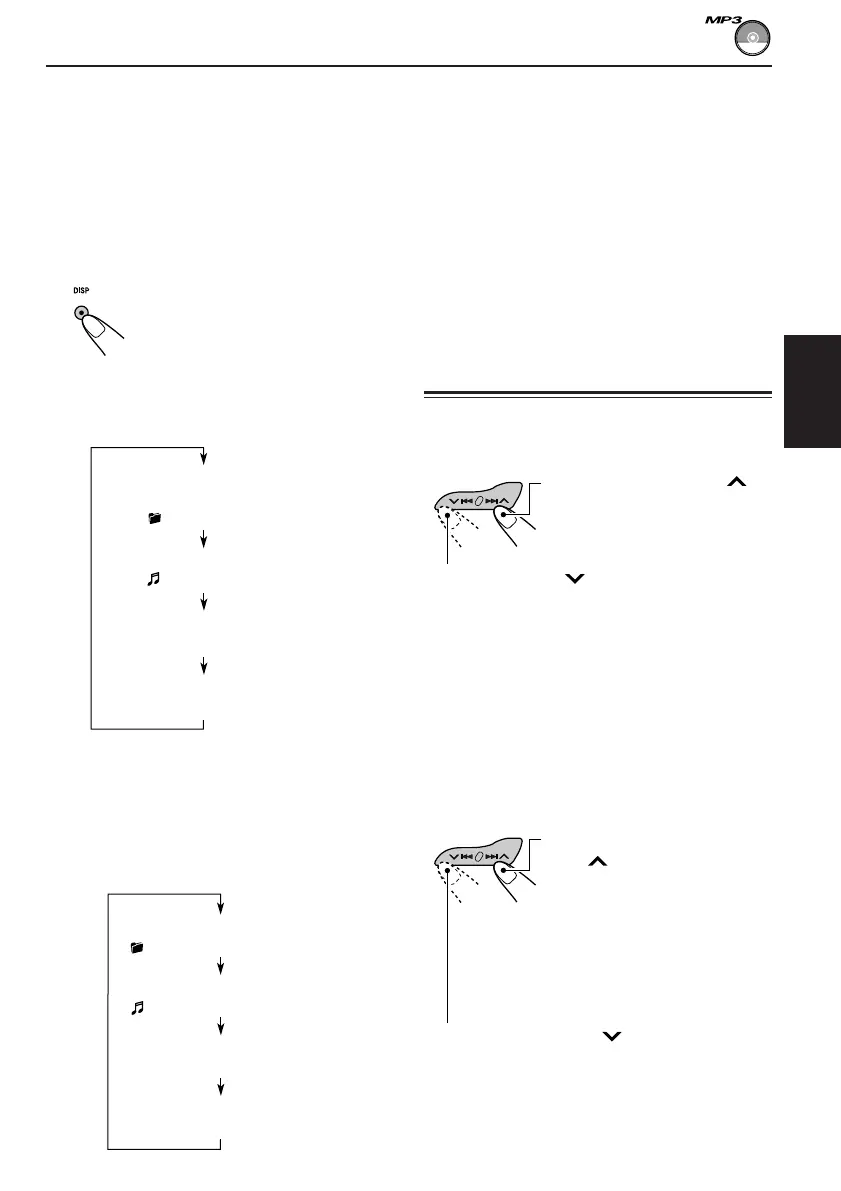
Pour changer linformation sur laffichage
Pendant la lecture dun fichier MP3, vous pouvez
change linformation du disque MP3 qui apparaît
sur laffichage.
Appuyez répétitivement sur DISP
(affichage).
Chaque fois que vous appuyez
sur la touche, laffichage change
comme suit:
Quand TAG DISP est réglé sur TAG
ON (réglage initial: voir la page 26)
* Si un fichier MP3 ne possède pas de balise ID3,
le nom de dossier et le nom de fichier
apparaissent. Dans ce cas, lindicateur TAG ne
sallume pas sur laffichage.
Quand TAG DISP est réglé sur TAG
OFF
Appuyez brièvement sur
¢ pendant la lecture,
pour sauter vers lavant au
début du fichier suivant.
Chaque fois que vous
appuyez sur la touche
consécutivement, le début des
fichier suivantes est localisé et
reproduit.
Remarques:
Laffichage montre 8 caractères en même temps et
défile sil y a plus de 8 caractères.
Référez-vous aussi à Pour choisir le mode de
défilementSCROLL à la page 26.
Quand un nom de dossier ou de fichier est affiché,
le numéro du dossier actuel ou lindicateur Tr et le
numéro du fichier actuel apparaissent aussi sur le
côté droit de laffichage.
Localisation dun fichier ou
dun passage particulier sur
un MP3 disque
Pour avancer rapidement ou inverser le
fichier
Remarque:
Pendant cette opération, vous pouvez uniquement
entendre des sons intermittents. (La durée écoulée
de lecture change aussi de façon intermittente sur
lindicateur laffichage).
Pour sauter aux fichiers suivantes ou
précédentes
Appuyez brièvement sur 4 pendant la
lecture, pour sauter vers lavant au début du
fichier actuel.
Chaque fois que vous appuyez sur la touche
consécutivement, le début des fichiers
précédentes est localisé et reproduit.
Maintenez pressée 4, pendant la lecture
dun disque pour inverser dans le fichier.
Maintenez pressée ¢ ,
pendant la lecture dun disque
pour avancer rapidement dans
le fichier.
Nom de lalbum / interprète
(nom du dossier*)
(TAG sallume sur laffichage)
Titre de la plage (nom de fichier*)
(TAG sallume sur laffichage)
Durée de lecture écoulée
et numéro du fichier actuel
Horloge et numéro
du fichier actuel
Durée de lecture écoulée
et numéro du fichier actuel
Nom du dossier
( sallume sur laffichage)
Nom de fichier
( sallume sur laffichage)
Horloge et numéro
du fichier actuel
FR17-21_KD-AR400_G400[J]f.p65 10/15/03, 2:48 PM19

Table of Contents

Questions and Answers:

JVC KD-AR400 Specifications

General IconGeneral
BrandJVC
ModelKD-AR400
CategoryCar Receiver
LanguageEnglish

Summary

Important Safety and Setup Information

Laser Product Safety Warnings

Safety precautions for Class 1 Laser Products and potential radiation exposure.

Unit Reset Procedure

Procedure to reset the unit's internal microcomputer to its default state.

Pre-Operation Safety Guidelines

Essential safety precautions to follow before operating the unit, including volume and handling.

Understanding the MODE Button

Button and Display Layout

Control Panel Button Identification

Identifies and explains controls on the main unit's front panel.

Display Window Indicator Meanings

Explains the various indicators shown on the unit's display.

Remote Control Operation

Remote Control Button Functions

Details the functions of each button on the remote controller.

Remote Controller Setup

Installing the Remote Battery

Instructions for installing or replacing the battery in the remote control.

Basic Operations

Powering the Unit On and Off

Steps to turn the unit's power on and off.

Selecting the Audio Source

How to choose between radio, CD, MP3, or other audio sources.

Adjusting Volume and Sound Settings

Guide to adjusting audio volume and sound settings like bass, treble, and loudness.

Canceling Display Demonstration

Setting the Clock and Display

Setting the Clock Time

Procedure for setting the hour and minute for the unit's clock.

Changing Display Mode

How to cycle through different display information modes (frequency, time, track title).

Radio Operations

Tuning Radio Stations

Methods for finding and listening to radio stations using auto or manual search.

Storing Radio Stations

Presetting Radio Stations

How to save favorite radio stations using automatic (SSM) or manual presets.

FM Reception Tips

Improving FM Stereo Reception

Tips for better reception when listening to FM stereo broadcasts.

Tuning to Preset Radio Stations

CD Operations

Playing an Audio CD

Steps for inserting, playing, and stopping a standard audio CD.

CD Playback Management

Stopping, Ejecting, and Navigating Tracks

Instructions for stopping playback, ejecting discs, and navigating between tracks.

CD Playback Modes

Random and Repeat Playback

How to set random track/disc and repeat track/disc playback modes for CDs.

CD Text and Disc Ejection Control

CD Text Information Display

How to view disc title, artist, and track information from CD Text discs.

Locking the Disc in Slot

How to lock a disc in the loading slot to prevent accidental ejection.

MP3 Introduction

What is MP3?

Explanation of the MP3 audio format, compression, and bit rate.

MP3 File Organization

How MP3 files are organized in folders and structured on a disc.

MP3 Operations

Playing an MP3 Disc

Steps for inserting and playing MP3 discs, including initial checks.

MP3 Playback Management

Stopping, Ejecting, and Navigating MP3 Files

Instructions for stopping playback, ejecting discs, and navigating between MP3 files.

MP3 File and Folder Navigation

Quick File Skipping (+10/-10)

How to quickly skip files using the +10 and -10 buttons within a folder.

Direct Folder Selection

Instructions for directly selecting folders using numbered buttons, requiring specific folder naming.

MP3 Playback Modes

Random and Repeat Playback Modes

How to set random (folder/disc) and repeat (track/folder) playback modes for MP3 discs.

Sound Adjustments

Preset Sound Modes (C-EQ)

How to choose predefined equalizer settings for different music genres.

Customizing Sound Settings

Adjusting Bass, Treble, and Loudness

Detailed steps for fine-tuning bass, treble, loudness, fader, and balance.

Other Main Functions

Changing General Settings (PSM)

How to modify various system preferences using the Preferred Setting Mode.

Preferred Setting Mode (PSM) Details

PSM Item Configuration Table

Table listing PSM items, selectable values, and corresponding pages for detailed operations.

Level Meter and Dimmer Settings

Instructions for activating the level meter and configuring the dimmer mode.

Advanced Settings and Options

Scroll Mode and External Input Selection

How to set scroll display mode and select external input sources (CD Changer, Line In, Sirius).

Amplifier Gain Control (AMP GAIN)

How to adjust the maximum volume level for speaker protection based on power.

Control Panel Handling

Detaching and Attaching the Control Panel

Step-by-step guide for removing and reattaching the detachable control panel.

CD Changer Operations

Playing Discs with CD Changer

How to select and play discs using the JVC CD changer unit.

CD Changer Playback Management

Disc Selection and Track Navigation

How to select specific discs and navigate between tracks/files with the CD changer.

CD Changer File and Folder Navigation

Quick File Skipping and Folder Selection

How to skip files quickly and navigate folders using the +10/-10 buttons on the CD changer.

Displaying CD Text/MP3 Information

How to view CD Text and MP3 file information when connected to a compatible changer.

CD Changer Playback Modes

Random and Repeat Playback Modes

How to set random (folder/disc/magazine) and repeat (track/folder/disc) playback modes for CDs.

External Component Operations

Playing External Components (LINE IN)

How to connect and play audio from external sources like Line In via the CD changer jack.

Troubleshooting

General and Radio Troubleshooting

Common problems and solutions for general unit operation and radio reception.

Disc Playback Troubleshooting

Troubleshooting steps for disc playback errors, including 'NO DISC' and playback failures.

MP3 Playback Troubleshooting

MP3 File and Disc Errors

Solutions for MP3 playback issues like 'NO FILES', incorrect time, or unplayable files.

CD Changer Troubleshooting

CD Changer Error Messages

Resolving common CD changer errors like 'NO DISC', 'NO MAG', and 'RESET' messages.

Maintenance

Disc Handling and Care

Guidelines for handling, storing, cleaning, and playing various disc types.

Moisture and CD-R/RW Precautions

Advice on moisture condensation and precautions for using CD-R and CD-RW discs.

Specifications

Audio, Tuner, and CD Player Specifications

Technical specifications for the audio amplifier, tuner, and CD player sections.

General and Physical Specifications

General operating specs, power requirements, voltage, temperature, and physical dimensions.

Related product manuals