Pandora® ·(for
KD
-
AR76ss
1
KD-R760
/
KD-R66o)
.
Preparation: .
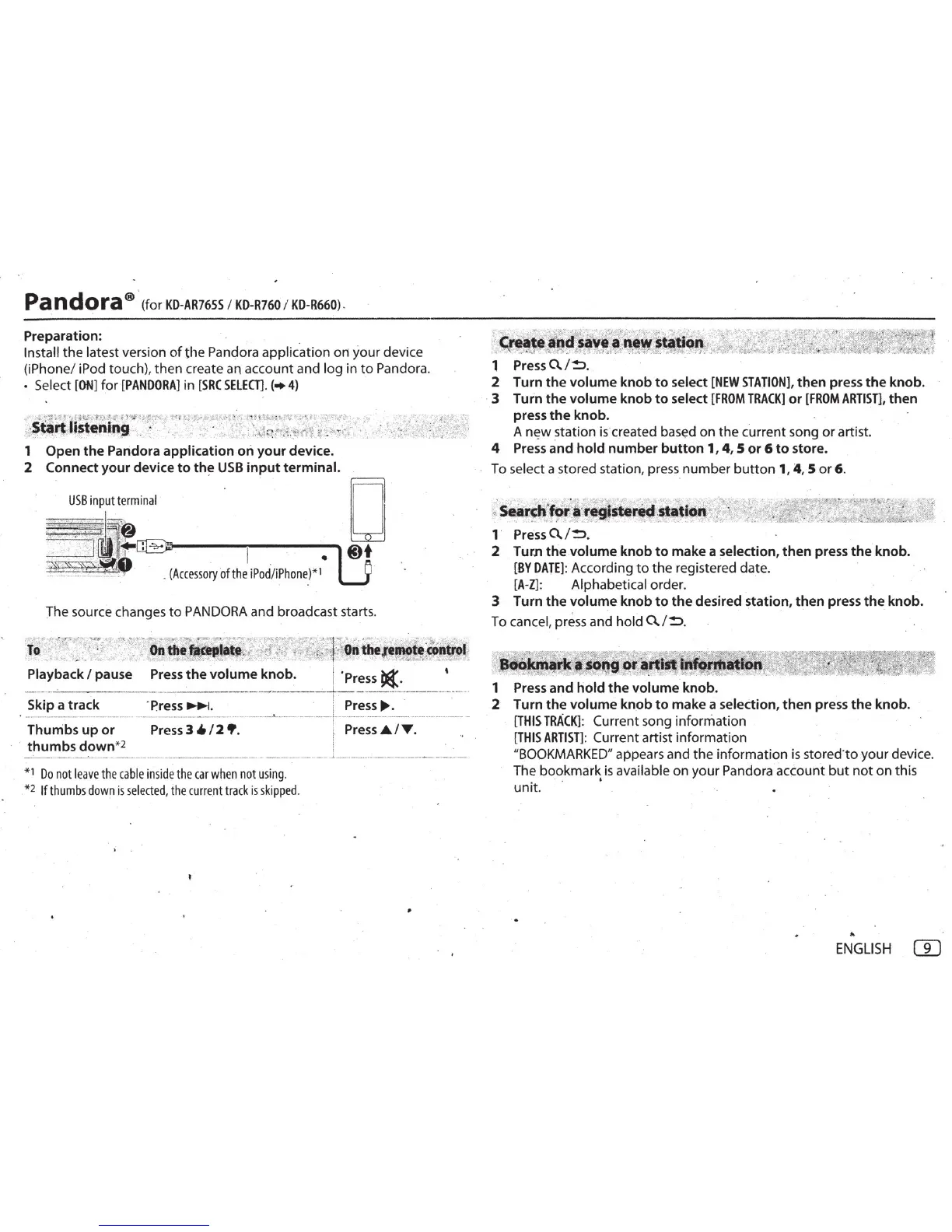
Install the latest version
of
the
Pandora application on your devic.e
(iPhone/ iPod touch
),
then create an account and log in
to
Pandora.
• Select
[ON
] for
[PANDORA]
in
[SRC
SELEa].
(•
4)
__
:
.
-?t~.'J
·
!
;~?~,,
r.,.#o
~
l
~
$
~:.;:~~
r~t~
-
~-~-
q
t
'
':i-"~.:~
-
\~f
~t~
«f
't·~
-
:.;
~:~~~~~.
,
~
·
:",·*S"f,~.-
~--"
0
.
S~f11tstenin'
:
:.
:
..
. .
~
. · · . ·
..
,;".k
~
;<ri'f
.
J.litfi'::.
~
.
...
\;
·
..
1 Open
the
Pandora
application
ori
your
device.
2 Connect
your
device
to
th~
USB
input
terminal.
USB
input
terminal
~
-
:
"
9j
J
:
"""
.
~
-
!
~
'
· .
(A
c
ce
ss
ory
ofth
e
iPod
/
iPhone
)*
l
D
@l+
The source changes
to
PANDORA
and broadcast starts.
~~
'~
-
·
-~'
'-t:~tt,;.-~~:~(
:
"'
;'
~
:
./:~·
_?
"'
~
/~
~
"~'".Yf-.
:;.·~
...
·~
:~
.,:
<,$._''':.::·
',
.;:~~:'
{~
11
/
<';
'
.:.
.
~
~"'
;
.
~.
'·•"-t,
·
~
.,_"
.To
,· · · c·;·
~
.· . {
Onth~
_
~t.ttr
-::~JJ
{''j.·,,,.z~,
,
;:
¥
:7
qn
·
tbe,K,~lt
,
c;90
.
frd
~
... . _
•••
~
• !
,.
-
r~
,~_)6
.
.#
_,
;.
. :
~---
• •
..
. -
..
...
,~
~
...
1
. -
~
.
-
~
~
~
A'""
,
..
,
~-~.
...
Y..,;_.4
·r
~
~
Playback I pause
Press
the
volume
knob. · I
'Press~
·
•
-··-·-
...;_
_
__
.
__
,.
____
_
·------------·-
·
-----+--
. - -
··
-·-
--·---
--
---··-···
Skip a track
·
press~
.
· i
Press
IJII>.
· ·
·
Th~-;b~
-
~~
-
~;
-
--
-
·-·-
,;;
·
~
·
~~i.-
/
'2"•
:
-------
-
·'--
·
---··--···
..
-
..
-·--r
--
,;~
-
~~~
-
i..
·-
,
;;;
:
···
.. ··
·---·-
·· ..
·
thumbs
down
*2 '
_._·--------------·-'----
--
·-
--
-
----
-------
--~
-----
-
-
-----·
-
-
----
-----------
--
· _.;. ---··
-------------------
----~
*1
Do
not
leave
the
cabl
e
inside
the
car
when
not
using
.
. *2
If
thumbs
down
is
selected
,
the
current
track
is s
kipped.
•
1
Press
0./!:>.
2 Turn
the
vo
l
ume
knob
to
select
[NEW
STATION],
then
press
the
knob.
· 3 Turn
the
volume
knob
to
select
[FROM
TRACK]
or
[FROM
ARTIST],
then
press
the
knob.
A
n~w
station
is
created based on the current song
or
artist.
4 Press
and
hold
number
button
1,
4,
5
or
6
to
store.
To select a stored station,
press
number
button
1, 4, 5
or
6.
~-
·
• - • .
.?'
• ' . :;. •
f...;<,..·}'"':-
>#
.r<'
- .
.J
_
..
~
:iWt'
• .
'<
._,7.
~-~(#"
.
..
~
_
-
....
-t
__
"'
•
~
s~a:r~ltf~~
l
-
~~·"
·
"~
·
'*~~to-.
r'~ji'<
11~~;~~
1·
Press
0.
/
!:>.
2 Turn
the
volume
knob
to
make a selection,
then
press
the
knob.
[BY
DATE]
: According
to
the registered date.
[A-Z]:
Alphabetical order.
3 Turn
the
volume
knob
to
the
desired station,
then
press
the
knob.
To cancel, press and hold
a.
/
!:>
.
~~
8idiiif~ji
J
~
\
1
'
g
~
1
'~
cii
,
jf8}1
,
~
.
.
"'
· ;* -
...
\::~:">~--".::~
:i-
·~>:
"'
--«~.
·-;
N
:
~
~
-
~
-"1
'"
~-l-
~
:
-..
·?-
·-~'
'!"'"t:·:
...
1
Press
and
hold
the
volume
knob.
2 Turn
the
volume
knob
to
make a selection,
then
press
the
knob.
[THIS
TRACK]
: Current song information
[THIS
ARTIST]:
Current artist information
"
BOOKMARKED"
appears and
the
information
is
stored·
toyour
device.
The bookmark
is
available on your Pandora account
but
not
on this
. . .
unit
.
.,
ENGLISH
GJ



 To Next Page
 Loading...