EasyManua.ls Logo

JVC KD-R520 - Using Bluetooth Devices; Bluetooth Pairing and Operation

JVC KD-R520
30 pages
Print Icon
To Next Page IconTo Next Page
To Previous Page IconTo Previous Page
Loading...
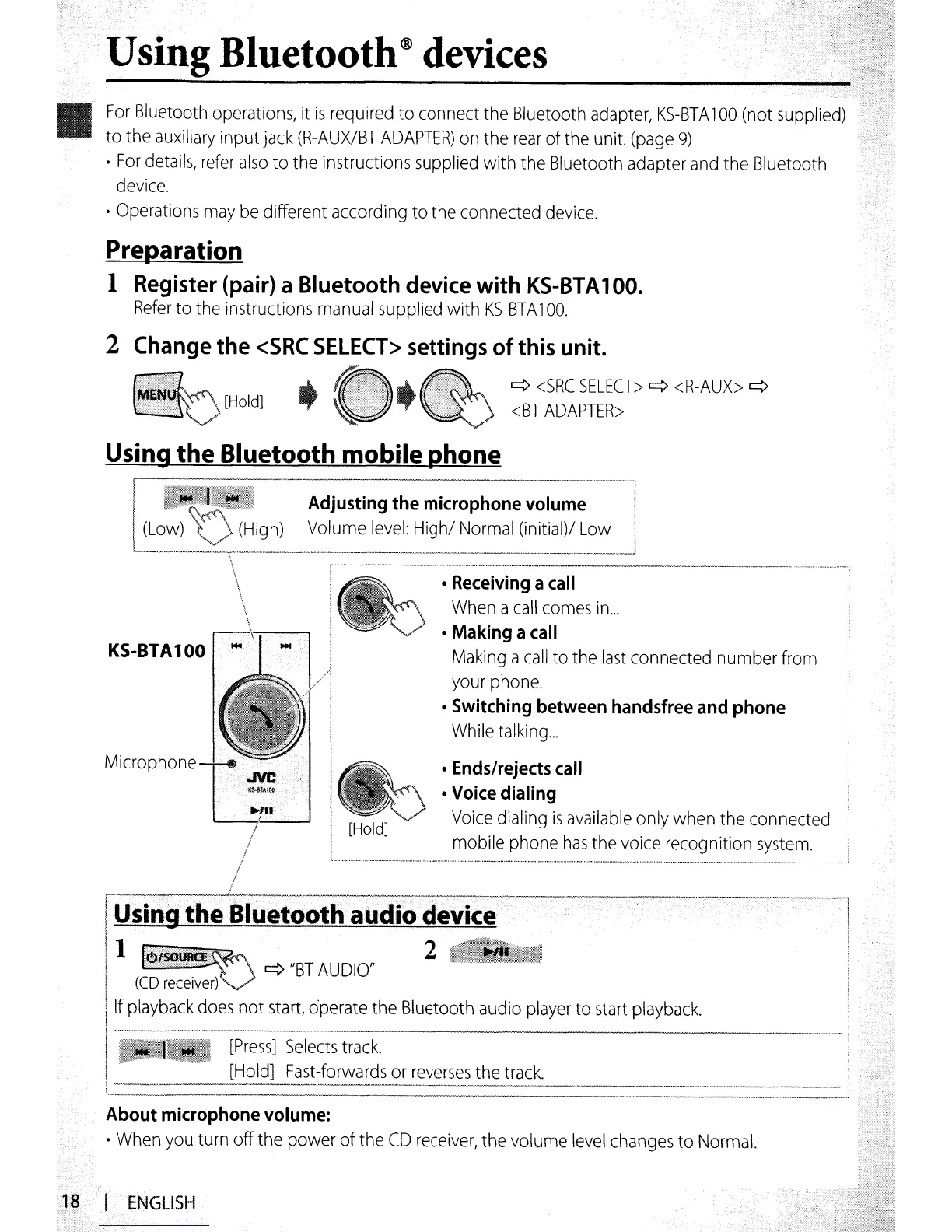
.Using Bluetooth® devices
For
Bluetooth
operations,
it
is
required to connect the Bluetooth
adapter,
KS-BTA
100
(not
supplied)
to
the
auxiliary
input
jack
(R-AUX/BT
ADAPTER)
on
the
rear
of
the
unit.
(page
9)
For
details,
refer
also
to the instructions
supplied
with the Bluetooth adapter
and
the Bluetooth
device
.
Operations
may
be
different according to the connected
device.
frgparation
1
Register
(pair)
a Bluetooth
device
with
KS-BTA
100.
Refer
to
the
instructions
manual
supplied with
KS-BTA
100.
2
Change
the
<SRC
SELECT>
settings
of
this
unit.
[Hold]
q
<SRC
SELECT>
q
<R-AUX>
q
<BT
ADAPTER>
________
·_·_.~
__
m !
Ends/rejects
call
Voice
dialing
Voice
dialing
is
available
only when the connected
mobile phone
has
the
voice
recognition
system.
[Hold]
q"BTAUDIO"
About microphone
volume:
When
you
turn off the power ofthe
CD
receiver,
the volume
level
changes
to
Normal.
Using the Bluetooth mobile phone
Adjusting
the
microphone
volume
I
Volume
level:
High/
Normal
(initial)/
Low
!
___
._
...•...
_ _
..
_.~
•..
_
..•
_
_._
__
..
_
_._.
__
.
__
. .•._
.•
__
._
••._ 1
\
._---_
..
__
_-
_ _ _
_-_
_ .
\
Receiving
a
call
\
When
a
call
comes
in
...
Making a
call
KS-BTA
100
Making
a
call
to
the
last
connected number from
your
phone.
Switching
between
handsfree
and
phone
While
talking
...
Microphone
I't:;;
)'------'
/
/
f
rus·i;,gl~liiuetooth
audio
device----·-·
! 1
....
2
II
~~II.I
(CD
receiver)
Ilf
playback
does
not
start,
operate the Bluetooth
audio
player
to
start
playback.
[Press]
Selects
track.
I [Hold]
Fast-forwards
or
reverses
the
track.
c=..-=
..
-------.-
-
...
--_.-.
;l§
I~NGLISH

Other manuals for JVC KD-R520

Related product manuals