ENGLISH
REMOTE CONTROL
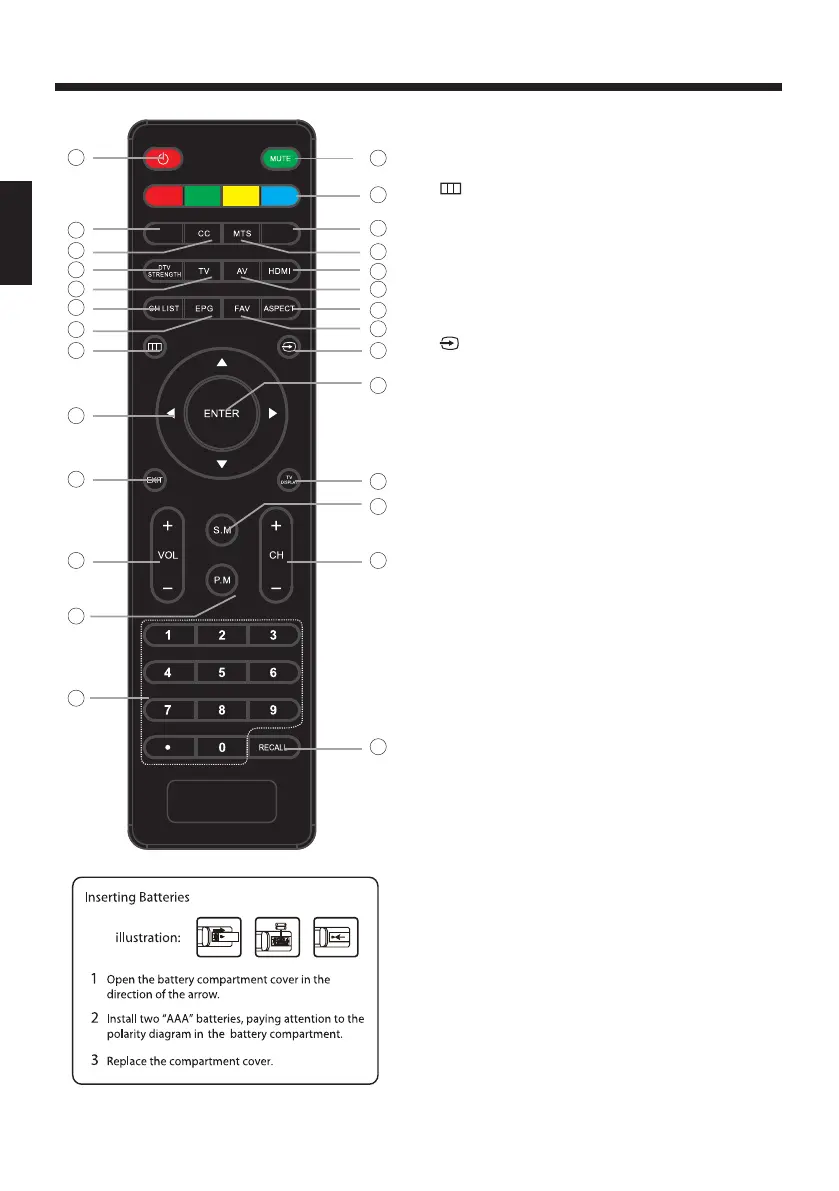
1: POWER
To set the TV standby or on.
2: NUMBER KEY
For direct access to program.
3:
Displays the main on-screen menu.
4: CURSOR
To move within the menu.
5: EXIT
Used to exit menu.
6: VOL+/-
To adjust sound level.
7: P.M
To switch picture mode.
8:
Press to display and select the available video sources.
9: MUTE
To disable or enable the sound.
10: RECALL
To access the previously viewed program.
11: ENTER
Confirms selection.
12: TV DISPLAY
Displays/removes the program Information
13: S.M
14: CH+/CH-
To access the next or previous program.
15: ASPECT
To change picture aspect .
16: CH LIST
Used to display the channel list.
17: EPG
Display all the information of DTV programs.
18: FAV
Used to access your favourite channels in digital TV mode.
19: HDMI
Hot key directly go to HDMI source.
20: AV
Hot key directly go to AV source.
21: DTV STRENGTH
Used to display the DTV signal strength menu.
22: TV
Hot key directly go to TV source.
23: SLEEP
Press to set the sleep timer.
24: CC
Enable or disable the CC function.
25: USB
Select USB source input.
26: MTS
Switch the sound stereo.
27: COLOR KEYS
Reserved keys
To switch sound mode(Standard, Music, Movie,
Sports, Personal).
9
14
13
10
12
11
15
18
20
19
25
26
1
2
4
5
6
7
24
23
21
22
16
17
27
3 8
SLEEP USB
-11-



 To Next Page
 Loading...