To Next PageTo Next Page
 Need help?
Do you have a question about the Kenmore ASPIRADORA 116.29914 and is the answer not in the manual?
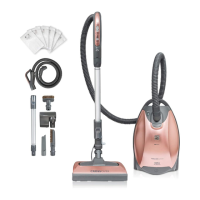
Lists all parts included with the vacuum cleaner.
Space to record vacuum cleaner's model and serial numbers for future reference.
Details the terms and conditions of the vacuum cleaner's one-year limited warranty.
Lists items and conditions not covered by the warranty, such as expendable items and misuse.
Provides essential warnings and precautions for safe operation and to prevent injury.
Lists specific warnings related to electrical shock, children, damaged cords, and environmental factors.
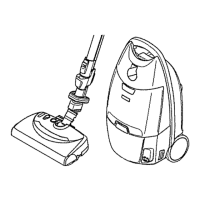
Identifies and illustrates the various parts and features of the PowerMate.
Instructions on how to assemble the handle and telescoping wand.
Guidance on attaching the wand to the PowerMate unit.
Instructions on opening, closing, and reinstalling the canister hood and tool storage cover.
Instructions for storing the Pet PowerMate attachment in the canister.
Step-by-step guide on how to plug in and begin operating the vacuum cleaner.
Instructions on how to select the appropriate pile height setting for different carpet types.
Guidance on safely and effectively vacuuming carpeted stairs.
Recommended pile height settings for various carpet types and bare floors.
Instructions for attaching and removing the handle and wands from the vacuum.
How to assemble the dusting brush and fabric brush.
A table detailing which attachments to use for different cleaning areas.
Explains the function of the overload protector and how to reset it.
Describes the function of the edge cleaner feature on the PowerMate.
Explains stair grip safety feature and wand light operation.
Details the CHECK BAG indicator and thermal protector.
Explains electronic and mechanical suction controls for adjusting cleaning power.
Explains how the dirt sensor lights indicate cleaning progress.
Instructions on how to identify and clear clogs in the airflow passages.
Step-by-step instructions on how to replace the disposable dust bag.
How to clean the vacuum cleaner's exterior and attachments safely.
Instructions for replacing the motor safety filter.
Steps for replacing the HEPA exhaust filter cartridge.
Guide to removing the belt and cleaning the agitator.
Recommended frequency for cleaning the agitator based on usage.
Step-by-step instructions for installing a new belt on the PowerMate.
Instructions for replacing the headlight bulb on the wand.
Procedure for cleaning the dirt sensor lenses to ensure accurate readings.
How to check brush wear and determine if the agitator assembly needs replacement.
Steps for replacing the entire agitator assembly.
Solutions for common problems like the vacuum not starting or poor dirt pickup.
Troubleshooting steps for when the vacuum shuts off or the PowerMate fails to run.
Explains common dirt sensor light behaviors and their solutions.
Addresses problems with the CHECK BAG indicator and rug pickup.
Solutions for overload protector, cord rewind, and carpet marking issues.
Details the advantages and coverage provided by the Master Protection Agreement.
Information on professional installation services offered by Sears.
Lists all parts included with the vacuum cleaner.
Space to record vacuum cleaner's model and serial numbers for future reference.
Details the terms and conditions of the vacuum cleaner's one-year limited warranty.
Lists items and conditions not covered by the warranty, such as expendable items and misuse.
Provides essential warnings and precautions for safe operation and to prevent injury.
Lists specific warnings related to electrical shock, children, damaged cords, and environmental factors.
Identifies and illustrates the various parts and features of the PowerMate.
Instructions on how to assemble the handle and telescoping wand.
Guidance on attaching the wand to the PowerMate unit.
Instructions on opening, closing, and reinstalling the canister hood and tool storage cover.
Instructions for storing the Pet PowerMate attachment in the canister.
Step-by-step guide on how to plug in and begin operating the vacuum cleaner.
Instructions on how to select the appropriate pile height setting for different carpet types.
Guidance on safely and effectively vacuuming carpeted stairs.
Recommended pile height settings for various carpet types and bare floors.
Instructions for attaching and removing the handle and wands from the vacuum.
How to assemble the dusting brush and fabric brush.
A table detailing which attachments to use for different cleaning areas.
Explains the function of the overload protector and how to reset it.
Describes the function of the edge cleaner feature on the PowerMate.
Explains stair grip safety feature and wand light operation.
Details the CHECK BAG indicator and thermal protector.
Explains electronic and mechanical suction controls for adjusting cleaning power.
Explains how the dirt sensor lights indicate cleaning progress.
Instructions on how to identify and clear clogs in the airflow passages.
Step-by-step instructions on how to replace the disposable dust bag.
How to clean the vacuum cleaner's exterior and attachments safely.
Instructions for replacing the motor safety filter.
Steps for replacing the HEPA exhaust filter cartridge.
Guide to removing the belt and cleaning the agitator.
Recommended frequency for cleaning the agitator based on usage.
Step-by-step instructions for installing a new belt on the PowerMate.
Instructions for replacing the headlight bulb on the wand.
Procedure for cleaning the dirt sensor lenses to ensure accurate readings.
How to check brush wear and determine if the agitator assembly needs replacement.
Steps for replacing the entire agitator assembly.
Solutions for common problems like the vacuum not starting or poor dirt pickup.
Troubleshooting steps for when the vacuum shuts off or the PowerMate fails to run.
Explains common dirt sensor light behaviors and their solutions.
Addresses problems with the CHECK BAG indicator and rug pickup.
Solutions for overload protector, cord rewind, and carpet marking issues.
Details the advantages and coverage provided by the Master Protection Agreement.
Information on professional installation services offered by Sears.
 General
| Brand | Kenmore |
|---|---|
| Model Number | 116.29914 |
| Type | Canister |
| Power Source | Corded Electric |
| Voltage | 120V |
| Amps | 12A |
| Filter Type | HEPA |
| Cord Length | 25 feet |
| Included Tools | Crevice Tool, Dusting Brush |