ENGLISH
74
SMART CALIBRATION
• This only applies to certain models.
How to Run
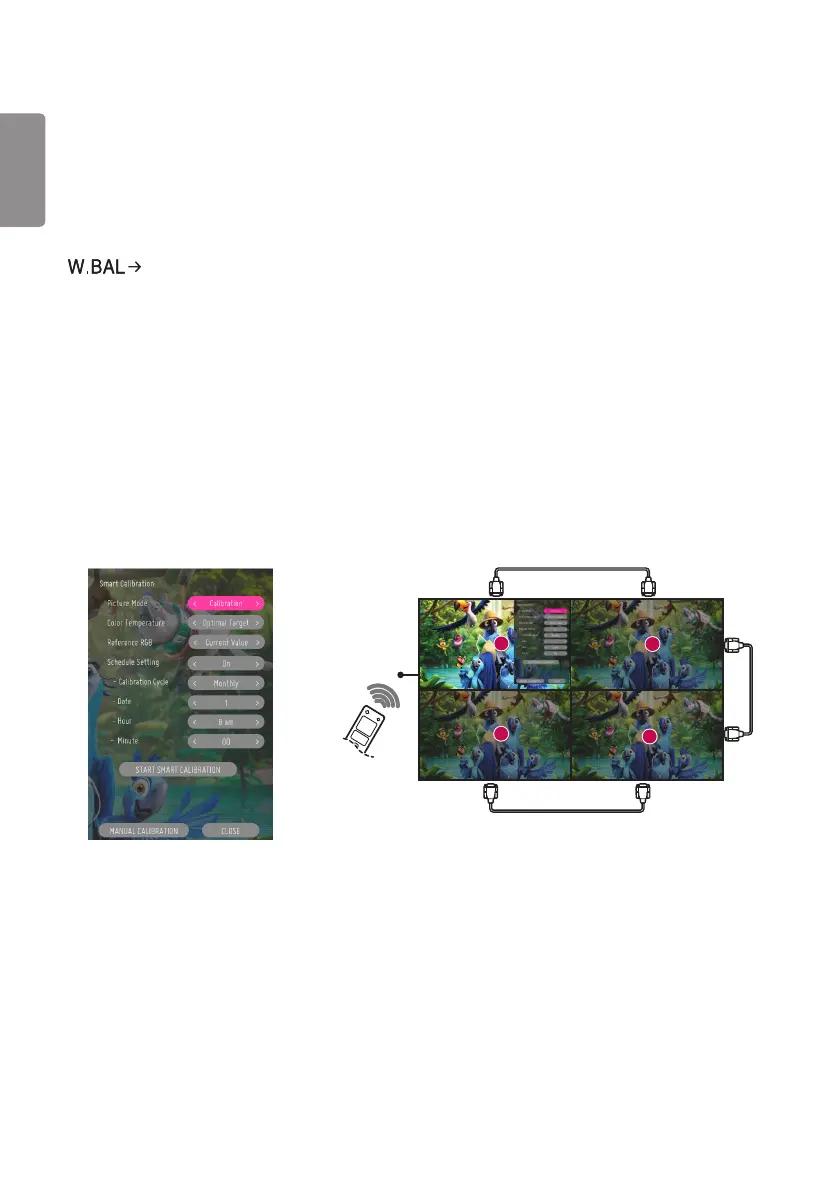
[Smart Calibration]
1 Set the Set ID of each set.
2 Select the [Picture Mode] to execute Smart Calibration.
When you set [Picture mode] to [Calibration] mode, you can set [Color Temperature] among [3000 K / Optimal
Target / Original].
- [Optimal Target]: Set the optimal color value of the installed set as the target.
- Please set the target to 3,000K in the broadcasting station environment.
When you set [Picture mode] except [Calibration] mode, you can set [Color Temperature] within 3200K~13000K.
You can adjust it in units of 100K.
3 With [START SMART CALIBRATION], you can correct the color/brightness.
4 If you set the [Schedule Setting] menu, calibration is performed automatically on a regular basis.
1
3
4
2
RS-232C
IR


 To Next Page
 Loading...