EasyManua.ls Logo

Mitsubishi DA-A15DC - Adjustment Procedures; Idling Current Adjustment; Neutral-Point Potential Adjustment

Mitsubishi DA-A15DC
20 pages
Print Icon
To Next Page IconTo Next Page
To Previous Page IconTo Previous Page
Loading...
ADJUSTMENT
(DA-A15DC
can be
adjusted in
the
same manner
as
in
DA-A1oDC.
)
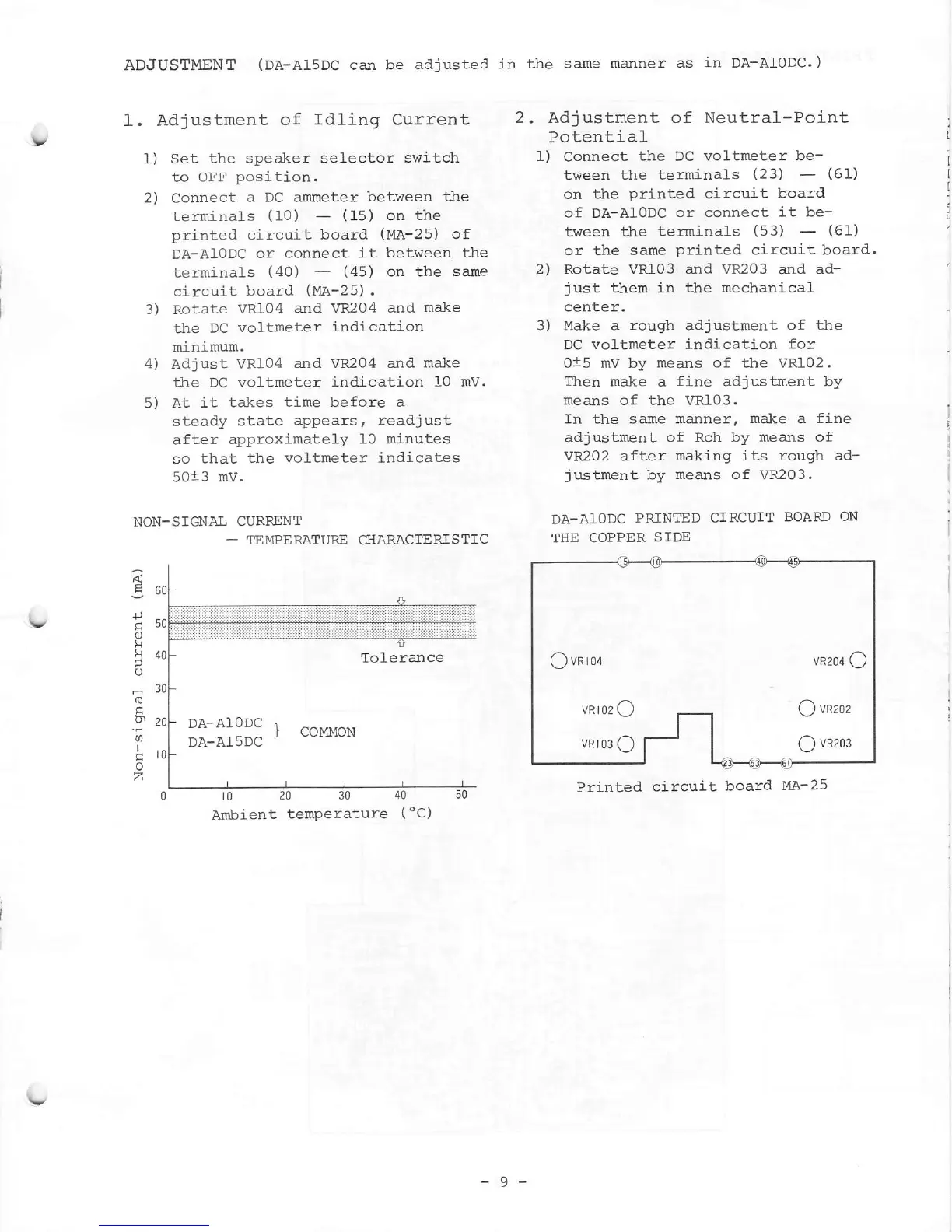
. Adjustment
of
Idling Current
l) Set
the speaker selector switch
to OFF
posi
tion.
2)
Connect
a DC anmete r
between the
terminals
(10)
-
(15)
on
the
printed
circuit
board
(MA-25)
of
DA-A1oDC
or connect
it between the
terminals
(40)
-
(45)
on the
sane
circuit
board
(Me-25).
3) Rotate
VR104
and VF204
and
make
the
DC
voltmeter
indication
rrinimum.
4) Adjust VR104
and vR204 and
make
the DC voltmeter
indication 1,0 mv.
5) At
it takes
time before a
steady
state
appears, readj ust
after
approximately
10 minutes
so
that
the voltmeter indicates
5013 mV.
NON-S]O{AL CURRENT
-
TEMPERATURE GIARACTERTSTIC
Adjustment of Neutral-Point
Potent
i a1
l)
Connect
the
DC
volureter be-
tween
the terminals
(23)
-
(61)
on
the
printed
circuj-t
board.
of DA-AIoDC
or connect
it be-
tween the
terminals
1531
-
(61)
or the same
printed
circuit board.
2)
Rotate VRL03 and VR203
and
ad-
just
them in
the mechanical
center.
3) Make a
rough
adjustment
of tJ:re
DC
voltmeter indicati"on for
0i5 mV by
means of the VRI02.
ltren
make a
fj-ne
adjustment by
means of the vR103.
In the s ame manrter,
make
a
fine
adjustnent of Rch by means of
vR202 after
making its rough ad-
justment
by
means of
VR203.
DA-AIODC
PRINTED
CIRCUIT
BOARD
ON
THE
COPPER
SIDE
Printed circuit
board
l4A- 25
.tl
C]
lr
tt
a
o
rd
b'
..1
o
I
o
Tolerance
DA-A}ODC
DA-A15DC
Ambient
temperature
(
"C)
Qvnron
vR2o4
O
vRro2
C
Q
vneoz
vRro3o
f- | O
vR2o3
-9-

Other manuals for Mitsubishi DA-A15DC

Related product manuals