15
How to Use (Using the optional remote controller)
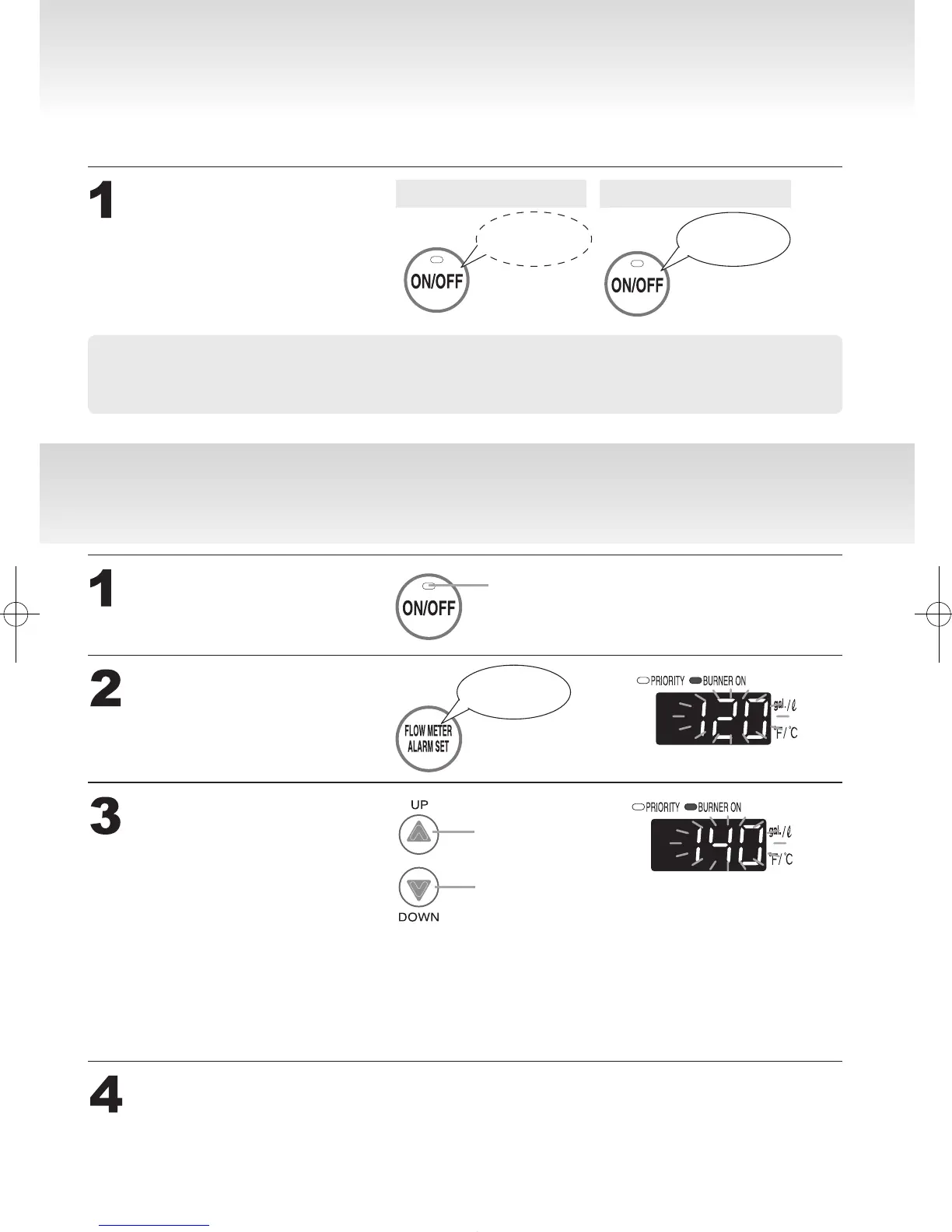
AdjustingtheMaximumOutputTemperature
The remote controller will emit a sound when any button is pushed. This sound can be muted if it is desired.
How to Use (Using the optional remote controller)
Muting the Remote Controller
* Initial factory setting is with sound
• The ow meter alarm cannot be muted.
• The high temperature warning tone when setting the unit to 125°F / 55°C (131°F) or higher will
not emit a sound when muted.
Hold the Power On/
OffButtonforve
seconds.
Sound
Muted
No sound
after 5 sec.
Tone sounds
after 5 sec.
TurnoffthePower
On/OffButton.
Pressandholdtheow
meteralarmsetbutton
until a sound is heard
(2sec.).
Change the temperature
using the setting
buttons.
SetthePowerbuttontoONwhen
continuingtousetheunitasis.
Otherwise,lettheunitsitfor30sec.
Off
Tone sounds
after 2 sec.
The upper limit of the hot-water supply
temperature can be changed to
(For Fahrenheit (°F))
115°F, 120°F, 125°F, 130°F, 135°F or 140°F.
(For Celsius (°C))
46°C, 47°C, 48°C, 50°C, 55°C or 60°C.
Up
Down


 To Next Page
 Loading...