10
Blending Tips
Liquids
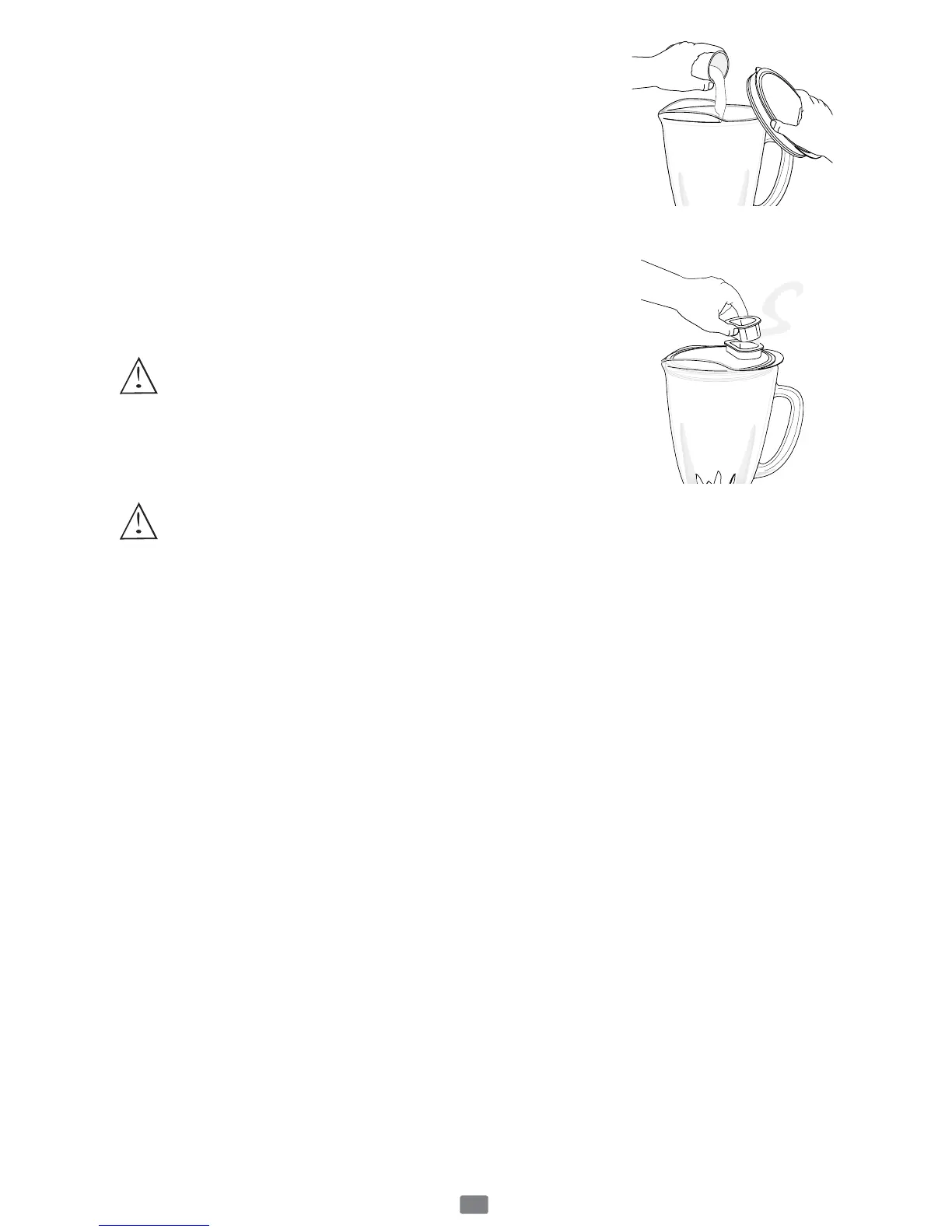
Put liquids into the jar first, unless the recipe says
otherwise.
Using the jar lid food chute
Do not remove the lid while in use. Food may splatter if
you do. Instead, open the jar lid food chute to add
smaller ingredients.
Working with Hot Foods or Liquids
WARNING: When you work with HOT FOODS,
remove the jar lid food chute to vent steam. Tilt the
lid away from you partially covering the opening.
Keep hands and other exposed skin away from the
lid opening to prevent possible burns.
When you work with HOT LIQUIDS, remove the jar lid food chute and
start at a low speed, and then gradually increase to a faster speed. Do not
add liquid over the 4 cup (1L) level. Always keep hands away from steam.
Ingredients Quantities
Use only the amount of food suggested in the recipes. If you want greater
amounts, prepare in batches. Using larger amounts may overload and strain
the motor. You might also get different results from those described.
Frequently Asked Questions
Why doesn’t the blender/food processor turn on?
• Make sure the base is plugged in an active power receptacle.
• Verify blinking red light is active after pushing on/off button.
How can I prevent liquids from leaking out?
Check to see that the sealing ring is correctly assembled in between
the multi-functional blade and the jar.

 To Next Page
 Loading...
 Need help?
 General