EasyManua.ls Logo

Philips Sonicare FlexCare Platinum - User Manual

Philips Sonicare FlexCare Platinum
24 pages
Print Icon
To Next Page IconTo Next Page
Loading...
Sonicare
FlexCare
Platinum

Other manuals for Philips Sonicare FlexCare Platinum

Question and Answer IconNeed help?

Do you have a question about the Philips Sonicare FlexCare Platinum and is the answer not in the manual?

Summary

Important Safeguards

Dangers

Safety precautions to prevent electrocution risks.

Warnings

Safety precautions against burns, fire, and physical injury.

Medical and EMF Warnings

Health advice, EMF compliance, and user safety guidelines.

Getting Started

Attaching Brush Head & Charging

Instructions for attaching the brush head and charging the toothbrush handle.

Using Your Sonicare

Brushing Technique & Instructions

Guidance on proper brushing technique, pressure, and mouth sections.

Modes, Intensity & Pressure Sensor

Explanation of brushing modes, intensity levels, and the pressure sensor feature.

Product Features

Pressure Sensor Operation

How to activate or deactivate the Pressure Sensor feature.

Battery Status Indicators

Understanding the LED indicators for battery charge level.

Quadpacer, Smartimer & Easy-start

Details on interval timers, auto-shutoff, and power ramp-up features.

Cord Management & Sanitizing

Instructions for managing the power cord and using the UV sanitizer.

Cleaning and Maintenance

Cleaning Toothbrush Handle & Brush Head

Instructions for cleaning the main handle and detachable brush head.

Cleaning Charger & UV Sanitizer

Steps for cleaning the charger base and UV sanitizer components.

Storage and Replacement

Storing Product & Replacing Brush Heads

Guidance on storing the product and recommended brush head replacement intervals.

UV Light Bulb Replacement

Information on obtaining replacement UV light bulbs.

Environment and Disposal

Battery Removal and Recycling

Instructions for safely removing and recycling the rechargeable battery.

Warranty and Service

Warranty Terms and Coverage

Details of the product's two-year limited warranty and covered defects.

Warranty Exclusions and Limitations

Items not covered by warranty and limitations on implied warranties and remedies.

Limitation of Remedies

Legal limitations on remedies for damages or breaches of warranty.

Summary

Important Safeguards

Dangers

Safety precautions to prevent electrocution risks.

Warnings

Safety precautions against burns, fire, and physical injury.

Medical and EMF Warnings

Health advice, EMF compliance, and user safety guidelines.

Getting Started

Attaching Brush Head & Charging

Instructions for attaching the brush head and charging the toothbrush handle.

Using Your Sonicare

Brushing Technique & Instructions

Guidance on proper brushing technique, pressure, and mouth sections.

Modes, Intensity & Pressure Sensor

Explanation of brushing modes, intensity levels, and the pressure sensor feature.

Product Features

Pressure Sensor Operation

How to activate or deactivate the Pressure Sensor feature.

Battery Status Indicators

Understanding the LED indicators for battery charge level.

Quadpacer, Smartimer & Easy-start

Details on interval timers, auto-shutoff, and power ramp-up features.

Cord Management & Sanitizing

Instructions for managing the power cord and using the UV sanitizer.

Cleaning and Maintenance

Cleaning Toothbrush Handle & Brush Head

Instructions for cleaning the main handle and detachable brush head.

Cleaning Charger & UV Sanitizer

Steps for cleaning the charger base and UV sanitizer components.

Storage and Replacement

Storing Product & Replacing Brush Heads

Guidance on storing the product and recommended brush head replacement intervals.

UV Light Bulb Replacement

Information on obtaining replacement UV light bulbs.

Environment and Disposal

Battery Removal and Recycling

Instructions for safely removing and recycling the rechargeable battery.

Warranty and Service

Warranty Terms and Coverage

Details of the product's two-year limited warranty and covered defects.

Warranty Exclusions and Limitations

Items not covered by warranty and limitations on implied warranties and remedies.

Limitation of Remedies

Legal limitations on remedies for damages or breaches of warranty.

Overview

The Philips Sonicare FlexCare Platinum is an advanced electric toothbrush designed for comprehensive oral care, offering various features to enhance brushing effectiveness and gum health. This device is intended for household use and is not suitable for multiple patients in a dental office or institution.

Function Description

The primary function of the Sonicare FlexCare Platinum is to provide superior plaque removal and improve gum health through its high-speed brush head movements. It utilizes sonic technology to create dynamic cleaning action, reaching between teeth and along the gumline. The device offers multiple brushing modes and intensity levels to cater to individual needs and preferences. Additionally, select models include a UV sanitizer to clean brush heads, ensuring a hygienic brushing experience.

Usage Features

Attaching the Brush Head:

To prepare the toothbrush for use, align the brush head so its bristles face the front of the handle. Then, firmly press the brush head down onto the metal shaft until it stops. Sonicare Platinum brush heads are designed with easily identifiable icons to help distinguish them.

Charging:

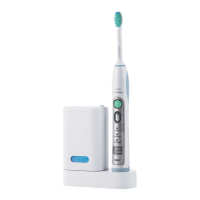
The Sonicare FlexCare Platinum can be charged using either a charger or a UV sanitizer (depending on the model). To charge, plug the charger or sanitizer into a live electrical outlet and place the handle on it. A flashing light on the battery level indicator will confirm that the toothbrush is charging. A full charge typically takes at least 24 hours. The battery status can be checked when the handle is not on the charger: a yellow LED indicates a low charge, while three green LEDs signify a full charge. If a long beep is heard and the yellow LED flashes, the Sonicare will turn off until recharged. For optimal battery life, the device can be kept on the charger when not in use.

Brushing Instructions:

  1. Wet the bristles of the brush head and apply a small amount of toothpaste.
  2. Place the toothbrush bristles against the teeth at a slight angle towards the gumline.
  3. Press the power on/off button to switch on the Sonicare.
  4. Apply light pressure and allow the Sonicare to do the brushing; avoid scrubbing.
  5. Gently move the brush head slowly across the teeth in a small back-and-forth motion, ensuring the longer bristles reach between your teeth. Continue this motion throughout the brushing cycle.

To ensure even brushing, the Quadpacer feature divides the mouth into four sections. Begin brushing in section 1 (outside top teeth) for 30 seconds, then move to section 2 (inside top teeth), followed by section 3 (outside bottom teeth), and finally section 4 (inside bottom teeth). After completing the main brushing cycle, additional time can be spent on chewing surfaces, areas with stains, or the tongue, as preferred.

The Sonicare FlexCare Platinum is safe for use on braces (though brush heads may wear out faster), dental restorations (fillings, crowns, veneers, implants).

Brushing Modes:

The device offers three brushing modes:

  • Clean: The default mode, designed for ultimate plaque removal.
  • White: A 2-minute mode for removing surface stains, followed by 30 seconds to brighten and polish front teeth.
  • Gum Care: Combines the Clean mode with an additional minute of gentle stimulation and massage for improved gum health.

To select a mode, press the mode button prior to turning on the Sonicare. The selected mode will illuminate. Once a mode is selected, it remains active until changed. Note that modes cannot be toggled while the toothbrush is switched on. For clinical studies, the default 2-minute Clean mode must be selected, with the handle fully charged and the Easy-start feature deactivated.

Intensity Levels:

Each mode offers three intensity levels:

  • Low: Indicated by 1 LED light.
  • Medium: Indicated by 2 LED lights.
  • High: Indicated by 3 LED lights.

Intensity can be adjusted at any time during the brushing cycle by pressing the '+' button to increase or the '-' button to decrease intensity.

Pressure Sensor:

This model includes an activated Pressure Sensor feature that works in all modes and intensity levels. It alerts the user with a change in vibration and a slight sound when too much pressure is applied during brushing. To deactivate or reactivate the Pressure Sensor:

  1. Place the handle with a brush head on the plugged-in charger or sanitizer.
  2. Press and hold the power button and the mode button for 2 seconds.
    • One beep indicates deactivation.
    • Two beeps indicate activation.

Quadpacer:

The Quadpacer is an interval timer that provides a short beep and pause to remind the user to brush the four sections of the mouth evenly. The interval length varies depending on the selected brushing mode. This feature is activated by default. To deactivate or reactivate the Quadpacer:

  1. Place the handle with a brush head on the plugged-in charger or sanitizer.
  2. Press and hold the mode button for 2 seconds.
    • One beep indicates deactivation.
    • Two beeps indicate activation.

Smartimer:

The Smartimer automatically turns off the toothbrush at the end of the recommended brushing cycle, typically 2 minutes, ensuring users brush for the dentist-recommended duration.

Easy-start:

The Easy-start feature gradually increases the power over the first 14 brushings, helping new users adapt to the Sonicare experience. This feature only works in Clean mode at the High intensity level and is deactivated by default. To activate or deactivate Easy-start:

  1. Attach a brush head to the handle.
  2. Place the handle on the plugged-in charger or sanitizer.
  3. Press and hold the power on/off button for 2 seconds.
    • Two beeps indicate activation.
    • One beep indicates deactivation. Each of the first 14 brushings must be at least 1 minute long to properly progress through the Easy-start ramp-up cycle. Using Easy-start beyond the initial ramp-up period is not recommended as it reduces the effectiveness of plaque removal.

Cord Wrap on Charger (Select Models):

For models with a charger cover and base, the travel charger is pre-installed inside the cover.

  1. To separate the charger cover from the base, press the two gray snap bars on the charger base and pull the white charger cover upwards.
  2. Wrap excess power cord around the gray charger base, ensuring it is on the inside of the two snap levers. Guide the cord through the small groove at the rear of the charger base.
  3. To reattach the charger cover, press it down over the charger base until it snaps into place. For travel convenience, the travel charger can be removed and used without the charger cover and base.

Sanitizing (Select Models):

The UV sanitizer allows for cleaning of the brush head after each use.

Important Safety Notes for UV Sanitizer:

  • Unplug the sanitizer and contact Consumer Care if the UV light bulb remains on when the door is open, the window is broken or missing, or if the sanitizer emits smoke or a burning smell.
  • UV light can be harmful to human eyes and skin. Keep the sanitizer out of reach of children.
  • Do not operate the UV sanitizer without the protective screen in place to avoid contact with the hot bulb.
  • If the sanitizer is used for 3 consecutive UV clean cycles, a minimum of 30 minutes "Off Time" is required before starting another cycle.
  • Do not clean Sonicare for Kids brush heads in the sanitizer.

Sanitizing Process:

  1. After brushing, rinse the brush head and shake off excess water. Do not place the travel cap on the brush head during sanitization.
  2. Place a finger in the door recess on top of the sanitizer and pull open the door.
  3. Place the brush head on one of the two pegs inside the sanitizer, with the bristles facing the light bulb. Only Sonicare snap-on brush heads should be cleaned in the sanitizer.
  4. Ensure the sanitizer is plugged into a live outlet of appropriate voltage.
  5. Close the door and press the green power on/off button once to start the UV clean cycle. The sanitizer will only turn on if the door is properly closed. If the door is opened during the cycle, the sanitizer will stop. The sanitizing cycle runs for 10 minutes and then automatically shuts off. The light glowing through the window indicates that the sanitizer is in operation.

Maintenance Features

Cleaning:

  • General Rule: Do not clean the brush head, handle, travel charger, charger cover, or UV sanitizer in the dishwasher.

  • Toothbrush Handle:

    1. Remove the brush head and rinse the metal shaft area with warm water. Avoid pushing on the rubber seal on the metal shaft with sharp objects, as this may cause damage.
    2. Use a damp cloth to wipe the entire surface of the handle.
  • Brush Head:

    1. Rinse the brush head and bristles after each use.
    2. Remove the brush head from the handle and rinse the brush head connection at least once a week with warm water.
  • Deluxe Charger (Select Models):

    1. Unplug the charger and remove the charger cover.
    2. Use a damp cloth to wipe the surface of the charger and charger cover.
  • UV Sanitizer (Select Models):

    • Do not immerse the sanitizer in water or rinse it under the faucet.
    • Do not clean the sanitizer when the UV light bulb is hot.
    • For optimal effectiveness, it is recommended to clean the sanitizer weekly.
    1. Unplug the sanitizer.
    2. Pull the drip tray straight out. Rinse the drip tray and wipe it clean with a damp cloth.
    3. Clean all interior surfaces with a damp cloth.
    4. Remove the protective screen in front of the UV light bulb by grasping its edges, gently squeezing, and pulling it out.
    5. Remove the UV light bulb by grasping it and pulling it out of the metal clasp.
    6. Clean the protective screen and the UV light bulb with a damp cloth.
    7. Reinsert the UV light bulb by aligning its bottom with the metal clasp and pushing it into place.
    8. Reinsert the protective screen by aligning its pegs with the slots on the reflective surface near the UV light bulb and pushing it straight into the slots.

Storage:

If the product will not be used for an extended period, unplug it from the electrical outlet, clean it, and store it in a cool, dry place away from direct sunlight. The cord wrap can be used to store the power cord in an organized manner.

Replacement:

  • Brush Head: Replace Sonicare brush heads every 3 months to achieve optimal results. Only use genuine Philips Sonicare replacement brush heads.
  • UV Light Bulb: Replacement UV bulbs are available through the Sonicare Consumer Care Center.

Removing the Rechargeable Battery (End of Product Life):

This process is not reversible.

  1. To deplete the rechargeable battery, remove the handle from the charger, turn on the Sonicare, and let it run until it stops. Repeat until the Sonicare can no longer be switched on.
  2. Insert a flathead screwdriver into the slot at the bottom of the handle. Turn the screwdriver counterclockwise to release the bottom cap.
  3. Place the handle on a solid surface with the buttons facing up and lightly tap the housing one inch from the bottom edge with a hammer.
  4. Hold the handle upside down and push down on the shaft to release the internal components.
  5. Insert the screwdriver under the circuit board, next to the battery connections, and twist to break the connections. Remove the circuit board and pry the battery from the plastic carrier. The rechargeable battery can then be recycled, and the rest of the product discarded appropriately.

Philips Sonicare FlexCare Platinum Specifications

General IconGeneral
ModelFlexCare Platinum
TypeElectric Toothbrush
Intensity Settings3
Smart SensorYes
BrushSync TechnologyYes
Pressure SensorYes
Battery TypeLithium Ion
Battery LifeUp to 3 weeks
Charging Time24 hours
Handle CompatibilityCompatible with all Philips Sonicare brush heads
Charging IndicatorYes
Travel CaseYes
UV SanitizerNo
Cleaning ModesGum Care
ColorWhite

Related product manuals