
 Need help?
Do you have a question about the Pioneer AVH-Z7200DAB and is the answer not in the manual?
Key safety warnings and guidelines for operating the product safely.
Detailed breakdown of the main unit's buttons, screen, and connectors.
Guidance and warnings related to operating the LCD panel.
Instructions for opening, closing, and automatic functions of the LCD panel.
Configuring automatic functions, horizontal movement, slide, and angle of the LCD panel.
Steps to connect, configure, and manage Bluetooth devices.
Using the system for making and receiving phone calls via Bluetooth.
Playing audio wirelessly from a Bluetooth-enabled device.
Lists the various audio and video sources compatible with the unit.
How to access and navigate the AV source operation screen.
Selecting sources, changing display order, and adjusting favourite source icons.
How to operate the Digital Radio tuner, including MFN support.
Configuring settings specific to Digital Audio Broadcasting (DAB).
Interface overview, manual tuning, and seek tuning for radio operation.
Automatically storing and recalling the strongest broadcast frequencies.
Customizing radio reception and features like TA Interrupt.
Instructions for inserting and ejecting discs into the unit.
Controlling playback of discs, including skipping and fast forward/reverse.
Switching between audio/video sources and using playback features.
How to insert discs and connect USB storage devices for media playback.
Procedures for playing files from USB storage devices and advanced playback options.
Steps to connect an iPod/iPhone and control basic playback functions.
Using iPod audio sources and Apple Music Radio functionality.
Overview, important notes, and steps to connect a smartphone for WebLink.
Configuring how audio from WebLink and AV sources are mixed.
Overview, notes, driving position, and starting procedure for Apple CarPlay.
Steps to start Apple CarPlay and adjust its audio volume.
Overview, notes, driving position, and starting procedure for Android Auto.
Connection, volume adjustment, and auto-launch configuration for Android Auto.
Instructions for connecting and playing music from the Spotify application.
Controlling music playback, track skipping, and saving songs within Spotify.
Steps to connect and configure the AUX audio/video input and operate the screen.
Steps to connect and configure video or camera input sources.
How to navigate settings and configure system-related options.
Customizing themes, illumination, and audio parameters like EQ and speaker levels.
Configuring video playback options, aspect ratio, and parental controls.
Registering, selecting, and removing frequently used menu items for quick access.
Adjusting time, screen modes, and restoring the product to default settings.
Comprehensive guide to resolving common operational problems and error messages.
Troubleshooting for connected devices like iPod, phones, and applications.
Resolving issues related to discs, USB devices, and DAB tuner.
Key safety warnings and guidelines for operating the product safely.
Detailed breakdown of the main unit's buttons, screen, and connectors.
Guidance and warnings related to operating the LCD panel.
Instructions for opening, closing, and automatic functions of the LCD panel.
Configuring automatic functions, horizontal movement, slide, and angle of the LCD panel.
Steps to connect, configure, and manage Bluetooth devices.
Using the system for making and receiving phone calls via Bluetooth.
Playing audio wirelessly from a Bluetooth-enabled device.
Lists the various audio and video sources compatible with the unit.
How to access and navigate the AV source operation screen.
Selecting sources, changing display order, and adjusting favourite source icons.
How to operate the Digital Radio tuner, including MFN support.
Configuring settings specific to Digital Audio Broadcasting (DAB).
Interface overview, manual tuning, and seek tuning for radio operation.
Automatically storing and recalling the strongest broadcast frequencies.
Customizing radio reception and features like TA Interrupt.
Instructions for inserting and ejecting discs into the unit.
Controlling playback of discs, including skipping and fast forward/reverse.
Switching between audio/video sources and using playback features.
How to insert discs and connect USB storage devices for media playback.
Procedures for playing files from USB storage devices and advanced playback options.
Steps to connect an iPod/iPhone and control basic playback functions.
Using iPod audio sources and Apple Music Radio functionality.
Overview, important notes, and steps to connect a smartphone for WebLink.
Configuring how audio from WebLink and AV sources are mixed.
Overview, notes, driving position, and starting procedure for Apple CarPlay.
Steps to start Apple CarPlay and adjust its audio volume.
Overview, notes, driving position, and starting procedure for Android Auto.
Connection, volume adjustment, and auto-launch configuration for Android Auto.
Instructions for connecting and playing music from the Spotify application.
Controlling music playback, track skipping, and saving songs within Spotify.
Steps to connect and configure the AUX audio/video input and operate the screen.
Steps to connect and configure video or camera input sources.
How to navigate settings and configure system-related options.
Customizing themes, illumination, and audio parameters like EQ and speaker levels.
Configuring video playback options, aspect ratio, and parental controls.
Registering, selecting, and removing frequently used menu items for quick access.
Adjusting time, screen modes, and restoring the product to default settings.
Comprehensive guide to resolving common operational problems and error messages.
Troubleshooting for connected devices like iPod, phones, and applications.
Resolving issues related to discs, USB devices, and DAB tuner.
 General
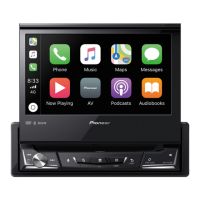
| DIN size | 1 DIN |
|---|---|
| Equalizer | Yes |
| Product color | Black |
| Disc types supported | CD, DVD |
| Equalizer bands quantity | 13 |
| Display type | LCD |
| Display diagonal | 7 \ |
| Line outputs (RCA) | 3 |
| USB ports quantity | 1 |
| Audio system | MOSFET |
| Audio formats supported | AAC, FLAC, MP3, WAV, WMA |
| Image formats supported | JPEG |
| Video formats supported | FLV, H.264, MKV, MPEG2, MPEG4 |
| Supported radio bands | DAB, DAB+ |




 To Next Page
