EasyManua.ls Logo

Pioneer CDJ-400 - Cd/Media Player - User Manual

Pioneer CDJ-400 - Cd/Media Player
24 pages
Print Icon
To Next Page IconTo Next Page
Loading...
Operating Instructions
COMPACT DISC PLAYER
CDJ-400

Other manuals for Pioneer CDJ-400 - Cd/Media Player

Questions and Answers

Summary

Safety and Compliance

Electrical and Laser Safety

Covers electrical shock, no user-serviceable parts, and laser warnings.

General Operating Precautions

Covers water, cleaning, heat sources, ventilation, power cord handling, and lightning storms.

Regulatory Compliance

Covers FCC and Canadian compliance statements.

Listening Safety and Environment

Safe Listening Levels

Explains setting volume to safe levels to prevent hearing damage.

FCC Declaration and Operating Environment

Covers FCC compliance, operating temperature, humidity, and installation location.

Key Features of the CDJ-400

DJ Performance Enhancements

Describes Scratch Jog Effect, Digital Jog Break, Tempo Control, Master Tempo, Reverse Play.

Jog Dial and Playback Control

Covers Jog Dial functions, Auto Cue, and Relay Play.

Loop and Cue Point Management

Explains Cue/Loop Memory, Seamless Loop, Reloop, and Beat Loop/Loop Divide.

Additional Features

Disc and Media Playback

Details Oil Damper Float, Multi Read, MP3 DJ Play, and CD-ROM/USB playback support.

PC Connectivity

Explains controlling the player via PC software.

Disc Compatibility

Supported Disc Types

Lists CD, CD-TEXT, CD-R, CD-RW, and their logos.

MP3 File Playback

Details MP3 format requirements and file extensions.

Media Playback Details

USB Memory Playback

Covers connecting and playing MP3 files from USB memory devices.

CD-ROM Playback

Details playing MP3 files from CD-ROMs, including format and folder structure.

Handling and Care Precautions

Installation and Environment

Covers location, installation guidelines, and avoiding heat/humidity.

Disc and Player Maintenance

Details disc storage, cleaning discs, cleaning the player, and CD lens care.

Condensation and Disc Handling

Explains condensation effects and general disc handling tips.

System Connections

Connecting to DJ Mixers

Details audio and control connections to various Pioneer DJ mixers.

Relay Play Connection

Explains connecting two units for automatic relay play.

Connecting Other Devices

Audio and Digital Connections

Covers connecting to stereo amplifiers and components with digital inputs.

Computer and Power Connections

Details USB connection to computers and connecting the power cord.

Front Panel Controls

Playback and Eject Controls

Covers Power, Eject, Play/Pause, Reverse buttons and indicators.

Jog Dial and Tempo Controls

Details Jog Dial, Tempo Control slider, Tempo Range, Master Tempo, and Jog Mode buttons.

Cue, Loop, and Search Functions

Explains CUE/LOOP buttons, Rotary dial, HOLD, and SEARCH/TRACK SEARCH buttons.

Panel Facilities (Continued)

Advanced Control Buttons

Details Loop buttons, Scratch/Digital Jog effects, Source Select, Text/Utility, Time/Auto Cue buttons.

Rear Panel Connections

Describes USB port, Audio Out, Control, Digital Out connectors, and AC inlet.

Display Information and Customization

Display Elements

Explains all indicators and displays (Segment, REMAIN, TEMPO, BPM, Playing Address, etc.).

Jog Sheet Replacement

Describes how to replace the jog sheet for customization.

Disc Operations

Loading and Ejecting Discs

Covers powering on, inserting discs, and standard ejection procedure.

Forced Ejection Procedure

Explains how to perform forced disc ejection and associated precautions.

Basic Player Operations

Playback Control

Covers starting, stopping, pausing, and resuming playback.

Auto Cue Function

Explains how to turn Auto Cue on/off and adjust its level.

Jog Dial and Search Operations

Jog Dial Functionality

Describes Pitch Bend, Scratch Play, Frame Search, and other jog dial uses.

Search and Cueing Methods

Details Fast-forward/reverse, Super-Fast search, Track cueing, and Rotary search.

Effects and Tempo Control

Scratch and Digital Effects

Explains Scratch Jog Effect (BUBBLE, TRANS, WAH) and Digital Jog Break (JET, ROLL, WAH).

Tempo Adjustment

Covers changing playback speed, tempo range selection, and Master Tempo function.

Cue Point Management and Mixing

Setting and Adjusting Cue Points

Details how to set, change, and use cue points in CDJ and VINYL modes.

Track Mixing Techniques

Explains a procedure for mixing tracks and mentions Fader Start Play.

Advanced Loop Operations

Creating and Manipulating Loops

Covers creating loops, setting loop points, dividing loops, and exiting loop playback.

Advanced Playback Modes

Details Fader Start Play, Scratch Play, Spin Play, and Reverse Play functions.

Memory, Relay Play, and Data Transfer

Cue;Loop Point Memory Management

Explains how to record, recall, and delete cue and loop points.

Relay Play and Data Operations

Covers setting up relay play between two players and transferring data to/from USB devices.

MIDI Control and Settings

MIDI Channel Configuration

Details how to set and save the MIDI channel for controlling the unit.

MIDI Control Map

Lists the MIDI messages and their corresponding functions for various controls.

Troubleshooting Guide

Common Symptoms and Solutions

Provides a table of symptoms, causes, and remedies for operational issues.

Important Operational Notes

Includes specific notes on disc compatibility, BPM measurement, and external effects.

Error Messages and Specifications

Error Code Reference

Lists error codes, types, descriptions, and recommended actions.

Technical Specifications

Details system, audio, and accessory specifications.

Service and Support Information

Contact Information for Service

Provides contact details for service in the USA and Canada.

Legal Disclaimers and Licensing

Includes disclaimers regarding software, trademarks, and audio coding technology licenses.

Summary

Safety and Compliance

Electrical and Laser Safety

Covers electrical shock, no user-serviceable parts, and laser warnings.

General Operating Precautions

Covers water, cleaning, heat sources, ventilation, power cord handling, and lightning storms.

Regulatory Compliance

Covers FCC and Canadian compliance statements.

Listening Safety and Environment

Safe Listening Levels

Explains setting volume to safe levels to prevent hearing damage.

FCC Declaration and Operating Environment

Covers FCC compliance, operating temperature, humidity, and installation location.

Key Features of the CDJ-400

DJ Performance Enhancements

Describes Scratch Jog Effect, Digital Jog Break, Tempo Control, Master Tempo, Reverse Play.

Jog Dial and Playback Control

Covers Jog Dial functions, Auto Cue, and Relay Play.

Loop and Cue Point Management

Explains Cue/Loop Memory, Seamless Loop, Reloop, and Beat Loop/Loop Divide.

Additional Features

Disc and Media Playback

Details Oil Damper Float, Multi Read, MP3 DJ Play, and CD-ROM/USB playback support.

PC Connectivity

Explains controlling the player via PC software.

Disc Compatibility

Supported Disc Types

Lists CD, CD-TEXT, CD-R, CD-RW, and their logos.

MP3 File Playback

Details MP3 format requirements and file extensions.

Media Playback Details

USB Memory Playback

Covers connecting and playing MP3 files from USB memory devices.

CD-ROM Playback

Details playing MP3 files from CD-ROMs, including format and folder structure.

Handling and Care Precautions

Installation and Environment

Covers location, installation guidelines, and avoiding heat/humidity.

Disc and Player Maintenance

Details disc storage, cleaning discs, cleaning the player, and CD lens care.

Condensation and Disc Handling

Explains condensation effects and general disc handling tips.

System Connections

Connecting to DJ Mixers

Details audio and control connections to various Pioneer DJ mixers.

Relay Play Connection

Explains connecting two units for automatic relay play.

Connecting Other Devices

Audio and Digital Connections

Covers connecting to stereo amplifiers and components with digital inputs.

Computer and Power Connections

Details USB connection to computers and connecting the power cord.

Front Panel Controls

Playback and Eject Controls

Covers Power, Eject, Play/Pause, Reverse buttons and indicators.

Jog Dial and Tempo Controls

Details Jog Dial, Tempo Control slider, Tempo Range, Master Tempo, and Jog Mode buttons.

Cue, Loop, and Search Functions

Explains CUE/LOOP buttons, Rotary dial, HOLD, and SEARCH/TRACK SEARCH buttons.

Panel Facilities (Continued)

Advanced Control Buttons

Details Loop buttons, Scratch/Digital Jog effects, Source Select, Text/Utility, Time/Auto Cue buttons.

Rear Panel Connections

Describes USB port, Audio Out, Control, Digital Out connectors, and AC inlet.

Display Information and Customization

Display Elements

Explains all indicators and displays (Segment, REMAIN, TEMPO, BPM, Playing Address, etc.).

Jog Sheet Replacement

Describes how to replace the jog sheet for customization.

Disc Operations

Loading and Ejecting Discs

Covers powering on, inserting discs, and standard ejection procedure.

Forced Ejection Procedure

Explains how to perform forced disc ejection and associated precautions.

Basic Player Operations

Playback Control

Covers starting, stopping, pausing, and resuming playback.

Auto Cue Function

Explains how to turn Auto Cue on/off and adjust its level.

Jog Dial and Search Operations

Jog Dial Functionality

Describes Pitch Bend, Scratch Play, Frame Search, and other jog dial uses.

Search and Cueing Methods

Details Fast-forward/reverse, Super-Fast search, Track cueing, and Rotary search.

Effects and Tempo Control

Scratch and Digital Effects

Explains Scratch Jog Effect (BUBBLE, TRANS, WAH) and Digital Jog Break (JET, ROLL, WAH).

Tempo Adjustment

Covers changing playback speed, tempo range selection, and Master Tempo function.

Cue Point Management and Mixing

Setting and Adjusting Cue Points

Details how to set, change, and use cue points in CDJ and VINYL modes.

Track Mixing Techniques

Explains a procedure for mixing tracks and mentions Fader Start Play.

Advanced Loop Operations

Creating and Manipulating Loops

Covers creating loops, setting loop points, dividing loops, and exiting loop playback.

Advanced Playback Modes

Details Fader Start Play, Scratch Play, Spin Play, and Reverse Play functions.

Memory, Relay Play, and Data Transfer

Cue;Loop Point Memory Management

Explains how to record, recall, and delete cue and loop points.

Relay Play and Data Operations

Covers setting up relay play between two players and transferring data to/from USB devices.

MIDI Control and Settings

MIDI Channel Configuration

Details how to set and save the MIDI channel for controlling the unit.

MIDI Control Map

Lists the MIDI messages and their corresponding functions for various controls.

Troubleshooting Guide

Common Symptoms and Solutions

Provides a table of symptoms, causes, and remedies for operational issues.

Important Operational Notes

Includes specific notes on disc compatibility, BPM measurement, and external effects.

Error Messages and Specifications

Error Code Reference

Lists error codes, types, descriptions, and recommended actions.

Technical Specifications

Details system, audio, and accessory specifications.

Service and Support Information

Contact Information for Service

Provides contact details for service in the USA and Canada.

Legal Disclaimers and Licensing

Includes disclaimers regarding software, trademarks, and audio coding technology licenses.

Overview

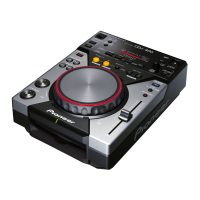
The Pioneer CDJ-400 is a compact disc player designed for professional DJ use, offering advanced functions and performance capabilities superior to traditional analog players. It supports playback of audio CDs, CD-R/CD-RW discs, and MP3 files from CD-ROMs or USB memory devices.

Function Description

The CDJ-400 integrates a wide array of features to enhance DJ performance and creativity:

  • Scratch Jog Effect: This function introduces new scratch sounds beyond conventional scratching. It includes three distinct effects:

    • BUBBLE: Simulates a bubbly scratch sound.
    • TRANS: Creates a muted sound effect, similar to a mixer's crossfader.
    • WAH: Produces a wah-wah pedal effect. These effects are active during VINYL mode and are applied while scratching.
  • Digital Jog Break: This feature provides original sound effects for remixing. It offers three individual remix assist functions:

    • JET: Adds a short delay sound, creating a "swooshing" effect with variable delay time based on jog dial rotation.
    • ROLL: Modifies playback sound with pitch and time variations in response to jog dial rotation, allowing for loop-played audio when the jog dial is touched.
    • WAH: Applies a filter with a cutoff frequency that changes with jog dial rotation, acting as a high-pass filter clockwise and a low-pass filter counterclockwise. These effects are active during CDJ mode and change based on the degree of jog dial rotation.
  • Jog Dial: A large 115 mm diameter jog dial provides enhanced handling.

    • Pitch Bend: Changes music tempo based on the direction and speed of jog dial rotation.
    • Scratch Play: In VINYL mode, pressing the jog dial surface stops playback, and rotating it produces sound according to the rotation's direction and speed.
    • Frame Search: In pause mode, rotating the jog dial moves the pause position in frame units (1/75 sec).
    • Super-Fast Search: Turning the jog dial while holding down the manual or track search button enables faster disc searching.
  • Tempo Control: A 100 mm high-precision slider allows for free speed adjustment.

    • Tempo Control Range: The variable range can be set to ±6%, ±10%, ±16%, or WIDE, offering flexible operation.
    • Master Tempo: Maintains the original pitch of the sound while altering the music tempo.
  • Reverse Play: Pressing the DIRECTION REV button enables playback in reverse.

  • CUE Functions:

    • Back Cue: Returns playback to a stored cue point and starts from there.
    • Auto Cue: Automatically skips non-recorded parts at the beginning of a track and enters standby mode at the track's start, allowing instant playback upon pressing PLAY/PAUSE.
    • Cue Point Sampler: Enables one-touch playback from a stored cue point, useful for confirming start points or as a sampler.
  • CUE/LOOP Memory: An internal memory allows recording and recalling cue and loop points.

  • Real Time Seamless Loop: Simplifies loop setting and canceling. Loops can be set instantly during playback, and an ADJUST mode allows one-touch adjustments to the loop-out point.

  • RELOOP: Allows returning to the set loop position multiple times after canceling loop play.

  • Beat Loop/Loop Divide: Automatically sets a loop-out point based on the track's BPM and starts loop play. Repeated presses divide the loop, creating new rhythms.

  • Playing Address: A bar graph visually represents track playback progress, similar to checking a needle's position on an analog record. The graph flashes to indicate the track's end.

  • Fader Start: When connected to a Pioneer DJ mixer, the mixer's fader operation can initiate quick start and back cue.

  • Relay Play: Two CDJ-400 units can be connected for automatic relay play, where playback seamlessly transfers from one player to the other when a track ends.

  • PC Connection: Most button and slider functions can output signals to external devices, allowing control of Pioneer's "DJS" software or other computer applications. Audio from computer-played tracks can also be output from the CDJ-400.

Usage Features

  • Disc Loading/Unloading: Discs are inserted label-side up into the front loading slot. The EJECT button removes the disc. A forced ejection hole is available if the EJECT button malfunctions.
  • Auto Cue Function: Automatically sets a cue point just before the actual audio starts. The auto cue level can be adjusted.
  • Starting Playback: After inserting a disc and with Auto Cue ON, pressing PLAY/PAUSE skips non-recorded parts and starts playback instantly. If Auto Cue is OFF, playback begins automatically from the first track.
  • Resume Function: Reinserting a previously ejected disc restarts playback from the point it was ejected.
  • Stopping Playback: Pressing the EJECT button stops playback and ejects the disc.
  • Temporarily Interrupting Playback: Pressing PLAY/PAUSE during playback pauses the track.
  • Fast-Forward/Fast-Reverse: SEARCH buttons allow fast-forward and fast-reverse with sound. Super-Fast search is possible by rotating the jog dial while holding a SEARCH button.
  • Track Cueing: TRACK SEARCH buttons change tracks. Holding them down performs continuous cueing.
  • Rotary Search: The rotary dial (SELECT PUSH) allows selecting tracks or folders. Pressing the dial confirms the selection and starts playback or enters the folder hierarchy.
  • Changing Playback Speed: The TEMPO Control slider adjusts playback speed. The tempo range can be selected (±6%, ±10%, ±16%, WIDE).
  • Applying Master Tempo: The MASTER TEMPO button maintains the original pitch while changing tempo.
  • HOLD Function: This feature maintains the effect created by the jog dial during Digital Jog Break or Scratch Jog Effect, even after the jog dial rotation stops.
  • Cue Point/Loop Point Memory: Cue and loop points can be recorded and recalled. A USB memory device can be used to write and read this data, allowing transfer between players.
  • MIDI Setting: The CDJ-400 can send its operating information via USB MIDI to compatible applications, with a configurable MIDI channel.

Maintenance Features

  • OIL DAMPER FLOAT: The unit features an OIL DAMPER FLOAT design to resist shakes and impacts, preventing sound distortions from external vibrations.
  • Cleaning the Player: The player should be wiped with a soft, dry cloth. For stubborn dirt, a weak solution of neutral detergent can be used, followed by a dry cloth. Avoid volatile liquids like benzene or thinner.
  • CD Lens Cleaner: The pickup lens should not require frequent cleaning. If it becomes soiled, contact a PIONEER authorized service center. Commercial lens cleaners can be used with caution.
  • Removing the Jog Sheet: The inner jog sheet can be replaced with a supplied alternative or a custom graphic by removing two screws and the jog plate with the provided screwdriver.

Cautions Regarding Handling

  • Location: Install in a well-ventilated area, away from direct sunlight, stoves, radiators, or high humidity/dust. Avoid placing near heat-generating sources or equipment that may cause noise (tuners, TVs).
  • Storing Discs: Store discs vertically in their cases, avoiding high heat, humidity, or extreme temperatures.
  • Condensation: If brought from a cold to a warm environment, allow the unit to stand for an hour or raise the room temperature gradually to prevent condensation.
  • Cleaning and Handling Compact Discs: Handle discs by the edges or center hole, avoid touching signal surfaces, and do not affix labels or tape. Clean discs gently with a soft cloth from the inner edge outwards. Do not use record cleaning sprays or anti-static agents. Never use damaged, cracked, or warped discs.
  • Special Shape Discs: Do not play non-circular discs (e.g., heart-shaped) to prevent malfunction.
  • CD-R/RW Discs: Due to their unique construction, prolonged pause or loop functions at a single point may make them difficult to play. Backup archive discs are recommended for important data.
  • USB Memory Devices: Pioneer is not responsible for data loss. Large data quantities may cause slow reading. Erratic performance may occur with USB hubs. Always use SOURCE SELECT to deselect the USB device before removal.
  • Power Cord: Handle the power cord by the plug, avoid pulling the cord, and never touch it with wet hands. Do not place objects on or pinch the cord. Check for damage regularly.
  • Ventilation: Ensure at least 5 cm of space at the rear and 3 cm on each side for proper ventilation to prevent overheating. Do not block openings with items like newspapers or curtains.
  • Naked Flame Sources: Do not place lighted candles or other naked flame sources on the equipment.
  • Power Switch: The POWER switch does not completely cut off AC power. Unplug the unit from the AC outlet for complete power shutdown or during long periods of disuse.

Pioneer CDJ-400 - Cd/Media Player Specifications

General IconGeneral
Signal-to-Noise Ratio115 dB
Total Harmonic Distortion0.006% (JEITA)
USB Ports1 x USB-A
Jog Wheel Size115 mm
Hot LoopYes
Quick ReturnYes
BPM CounterYes
Slot-In CD LoadingYes
MP3 Folder SearchYes
DisplayLCD
Power SupplyAC 220-240V, 50/60 Hz
Media TypeCD, CD-R, USB
Frequency Response4 Hz - 20 kHz
Weight2.7 kg
Jog Wheel TypeTouch-sensitive
Tempo Control Range+/- 6%, +/- 10%, +/- 16%, WIDE
Playable File TypesMP3
Audio Outputs1 x Stereo RCA
Dimensions217.9 mm x 296.3 mm x 107.5 mm

Related product manuals