EasyManua.ls Logo

Pure Comfort DET-215 - User Manual

Pure Comfort DET-215
10 pages
Print Icon
To Next Page IconTo Next Page
Loading...
Owner's Manual
Model DET-215
Contents Introduction
1 2
Please read all instructions carefully and thoroughly
before using this product.
The multi functional thermometer is intended solely for measuring
forehead temperature, ear temperature and object temperature. It
allows you to quickly and easily measure body temperature and
object temperature. It converts the measured heat into a temperature
reading displayed on the LCD. Infrared Thermometer is intended
for the intermittent measurement of human body temperature by
people of all ages.
1.
It's not meant to replace a visit to the doctor. Please
consult with doctor if you have health concerns.
2. There is no gender or age limitation for using multi
functional thermometer. This thermometer can be reused by
many people.
3. Do not allow children to take their temperatures unsupervised,
some parts are small enough to be swallowed.
4. Never immerse this device in water or other liquids(not
waterproof).
5.Do not modify this equipment without authorization of
manufacturer.
6. Do not expose the thermometer to temperature extremes
(below -25/-13 or over 55/131) nor excessive
humidity (>95%RH).
7. Keep the battery away from children.
8
The devices are reusable for home use only.
. Remove battery from the device when not in operation for
a long time.
Warning:
Document No.: JDET-0504-002
Article No.: 002
Version: F
Date of Issue: 2020-01
Introduction ......................................................02
Product Description ........................................... 03
Lcd Display ...................................... 04
Basic Functions ............................................... 05
Real Time Clock Setting ............................ 06
Body Temperature ..............................................08
Illustration For Use ..........................................09
Temperature Taking Hints .................................15
Memory Mode ....................................................17
Selecting A Temperature Scale ............................18
Care And Cleaning .............................................19
Battery Replacement ..........................................21
Specifications .....................................................22
Troubleshooting .................................................23
Calibration .............................................................25
Service .............................................................26
Warranty .............................................................27
FCC Information ..................................................28
Electromagnetic Compatibility Information ...............29
Introduction ..
TEMPA CHECK INFRARED THERMOMETER

Questions and Answers

Summary

Introduction

Product Description

LCD Display Introduction

Basic Functions

Real Time Clock Setting

Body Temperature

Illustration For Use

Before measurement

Pre-measurement checks and considerations for accurate temperature readings.

How to switch between ear and forehead mode

Instructions on how to change the measurement mode between ear and forehead.

To measure forehead temperature

Detailed steps for taking forehead temperature, including placement and operation.

To measure ear temperature

Step-by-step guide for taking ear temperature, including ear canal positioning.

To measure object temperature

Instructions on how to measure the temperature of objects using the thermometer.

After measurement

Guidelines for powering off the device and cleaning the probe after use.

Temperature indicator

Explains the meaning of the happy/sad face indicators for temperature readings.

BackLight

Describes the function and behavior of the display backlight.

Temperature Taking Hints

Memory Mode

Selecting A Temperature Scale

Care And Cleaning

Battery Replacement

Troubleshooting

Calibration

Service

Warranty

FCC Information

Electromagnetic Compatibility Information

Summary

Introduction

Product Description

LCD Display Introduction

Basic Functions

Real Time Clock Setting

Body Temperature

Illustration For Use

Before measurement

Pre-measurement checks and considerations for accurate temperature readings.

How to switch between ear and forehead mode

Instructions on how to change the measurement mode between ear and forehead.

To measure forehead temperature

Detailed steps for taking forehead temperature, including placement and operation.

To measure ear temperature

Step-by-step guide for taking ear temperature, including ear canal positioning.

To measure object temperature

Instructions on how to measure the temperature of objects using the thermometer.

After measurement

Guidelines for powering off the device and cleaning the probe after use.

Temperature indicator

Explains the meaning of the happy/sad face indicators for temperature readings.

BackLight

Describes the function and behavior of the display backlight.

Temperature Taking Hints

Memory Mode

Selecting A Temperature Scale

Care And Cleaning

Battery Replacement

Troubleshooting

Calibration

Service

Warranty

FCC Information

Electromagnetic Compatibility Information

Overview

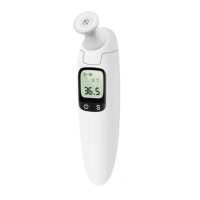
This document outlines the features, usage, and maintenance of the PureComfort Tempa Check Infrared Thermometer, Model DET-215. This multi-functional device is designed for the intermittent measurement of human body temperature (forehead and ear) and object temperature for people of all ages.

Function Description

The PureComfort Tempa Check Infrared Thermometer converts measured heat into a temperature reading displayed on its LCD screen. It offers three primary measurement modes: forehead temperature, ear temperature, and object temperature. The device is intended for home use and provides quick and easy temperature readings.

Key functions include:

  • Real-Time Clock: The thermometer records the measurement date and time, which is stored with each memory entry, helping users track temperature changes over time. The time format can be set to either AM/PM (12-hour) or 24-hour.
  • Ear/Forehead Temperature Mode: This mode is designed for body temperature measurement. It's important to compare results to a person's regular body temperature for accurate assessment.
  • Object Temperature Mode: This mode displays actual, unadjusted surface temperatures, useful for monitoring the temperature of objects like baby's milk to ensure it's suitable for use.
  • Beep Alarm: If a body temperature of 37.8°C (100.0°F) or higher is detected in ear mode, the thermometer emits a long beep followed by three short beeps to alert the user.
  • Memory Mode: The device stores up to 10 sets of measurements for each mode (ear, forehead, and object), including the measurement date, time, and mode icon. The most recent reading is stored as number 1, and the oldest as number 10.
  • °C/°F Switch: Users can easily switch between Celsius and Fahrenheit temperature scales.
  • Temperature Indicator: In ear/forehead mode, a happy face icon is displayed for readings below 37.8°C (100.0°F), while a bad face icon appears for readings at or above this threshold.
  • Backlight: The display features a green backlight that illuminates for 3 seconds when the unit is ready for measurement and after a measurement is completed, aiding readability in low-light conditions.

Usage Features

To ensure accurate readings, users should follow specific guidelines:

  • Initial Setup: When using the thermometer for the first time, the real-time clock must be set. This involves holding the S BUTTON for 3 seconds to enter setting mode, then adjusting the time format, hour, minute, month, date, and year using the S BUTTON and BUTTON.
  • Before Measurement:
    • Always check that the lens is intact and undamaged.
    • Allow the thermometer to acclimate to the room temperature for at least 30 minutes before use.
    • Ensure both the user and the thermometer are at the same ambient temperature.
    • Verify the device is in the correct measurement mode (ear, forehead, or object).
  • Switching Modes: To switch between ear and forehead mode, press and hold the S BUTTON when the device is on. To enter object temperature mode, hold down the BUTTON and S BUTTON simultaneously for 2 seconds. To exit object mode, repeat this action for 3 seconds.
  • Forehead Temperature Measurement:
    • Install the forehead cap.
    • Press the BUTTON to turn on the thermometer.
    • After self-checking (indicated by beeps and a specific display pattern), place the probe with the forehead cap on the temple.
    • Press the START BUTTON, then smoothly move the thermometer across the forehead to the other temple and back.
    • The measured value will appear with a short beep.
    • Avoid using on perspiring foreheads or immediately after removing hats/hair; wait 10 minutes.
    • Remove oils or cosmetics from the forehead, and wait at least 10 minutes after washing the forehead area.
  • Ear Temperature Measurement:
    • Remove the forehead cap.
    • Press the BUTTON to turn on the thermometer.
    • After self-checking, ensure the sensor tip and ear canal are clean.
    • For infants under age 1, pull the ear up to ensure the sensor faces the eardrum.
    • For individuals over age 1, pull the ear back to ensure the sensor faces the eardrum.
    • Press the START BUTTON to begin measurement.
    • A waiting period of 20 seconds between tests is recommended to prevent excessive skin cooling.
  • Object Temperature Measurement:
    • Press the BUTTON to turn on the thermometer.
    • Hold down the BUTTON and S BUTTON simultaneously for 2 seconds to enter object temperature mode.
    • Aim the thermometer at the center of the object from a distance of 1 to 2 cm.
    • Press the START BUTTON to start measurement.
    • The measured value will appear with a short beep.
  • General Measurement Hints:
    • Always measure temperature in the same ear for consistent tracking.
    • Ear wax can affect readings; clean the ear if necessary.
    • Avoid touching the probe window, as it is delicate and damage or dirt can affect accuracy.
    • Do not drink, eat, or engage in physical activity (bathing, showering, shampooing, hair drying) before measurement; wait 20 minutes.
    • Avoid holding a hand on the forehead before measurement.
    • Do not measure over scar tissue, open sores, or abrasions.
    • Do not measure while or immediately after nursing a baby.
    • Do not use outdoors or near very hot places (fireplaces, stoves).
    • If stored in a significantly different environment, allow 30 minutes for the thermometer to acclimate to the testing location.
  • Power Off: The device automatically shuts off after 60 seconds of inactivity. To prolong battery life, users can manually turn it off by pressing the BUTTON.

Maintenance Features

Proper care and cleaning are essential for accurate readings and device longevity.

  • Probe Window Care: The probe window must be kept clean, dry, and undamaged. Fingerprints, earwax, dust, and other soiling compounds reduce its transparency and can lead to lower temperature readings. To clean, gently wipe the surface with a cotton swab slightly moistened with isopropyl alcohol, then immediately wipe dry with a clean cotton swab. Allow at least 5 minutes drying time after cleaning. Do not use any chemicals other than isopropyl alcohol.
  • Device Cleaning: Use a soft, dry cloth to clean the thermometer display and exterior. The thermometer is not waterproof; do not submerge it in water.
  • Disinfection: After each use, clean and disinfect the probe to prevent cross-contamination.
    • For general cleaning, soak a clean soft cloth in drinking water, wring it out, and wipe the thermometer (including probe) no less than 3 times. Then use another clean soft cloth to wipe off residue water.
    • For disinfection, use a clean soft cloth dipped in 70% medical alcohol to wipe the probe 3 times for at least one minute each time. Use a clean cotton swab dipped in 70% medical alcohol to wipe the sensor window 3 times. Wait at least 10 minutes for the alcohol to volatilize before storing.
  • Storage: Store the thermometer in a dry location, free from dust and contamination, and away from direct sunlight. After use, return the thermometer to its original packaging.
  • Battery Replacement: Replace the batteries when the battery icon appears on the LCD. Slide the battery cover down, remove the old batteries, and install two new AAA alkaline batteries.
  • Calibration: The thermometer is factory-calibrated and does not require periodic readjustment under normal use. However, it is recommended to check calibration every two years or if clinical accuracy is in question. Contact the retailer or manufacturer for service.
  • Safety Precautions:
    • Do not allow children to use the instrument unsupervised, as small parts can be swallowed.
    • Do not immerse the device in water or other liquids.
    • Do not modify the equipment without manufacturer authorization.
    • Avoid exposing the thermometer to temperature extremes (below -25°C/-13°F or over 55°C/131°F) or excessive humidity (>95%RH).
    • Keep batteries away from children.
    • Remove batteries if the device will not be used for a long time.
    • Do not remove or modify the equipment without permission.
    • Strong electromagnetic fields may interfere with operation; the device requires special precautions regarding EMC.
    • Not intended for use in oxygen-rich environments or in the presence of flammable anesthetic mixtures.
  • Warranty and Service: The thermometer has a limited one-year warranty against defects in material and workmanship under normal use. It does not cover damage from misuse, negligence, or accidents. Do not attempt to disassemble or repair the thermometer yourself. For service, repackage the thermometer carefully in its original packaging, include the original sales slip, a note describing the problem, and your return address, then send it prepaid and insured to the manufacturer.

Pure Comfort DET-215 Specifications

General IconGeneral
TypeDigital
DisplayLCD
Measurement Range32.0°C to 42.9°C
Accuracy±0.2°C
Auto Power OffYes
Fever AlarmYes