EasyManua.ls Logo

Samsung SDC-415 Series - User Manual

Samsung SDC-415 Series
21 pages
Print Icon
To Next Page IconTo Next Page
Loading...
SAMSUNG CCD CAMERA
SDC-415 SERIES
HIGH RESOLUTION
COLOR CCD CAMERA
INSTRUCTION MANUAL
Please read this manual carefully before installing and using the product.
P/No. : Z6806-0660-01A
www.samsungtechwin.co.kr
www.samsungcctv.co.kr
SAMSUNG TECHWIN CO., LTD.
Optics & Digital Imaging Division 145-3, Sangdaewon 1-Dong,
Jungwon-Gu, Sungnam, Gyeonggi-do, Korea 462-703
TEL: 82-31-740-8137~41 FAX: 82-31-740-8145
SAMSUNG OPTO-ELECTRONICS UK LTD (SOUK)
Samsung House, 1000 Hillswood Drive Hillswood Business
Park Chertsey Surrey KT16 OPS
TEL: 44-(0)1932-45-5308 FAX: 44-(0)1932-45-5325
SAMSUNG OPTO-ELECTRONICS AMERICA, INC. (SOA)
Closed Circuit Division 40 Seaview Drive, Secaucus NJ 07094,
U.S.A
TEL : (201) 902-0347 FAX: (201) 902-0429
TIANJIN SAMSUNG OPTO-ELECTRONICS CO., LTD (TSOE)
7 Pingchang Rd, Nankai Dist, Tianjin, P.R China
Post Code : 300190
TEL : 86-22-2761-9698 FAX: 86-22-2761-6514
SALES NETWORK

Other manuals for Samsung SDC-415 Series

Question and Answer IconNeed help?

Do you have a question about the Samsung SDC-415 Series and is the answer not in the manual?

Summary

Features

Horizontal Resolution 530 TV Lines

Features clear image quality with 410,000 pixels and 530 TV lines resolution.

DAY & NIGHT

Provides automatic mode selection for daytime (color) and nighttime (BW) images.

Electronic IRIS

Offers continuous automatic shutter control from 1/60 to 1/120,000 seconds.

High Sensitivity

Delivers clear images even in low illumination conditions (0.3Lux/0.1Lux B/W).

SSNR (Samsung Super Noise Reduction)

Minimizes low light noise, improving S/N ratio for clearer dark images.

Camera Operation

Menu

Overview of the camera's setup menu structure and available options.

Settings

How to navigate and adjust settings using the camera's control buttons.

Troubleshooting

Nothing appears on the screen

Verify power and video signal connections are secure.

The video image is not clear

Check lens cleanliness, monitor contrast, and cable connections.

The screen is dark

Adjust monitor contrast, check lighting, and camera back focus.

There is a problem with the camera operation

Confirm auto iris settings, power source, and voltage stability.

The camera surface is too hot and black stripes appear on the screen

Ensure correct power source and stable voltage supply.

Summary

Features

Horizontal Resolution 530 TV Lines

Features clear image quality with 410,000 pixels and 530 TV lines resolution.

DAY & NIGHT

Provides automatic mode selection for daytime (color) and nighttime (BW) images.

Electronic IRIS

Offers continuous automatic shutter control from 1/60 to 1/120,000 seconds.

High Sensitivity

Delivers clear images even in low illumination conditions (0.3Lux/0.1Lux B/W).

SSNR (Samsung Super Noise Reduction)

Minimizes low light noise, improving S/N ratio for clearer dark images.

Camera Operation

Menu

Overview of the camera's setup menu structure and available options.

Settings

How to navigate and adjust settings using the camera's control buttons.

Troubleshooting

Nothing appears on the screen

Verify power and video signal connections are secure.

The video image is not clear

Check lens cleanliness, monitor contrast, and cable connections.

The screen is dark

Adjust monitor contrast, check lighting, and camera back focus.

There is a problem with the camera operation

Confirm auto iris settings, power source, and voltage stability.

The camera surface is too hot and black stripes appear on the screen

Ensure correct power source and stable voltage supply.

Overview

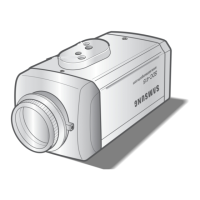
The SAMSUNG SDC-415 Series is a high-resolution color CCD camera designed for surveillance applications, offering clear image quality and a range of features for optimal performance in various lighting conditions.

Function Description

The SDC-415 Series camera utilizes a SONY CCD with 410,000 (effective) pixels, achieving a horizontal resolution of 530 TV lines for sharp and detailed images. It supports both NTSC and PAL signal systems, with models available for DC 12V or AC 24V power sources.

A key function is its DAY & NIGHT capability, which automatically switches between color and black & white modes based on ambient light. In daytime, the COLOR mode provides optimal color reproduction, while in low-light conditions, the BW mode enhances image definition.

The camera also incorporates an Electronic IRIS function, allowing for continuous automatic control of the shutter speed between 1/60 and 1/120,000 seconds, adapting to changing light levels.

For enhanced privacy, the PRIVACY Function enables users to select and mask up to four specific areas on the screen, preventing them from being recorded or displayed.

The SDC-415 Series supports both VIDEO/DC Drive Lenses, offering flexibility in lens selection via a simple switch.

Usage Features

High Sensitivity is a prominent feature, with the built-in SONY COLOR CCD enabling clear image capture even in low illumination environments (0.3 Lux in color, 0.1 Lux in B/W). This sensitivity is further boosted by the SENS-UP function, which automatically brightens the screen image in low-light conditions by increasing storage magnification (up to X128).

The camera benefits from SSNR (Samsung Super Noise Reduction) technology, which significantly reduces low-illuminance noise and improves the signal-to-noise ratio and horizontal resolution, resulting in clear and sharp images even in the dark. SSNR offers various levels of noise reduction, from minimal to highly effective, with options to balance noise reduction against potential ghost imaging.

Camera settings are easily controlled via an OSD Menu, allowing users to navigate and select functions using buttons located on the side of the camera. The menu provides access to various adjustments, including:

  • LENS selection (Manual, DC, or Video) to adjust screen brightness.
  • SHUTTER control (ESC for auto, FLK for flicker reduction, or Manual for specific speed settings).
  • WHITE BALANCE (ATW for auto tracking, AWC for manual adjustment, or Manual for fine-tuning color temperature).
  • BACKLIGHT compensation (OFF, LOW, MIDDLE, HIGH) to ensure clear images even with strong backlighting.
  • AGC (Auto Gain Control) (OFF, LOW, MIDDLE, HIGH) to adjust image brightness, with higher gain levels increasing brightness but potentially introducing more noise.
  • SPECIAL functions, including:
    • CAMERA ID for displaying a custom camera name on the monitor.
    • COLOR mode selection (AUTO for automatic day/night switching or ON for continuous color).
    • SYNC (INTERNAL or LINE-LOCK) for synchronizing video signals, especially useful in multi-camera setups.
    • MOTION DETECTION (ON/OFF) with programmable zones and adjustable sensitivity, triggering an on-screen alert when movement is detected.
    • MIRROR (ON/OFF) for horizontal image inversion.
    • SHARPNESS adjustment (0-31 levels) to enhance image outlines, though excessive levels may introduce noise.
    • RESET to restore factory default settings.
    • RETURN to navigate back through the menu.
    • EXIT to save all settings and close the menu.

Maintenance Features

The manual emphasizes several precautions for proper device maintenance and longevity:

  • Environmental Conditions: Avoid installing the camera in extreme temperatures (-10°C to +50°C) or high humidity environments. Ensure adequate ventilation, especially in high temperatures.
  • Physical Handling: Do not drop the camera or subject it to physical shocks.
  • Light Exposure: Never point the camera directly at strong light sources, as this can cause smear or blooming.
  • Lens Care: Keep the lens clean and avoid touching it with fingers, as foreign objects or fingerprints can degrade image quality, particularly in low-light conditions.
  • Power Supply: Always use the specified power sources (DC 12V or AC 24V, 500mA depending on the model) and ensure the voltage meets normal specifications to prevent malfunctions.
  • Installation: Install the camera on a stable surface that can support its weight. When using a mounting bracket, ensure screws are not overtightened or inserted too deeply (max 5mm) to prevent internal damage.
  • Liquid Exposure: Do not expose the camera to rain or spills. If it gets wet, wipe it dry immediately, as minerals in liquids can corrode electronic components.
  • Radioactivity: Do not expose the camera to radioactivity, as this can damage the CCD.
  • Disassembly: Do not attempt to disassemble the camera, as this may lead to fire, electric shock, or other hazards.
  • Periodic Inspection: The camera requires periodic inspection by an authorized technician.
  • Malfunction Response: Stop using the camera immediately if smoke or unusual heat is detected, as this could indicate a fire hazard.

The manual also provides troubleshooting steps for common issues such as no image, unclear video, dark screen, flickering, and non-functional features, guiding users to check connections, settings, and environmental factors.

Samsung SDC-415 Series Specifications

General IconGeneral
Camera TypeDome
ModelSDC-415
Night VisionYes
Video OutputBNC
IR Distance10m
Power SupplyDC 12V
Operating Temperature-10°C to +50°C

Related product manuals