EasyManua.ls Logo

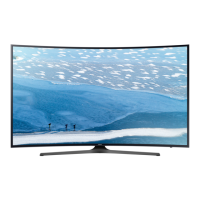
Samsung UN65KU7500 - User Manual

Samsung UN65KU7500
105 pages
Print Icon
To Next Page IconTo Next Page
Loading...
E-MANUAL
Thank you for purchasing this Samsung product.
To receive more complete service, please register your
product at
www.samsung.com/register
Model______________ Serial No.______________

Table of Contents

Question and Answer IconNeed help?

Do you have a question about the Samsung UN65KU7500 and is the answer not in the manual?

Summary

Smart Features

Voice Interaction

Setting up and using voice commands for TV control.

TV Viewing

Recording and Timeshift Functions

Recording programs and pausing live TV.

Picture and Sound

Picture Quality Adjustments

Picture modes, advanced settings, PIP, and HDR.

Sound Quality Adjustments

Sound modes, advanced settings, speakers, and Bluetooth audio.

System and Support

Connectivity and Software Updates

Anynet+, software updates, and security.

Accessibility and Other Functions

Accessibility features and system settings.

Troubleshooting

General Support and Diagnostics

Remote management, contact info, and diagnostic tests.

Picture, Sound, and Broadcast Issues

Resolving common problems with display, audio, and reception.

Connectivity and Application Issues

Troubleshooting network, apps, and file playback.

Precautions and Notes

Pre-Usage Instructions

Guidelines before using recording, voice, apps, internet, and media.

Network Connections

Troubleshooting Internet Connectivity

Resolving network connection problems.

Samsung Smart Remote Features

Voice Interaction Remote Overview

Button layout and functions for voice remote.

Non-Voice Interaction Remote Overview

Button layout and functions for standard remote.

Voice Interaction

Voice Interaction Setup and Usage

Configuring and running voice commands.

TV Viewing Functions

Recording and Schedule Management

Scheduling and managing recordings.

Schedule Viewing and Recording

Setting Up and Managing Schedules

Scheduling and editing viewings/recordings.

Channel and Timeshift Operations

Timeshift Functionality

Pausing and rewinding live TV.

Picture Adjustments

Picture Modes and Quality Settings

Selecting modes and advanced picture settings.

Sound Adjustments

Sound Modes and Quality Settings

Selecting modes and advanced sound settings.

Sound Support Features

Speaker selection and Bluetooth/Multiroom audio.

Screen Protection and Energy Saving

Anynet+ (HDMI-CEC) Control

Software Updates

TV Security

Accessibility and Other Functions

Getting Support

Connectivity Troubleshooting

Function-Specific Troubleshooting

Application and Media Playback Troubleshooting

TV Reset and Other Issues

Pre-Usage Guidelines

Technical Specifications and Compatibility

Buttons and Functions

Summary

Smart Features

Voice Interaction

Setting up and using voice commands for TV control.

TV Viewing

Recording and Timeshift Functions

Recording programs and pausing live TV.

Picture and Sound

Picture Quality Adjustments

Picture modes, advanced settings, PIP, and HDR.

Sound Quality Adjustments

Sound modes, advanced settings, speakers, and Bluetooth audio.

System and Support

Connectivity and Software Updates

Anynet+, software updates, and security.

Accessibility and Other Functions

Accessibility features and system settings.

Troubleshooting

General Support and Diagnostics

Remote management, contact info, and diagnostic tests.

Picture, Sound, and Broadcast Issues

Resolving common problems with display, audio, and reception.

Connectivity and Application Issues

Troubleshooting network, apps, and file playback.

Precautions and Notes

Pre-Usage Instructions

Guidelines before using recording, voice, apps, internet, and media.

Network Connections

Troubleshooting Internet Connectivity

Resolving network connection problems.

Samsung Smart Remote Features

Voice Interaction Remote Overview

Button layout and functions for voice remote.

Non-Voice Interaction Remote Overview

Button layout and functions for standard remote.

Voice Interaction

Voice Interaction Setup and Usage

Configuring and running voice commands.

TV Viewing Functions

Recording and Schedule Management

Scheduling and managing recordings.

Schedule Viewing and Recording

Setting Up and Managing Schedules

Scheduling and editing viewings/recordings.

Channel and Timeshift Operations

Timeshift Functionality

Pausing and rewinding live TV.

Picture Adjustments

Picture Modes and Quality Settings

Selecting modes and advanced picture settings.

Sound Adjustments

Sound Modes and Quality Settings

Selecting modes and advanced sound settings.

Sound Support Features

Speaker selection and Bluetooth/Multiroom audio.

Screen Protection and Energy Saving

Anynet+ (HDMI-CEC) Control

Software Updates

TV Security

Accessibility and Other Functions

Getting Support

Connectivity Troubleshooting

Function-Specific Troubleshooting

Application and Media Playback Troubleshooting

TV Reset and Other Issues

Pre-Usage Guidelines

Technical Specifications and Compatibility

Buttons and Functions

Samsung UN65KU7500 Specifications

General IconGeneral
Screen Size65 inches
Resolution3840 x 2160
Display TechnologyLED
HDR SupportYes
Refresh Rate120 Hz
Smart TVYes
HDMI Ports4
USB Ports3
Wi-FiYes
CurvedYes
BluetoothNo

Related product manuals