35
Using the Menu
DCR-HC21 2-584-905-11(1)
[PAGE2]
DATA CODE*
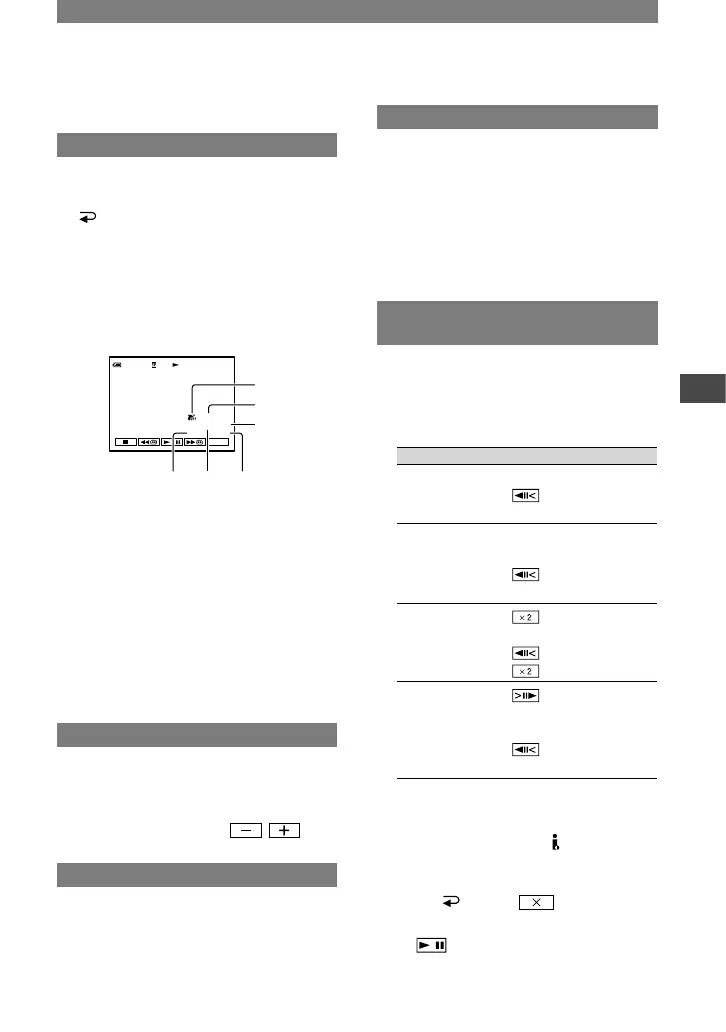
Displays information recorded
automatically (data code) during recording.
OFF
Data code is not displayed.
DATE/TIME
Displays the date and time.
CAM DATA (below)
Displays camera setting data.
SteadyShot off
Exposure
White balance
Gain
Shutter speed
Aperture value
• In the DATE/TIME data display, the date and
time are displayed in the same area. If you
record a picture without setting the clock, [--- --
----] and [--:--:--] will appear.
LCD BRT (LCD bright)
You can adjust the brightness of the LCD
screen. The recorded picture will not be
affected by this operation.
Adjust the brightness with / .
BURN DVD
When your camcorder is connected to a
Sony VAIO series personal computer, you
can easily burn the picture recorded on the
tape to a DVD (Direct Access to “Click to
DVD”). (p. 60)
BURN VCD
When your camcorder is connected to a
personal computer, you can easily burn
the picture recorded on the tape to a CD-R
(Direct Access to Video CD Burn).
For details, see “First Step Guide” stored
on the supplied CD-ROM.
[PAGE3]
V SPD PLAY
(Various speed playback)
You can play back in various modes while
viewing movies.
Touch the following buttons during
playback.
To Touch
change the
playback
direction*
(frame)
play back
slowly**
[ SLOW]
To reverse direction :
(frame)
[ SLOW]
play back 2 times
faster (double
speed)
(double speed)
To reverse direction:
(frame)
(double speed)
play back frame
by frame
(frame) during
playback pause.
To reverse direction:
(frame) during
frame playback.
* Horizontal lines may appear at the top,
bottom, or in the center of the screen. This
is not a malfunction.
**Pictures output from the DV Interface
cannot be played back smoothly in slow
mode.
Touch [ RET.] .
To return to the normal playback mode,
touch (Play/Pause) twice (once from
frame playback).
Continued


 To Next Page
 Loading...