14
Playing tracks repeatedly
— Repeat Play
You can select:
•REP-1 – to repeat a track.
•REP-2 – to repeat a disc.
1 During playback, press (SHIFT), then
press (3) (PLAY MODE) repeatedly until
“REP” appears.
2 Press (4) (n) repeatedly until the
desired setting appears.
z REP-1 z REP-2
REP-OFF Z
Repeat Play starts.
3 Press (SHIFT).
To return to normal playback mode, select
“REP-OFF” in step 2 above.
Playing tracks in random
order — Shuffle Play
You can select:
•SHUF-1 – to play the tracks on the current
disc in random order.
•SHUF-2 – to play the tracks in the current
unit in random order.
•SHUF-ALL – to play all the tracks in all the
units in random order.
1 During playback, press (SHIFT), then
press (3) (PLAY MODE) repeatedly until
“SHUF” appears.
2 Press (4) (n) repeatedly until the
desired setting appears.
z SHUF-1 z SHUF-2
SHUF-OFF Z SHUF-ALL Z
Shuffle Play starts.
3 Press (SHIFT).
To return to normal playback mode, select
“SHUF-OFF” in step 2 above.
Locating a specific track
— Automatic Music Sensor (AMS)
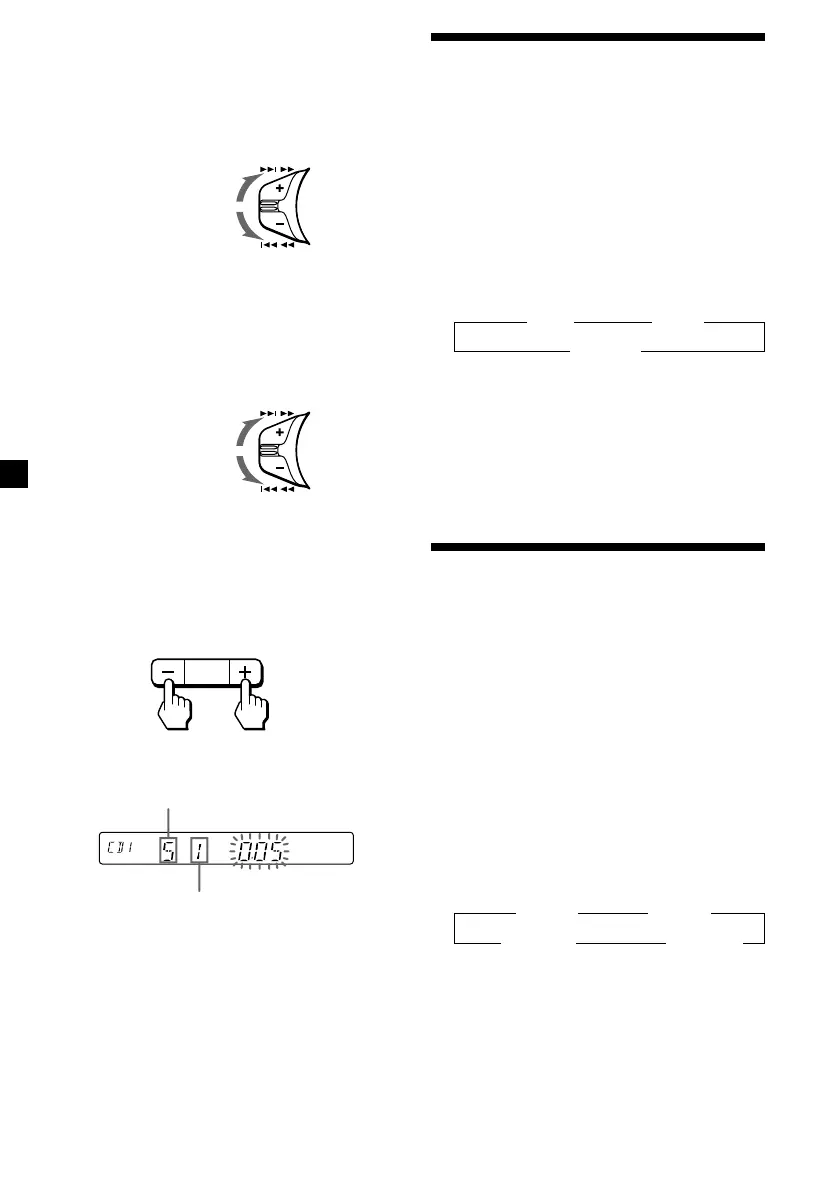
During playback, push the SEEK/AMS
control up or down and release for each
track you want to skip.
Locating a specific point in a track
— Manual Search
During playback, push the SEEK/AMS
control up or down and hold. Release
when you have found the desired point.
Changing Discs
During playback, press either side of
(PRESET/DISC) momentarily.
The desired disc in the current unit begins
playback.
To locate
succeeding tracks
To locate
preceding tracks
To search forward
To search backward
For preceding
discs
For succeeding
discs
SEEK / AMS
SEEK / AMS
DISC
PRESET
+
–
Disc number
Track number


 To Next Page
 Loading...