EasyManua.ls Logo

ST NUCLEO-H745ZI-Q - User Manual

ST NUCLEO-H745ZI-Q
51 pages
Print Icon
To Next Page IconTo Next Page
Loading...
December 2019 UM2408 Rev 2 1/51
1
UM2408
User manual
STM32H7 Nucleo-144 boards (MB1363)
Introduction
The STM32H7 Nucleo-144 boards based on the MB1363 reference board (NUCLEO-
H745ZI-Q, NUCLEO-H755ZI-Q, NUCLEO-H7A3ZI-Q) provide an affordable and flexible
way for users to try out new concepts and build prototypes, by choosing from the various
combinations of performance and power consumption features provided by the STM32H7
microcontroller. The ST Zio connector, which extends the ARDUINO
®
Uno V3 connectivity,
and the ST morpho headers provide an easy means of expanding the functionality of the
Nucleo open development platform with a wide choice of specialized shields. The STM32H7
Nucleo-144 boards do not require any separate probe as they integrate the STLINK-V3E
debugger/programmer. The STM32H7 Nucleo-144 boards come with the comprehensive
free software libraries and examples available with the STM32Cube MCU Package.
Pictures are not contractual.
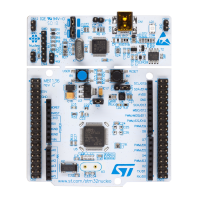
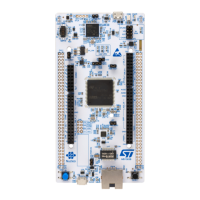
Figure 1. Nucleo-144 board (Top view) Figure 2. Nucleo-144 board (Bottom view)
www.st.com
Downloaded from Arrow.com.

Table of Contents

Question and Answer IconNeed help?

Do you have a question about the ST NUCLEO-H745ZI-Q and is the answer not in the manual?

ST NUCLEO-H745ZI-Q Specifications

General IconGeneral
BrandST
ModelNUCLEO-H745ZI-Q
CategoryMotherboard
LanguageEnglish

Summary

Features

Ordering information

Quick start

Getting started

Step-by-step guide to configure and run the board.

Hardware layout and configuration

Program and debug the onboard STM32 H7 target

Explains methods to program and debug the STM32H7 microcontroller.

Using the STLINK-V3 E to program and debug the onboard STM32 H7

Details features and usage of the integrated STLINK-V3E debugger.

Using an external debug tool to program and debug the onboard STM32 H7

Explains how to use external debug tools with the board.

Power supply and power selection

Details various power supply options and selection methods.

Power supply input from STLINK-V3 E USB connector (Default setting)

Describes powering the board via the STLINK USB connector.

External power supply input from VIN (7-11 V, 800 mA max)

Details powering the board using an external VIN source.

External power supply input 5 V_EXT (5 V, 500 mA max)

Explains using an external 5V_EXT power supply.

External power supply input from USB CHARGER (5 V)

Describes powering the board via a USB charger.

External power supply input from 3 V3_EXT (3.3 V)

Details powering the board using an external 3.3V_EXT source.

Debugging while using VIN or EXT as an external power supply

Explains debugging procedures when using external power.

USB OTG FS or device

Details USB OTG and device communication capabilities.

Ethernet (Only with NUCLEO-H745 ZI-Q and NUCLEO-H755 ZI-Q)

Covers Ethernet communication features and pin configurations.
FCC and Industry Canada (IC) Compliance

Related product manuals