29 30
4.7 Camera .....................................................................................
Accessing the camera
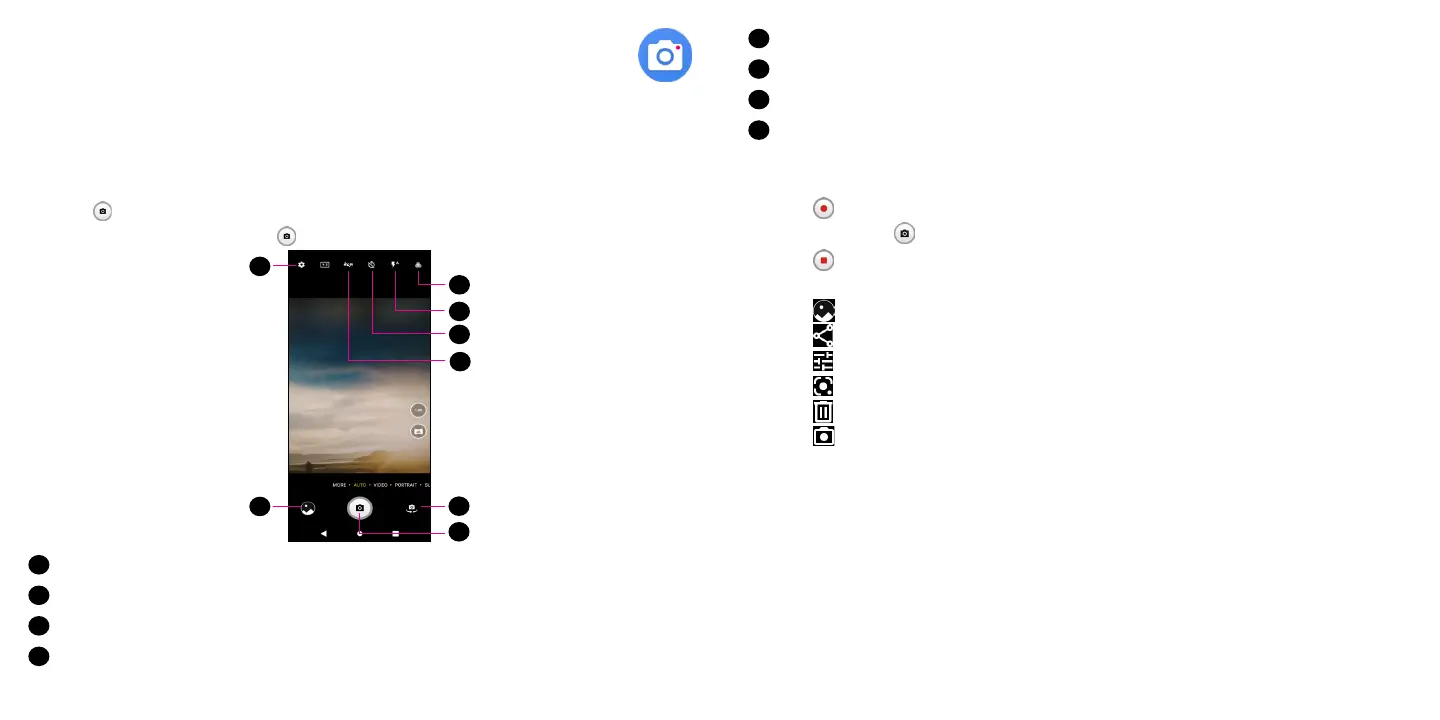
From the Home screen, touch Camera. If the phone is locked, double-press the Power key to open the
camera.
Taking a picture
• Position the object or landscape in the viewfinder, touch the screen to focus if necessary
• Touch to take the picture which will be automatically saved.
• To take burst shots, touch and hold or the Volume key.
5
4
2
3
1
6
7
8
1
Touch to select a filter
2
Touch to select flash mode or turn camera flash on/off
3
Touch to set countdown seconds
4
Touch to turn HDR on/off
5
Touch to access more options
6
Switch between front/back camera
7
Touch to take a photo
8
Touch to view photos or videos you have taken
Making a video
• Touch VIDEO to enter the Video mode.
• Touch in the center of the screen to start video recording.
• You can also touch to take a picture during video recording.
• Touch to stop recording. The video will be automatically saved.
Further operations when viewing a picture/video you have taken
• Touch from camera screen to view the photos or videos you have taken.
• Touch then Gmail, Bluetooth, MMS, etc. to share the photo or video.
• Touch to edit.
• Touch enable the Google Lens function.
• Touch to delete.
• Touch to go back to Camera mode



 To Next Page
 Loading...









