
 Need help?
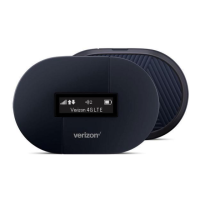
Do you have a question about the Verizon Ellipsis Jetpack MHS900L and is the answer not in the manual?
 General
| Device Type | Mobile Hotspot |
|---|---|
| Model | MHS900L |
| Network Technology | 4G LTE |
| Wi-Fi Standard | 802.11 b/g/n |
| Wi-Fi Frequency Bands | 2.4 GHz |
| Maximum Wi-Fi Speed | 150 Mbps |
| Battery Life | up to 24 hours |
| Maximum Connected Devices | 8 |
| Display | LCD |
| Security | WPA/WPA2 |
Introduces the Ellipsis Jetpack and its capabilities, including 4G LTE network access and connecting multiple devices.
Details the physical parts of the Jetpack, including buttons, display, ports, and SIM card slot.
Explains the icons and indicators shown on the Jetpack's display for network status, battery, and connections.
Provides information on charging the Jetpack's rechargeable battery and important notes on battery care.
Lists the necessary requirements for using the Jetpack, including device compatibility and browser versions.
Explains how to connect to the 4G LTE network and Wi-Fi standards supported by the Jetpack.
Guides users through the initial setup, including SIM card installation and powering on the device.
Details how to connect Wi-Fi devices to the Jetpack using its name (SSID) and password.
Covers using the Jetpack as a mobile hotspot and managing security settings like Wi-Fi and Admin passwords.
Guides users on accessing and customizing Jetpack settings via the My Jetpack Home page.
Details the My Jetpack Home page features for quick access to links and menu options for managing your device.
Explains how to view and monitor your mobile broadband data usage and billing cycle information.
Allows users to view, manage, and block devices connected to the Jetpack's Wi-Fi network.
Covers detailed settings for Jetpack, Wi-Fi, and advanced network options like DNS, Firewall, and LAN.
Covers managing SMS messages and accessing support information and device details.
Introduces common problems and provides general tips for resolving issues with the Jetpack.
Outlines initial troubleshooting steps to take before contacting support, such as checking coverage and restarting.
Addresses frequent issues like unexpected power-off, battery depletion, and connectivity problems with solutions.
Provides contact information for Verizon Customer Care and guidance on when to seek professional help.
Details FCC compliance, SAR information, and body-worn operation guidelines for the device.
Covers safety precautions related to electronic devices, medical equipment, pacemakers, and battery usage.
Outlines the terms of the manufacturer's limited one-year warranty and disclaims certain liabilities.
Provides legal information regarding trademarks, service marks, and copyright for the document.
Provides a comprehensive list of technical terms and their definitions relevant to the Jetpack and its features.










 To Next Page
