Need help?
Do you have a question about the Vision Tech Shop DSW-100 and is the answer not in the manual?
Detailed technical specifications including capacity, graduation, power, dimensions, and communication options.
Explains the scale's display segments, icons (ZERO, STA, NET, CAL), and battery level indicator.
Details the function of key buttons: UNIT for unit conversion, TARE for zeroing, ZERO for zero correction, and ON/OFF.
Presents the physical dimensions of the scale through front, back, and side view diagrams with measurements.
Identifies the optional USB and RS-232C communication ports available on the scale.
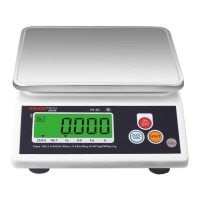
Provides a visual representation of the scale's main LCD screen, showing digits and status indicators.
Instructions for starting up the scale, including a note on low battery indication and replacement.
Describes two methods to power the scale on and off: using the button or unplugging the power adapter.
Step-by-step guide for zeroing the scale, including how to handle items exceeding the zero range.
Explains the procedure for using the tare function to subtract the weight of a container or intermediate load.
Details how to change the displayed unit of measurement between different options like lb and kg.
Instructions on how to adjust the brightness level of the scale's display backlight.
Configuration of automatic backlight turn-off and power saving modes, including specific bit settings.
Settings for automatic power-off functionality, dependent on battery usage and specific configurations.
Detailed technical specifications including capacity, graduation, power, dimensions, and communication options.
Explains the scale's display segments, icons (ZERO, STA, NET, CAL), and battery level indicator.
Details the function of key buttons: UNIT for unit conversion, TARE for zeroing, ZERO for zero correction, and ON/OFF.
Presents the physical dimensions of the scale through front, back, and side view diagrams with measurements.
Identifies the optional USB and RS-232C communication ports available on the scale.
Provides a visual representation of the scale's main LCD screen, showing digits and status indicators.
Instructions for starting up the scale, including a note on low battery indication and replacement.
Describes two methods to power the scale on and off: using the button or unplugging the power adapter.
Step-by-step guide for zeroing the scale, including how to handle items exceeding the zero range.
Explains the procedure for using the tare function to subtract the weight of a container or intermediate load.
Details how to change the displayed unit of measurement between different options like lb and kg.
Instructions on how to adjust the brightness level of the scale's display backlight.
Configuration of automatic backlight turn-off and power saving modes, including specific bit settings.
Settings for automatic power-off functionality, dependent on battery usage and specific configurations.
The DSW-100 is a versatile electronic scale designed for accurate weighing in various settings, offering a blend of essential functions and user-friendly features. Its primary function is to measure weight, with the capability to display measurements in multiple units including grams (g), kilograms (kg), pounds (lb), and ounces (oz). This multi-unit functionality makes it adaptable for diverse applications, from retail and food service to industrial and personal use.
A key usage feature of the DSW-100 is its clear and intuitive indicator display. The LCD screen provides real-time weight readings and includes several indicators to enhance user experience. For instance, a "ZERO" indicator lights up when the scale is at zero weight, ensuring a precise starting point for measurements. A stability indicator illuminates when the weight value is stable, preventing premature readings and ensuring accuracy. When the displayed value represents net weight, a dedicated indicator lights up, clearly distinguishing it from gross weight. Furthermore, a "CAL" indicator appears when the scale is undergoing setting or calibration, guiding the user through these essential processes. The display also features a remaining battery indicator, allowing users to monitor power levels and plan for recharging or battery replacement, thus preventing unexpected shutdowns during operation.
The DSW-100 incorporates several basic function keys for straightforward operation. The "UNIT" key allows users to easily switch between different weight units (lb → oz → g → kg → lb), providing flexibility for various measurement requirements. The "TARE" mode key is crucial for measuring the net weight of items by subtracting the weight of a container. This function can be used to set a tare weight or to delete an existing one, simplifying the process of weighing contents without including the container's mass. The "ZERO" key is used to correct the weight to zero, ensuring accuracy before each measurement, especially after placing or removing items. Finally, the "ON/OFF" power key provides simple control over the device's power status.
Beyond basic weighing, the DSW-100 offers several advanced operational features. The booting process is designed to be quick and efficient, with a note to press the [ZERO] key to exit the field check and enter weighing mode. The scale also provides clear guidance on battery status; if the battery capacity indicator shows only one bar, it signals low battery voltage, prompting the user to replace the four R20P SIZE-D 1.5V alkaline batteries. Powering the device on and off can be done either by clicking the [ON/OFF] button or by unplugging the AC power, offering convenient options for different scenarios.
The zero operation is a fundamental aspect of accurate weighing. Users can place a heavy object (within the allowable zero setting range, e.g., 0.500lb) on the scale, and then click [ZERO] to set the display to zero, effectively subtracting the object's weight. Removing the object will then show a negative value, and clicking [ZERO] again resets the scale to zero. An audible beep indicates if the weighing item exceeds the zero range, providing immediate feedback.
The tare operation is similarly user-friendly. By placing a container (within the allowable tare range, e.g., 2.500lb) on the scale and pressing the [TARE] key, the displayed weight is reset to zero. Removing the container then shows its tare weight as a negative value. Pressing [TARE] again resumes zero setting. If the placed weight exceeds the allowable tare range, the tare operation will not be performed, preventing incorrect measurements.
The DSW-100 also includes features for managing its display and power consumption. The backlight brightness can be adjusted to suit different lighting conditions and to conserve battery life. By pressing and holding the [UNIT] key for 5 seconds, users can access the backlight brightness setting, indicated by "bL.S 3" on the screen. The brightness level can be increased by clicking [UNIT], with a range from 0 (no backlight) to 9 (maximum brightness). This setting can be saved by clicking [ZERO]. A crucial note for battery operation is to decrease backlight brightness to extend battery life.
Further power management features include backlight off settings and power off time. By long-pressing [ZERO] and clicking [UNIT] three times, users can enter user settings to configure automatic backlight off times (e.g., 10 seconds, 20 seconds, 30 seconds, or never) and allow or forbid automatic entry into power-saving mode. The scale also allows setting an automatic shutdown time (e.g., 10 seconds, 30 seconds). These settings are particularly useful for battery-powered operation, helping to conserve energy. The default settings for backlight and power-saving modes are provided, ensuring optimal performance out of the box.
Maintenance features are primarily focused on troubleshooting and ensuring safe operation. The manual provides an "OPERATIONAL WARNING" section with clear instructions to ensure product and personal safety. These warnings cover important aspects such as checking power supply compatibility, keeping hands dry when handling power plugs, avoiding sharing sockets with high-power devices, preventing metal objects or liquids from entering the scale, and not inserting flammable objects into interfaces. It also advises against scratching or modifying the power cord, bending it excessively, or placing heavy objects on it. In case of a fall, smoke, or strange smell, users are instructed to immediately turn off the scale, unplug it, and contact service personnel. The manual also emphasizes proper grounding of the scale and extension cable to prevent electrostatic charges and advises against pulling the power cord to unplug it. Finally, it strictly prohibits removing, repairing, or modifying the scale body or internal components to ensure personal safety.
The "ERROR MESSAGE" section serves as a vital maintenance feature, providing a guide to common issues and their solutions. For instance, "OF" indicates weight overload, requiring removal or recalibration. "UF." signifies gross or net weight is negative, prompting users to zero or clear the tare. "888888" appears when the [ZERO] button is pressed, requiring its release. "0-Er" indicates a system zero error, necessitating removal or recalibration. "zr.Err" means the weight exceeds the allowable range, again requiring removal or recalibration. "S On" and "S OFF" indicate the calibration switch is in the "on" or "off" state, respectively, with the error message automatically clearing after 5 seconds. These error messages and their corresponding solutions empower users to quickly diagnose and resolve minor issues, minimizing downtime and ensuring continuous operation of the DSW-100.
 General
| Capacity | 100 kg |
|---|---|
| Units | kg, lb |
| Display | LCD |
| Material | Stainless steel |
| Auto Power Off | Yes |
| Overload Indicator | Yes |
| Power Source | Battery or AC adapter |

 To Next Page