EasyManua.ls Logo

Yamaha Electone ME-10 - Electone ME-10 Basic Features; Creating Sound Registrations

Yamaha Electone ME-10
17 pages
Print Icon
To Next Page IconTo Next Page
To Previous Page IconTo Previous Page
Loading...
Il.
The
Basic
Features
of
Your
Electone
1.
Now,
Let’s
Create
Some
Registrations
UPPER
KEYBOARD
VOICE
SECTIONS
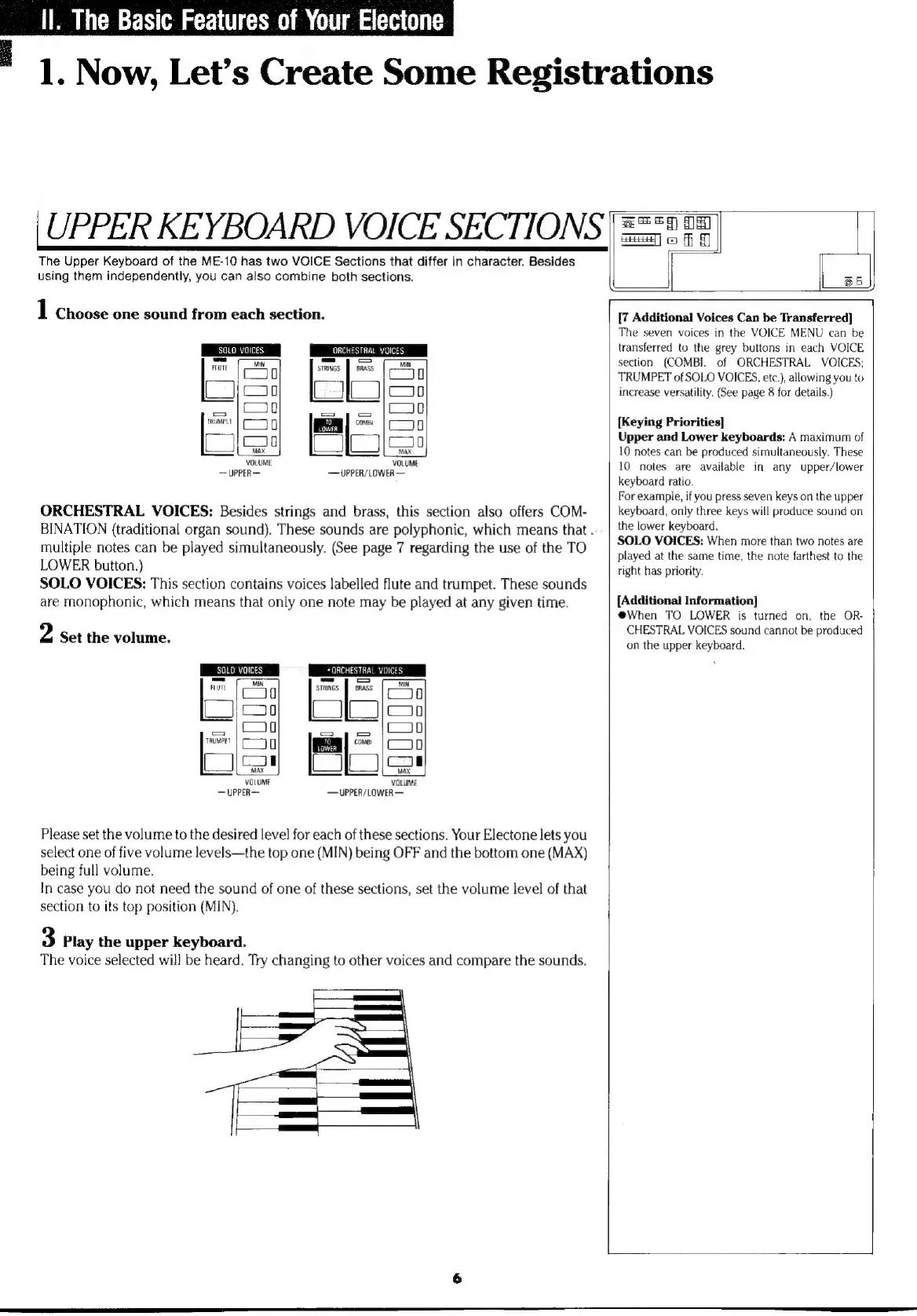
The
Upper
Keyboard
of
the
ME-10
has
two
VOICE
Sections
that
differ
in
character.
Besides
using
them
independently,
you
can
also
combine
both
sections.
1
Choose
one
sound
from
each
section.
SOLO
VOICES
|
p
OPCHESTRAL
voices
ME
VOICES
чинэ.
-—
nu
ми
D
stanes
||
Gees
CJI
0
TRUMPET
D
come
ц
a
VOLUME
VOLUMI
UPPER—
UPPER/LOWER
ORCHESTRAL
VOICES:
Besides
strings
and
brass,
this
section
also
offers
COM-
BINATION
(traditional
organ
sound).
These
sounds
are
polyphonic,
which
means
that
.
multiple
notes
can
be
played
simultaneously.
(See
page
7
regarding
the
use
of
the
TO
LOWER
button.)
SOLO
VOICES:
This
section
contains
voices
labelled
flute
and
trumpet.
These
sounds
are
monophonic,
which
means
that
only
one
note
may
be
played
at
any
given
time.
2
Set
the
volume.
SOLO
VOICES
*
ORCHESTRAL
VOICES
=
|
E
|
=
FLUTE
‘STRINGS
BRASS
LOWER
TRUMPET
Г
155
VOLUME
UPPER—
UPPER/LOWER
VOLUME
Please
set
the
volume
to
the
desired
level
for
each
of
these
sections.
Your
Electone
lets
you
select
one
of
five
volume
levels—the
top
one
(MIN)
being
OFF
and
the
bottom
one
(MAX)
being
full
volume.
In
case
you
do
not
need
the
sound
of
one
of
these
sections,
set
the
volume
level
of
that
section
to
its
top
position
(MIN).
3
Play
the
upper
keyboard.
The
voice
selected
will
be
heard.
Try
changing
to
other
voices
and
compare
the
sounds.
[7
Additional
Voices
Can
be
Transferred]
The
seven
voices
in
the
VOICE
MENU
can
be
transferred
to
the
grey
buttons
in
each
VOICE
section
(COMBI.
of
ORCHESTRAL
VOICES;
TRUMPET
of
SOLO
VOICES,
etc.),
allowing
you
to
increase
versatility.
(See
page
8
for
details.
[Keying
Priorities]
Upper
and
Lower
keyboards:
A
maximum
of
10
notes
can
be
produced
simultaneously.
These
10
notes
are
available
in
any
upper/lower
keyboard
ratio.
For
example,
if
you
press
seven
keys
on
the
upper
keyboard,
only
three
keys
will
produce
sound
on
the
lower
keyboard.
SOLO
VOICES:
When
more
than
two
notes
are
played
at
the
same
time,
the
note
farthest
to
the
right
has
priority.
[Additional
Information]
@When
TO
LOWER
is
turned
on,
the
OR-
CHESTRAL
VOICES
sound
cannot
be
produced
on the
upper
keyboard.

Other manuals for Yamaha Electone ME-10

Related product manuals