Chapter 3: Using the Eee Slate
3-4
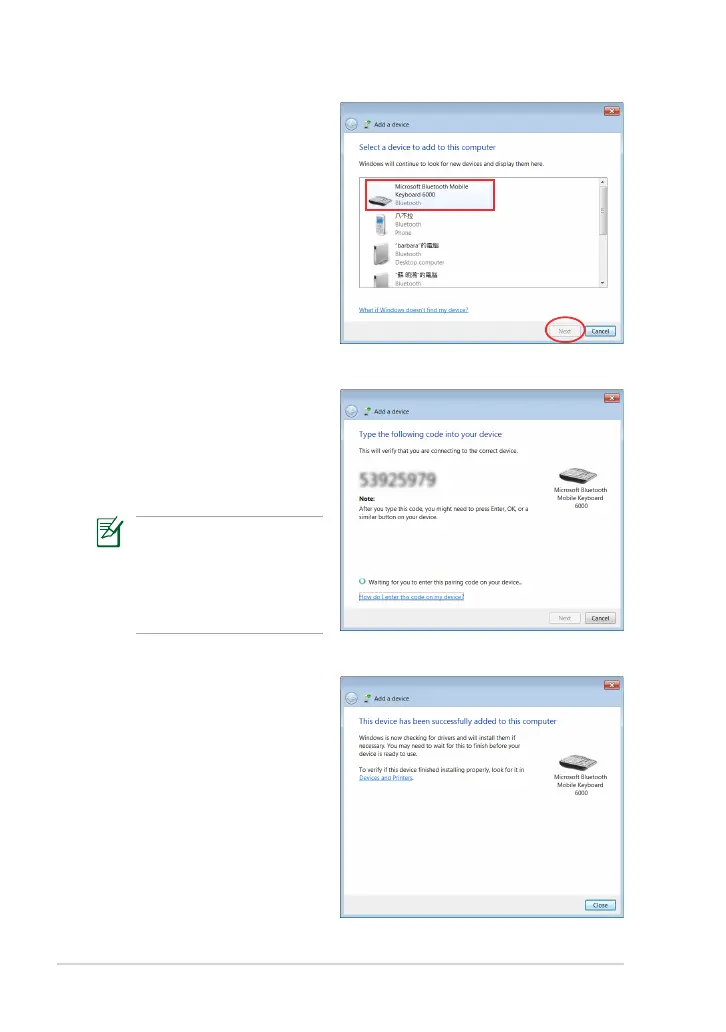
6. Key in the Bluetooth
security code or passcode
into the Bluetooth device
to pair the Bluetooth
device with your Eee Slate.
The security code shown
in the right gure is for
reference only. Please key
in the code shown on
your Eee Slate.
5. From the list, select the
Bluetooth device that you
want your Eee Slate to
communicate with, then
tap Next.
7. The Bluetooth device is
successfully paired with
your Eee Slate. Tap Close
to exit the Bluetooth
wizard.


 To Next Page
 Loading...