2-1 Chapter 2: Setup
2.1 Detaching the arm/stand
(for VESA wall mount)
ThedetachablestandoftheVW199(x)LSeriesLCDmonitorisspeciallydesigned
forVESAwallmount.
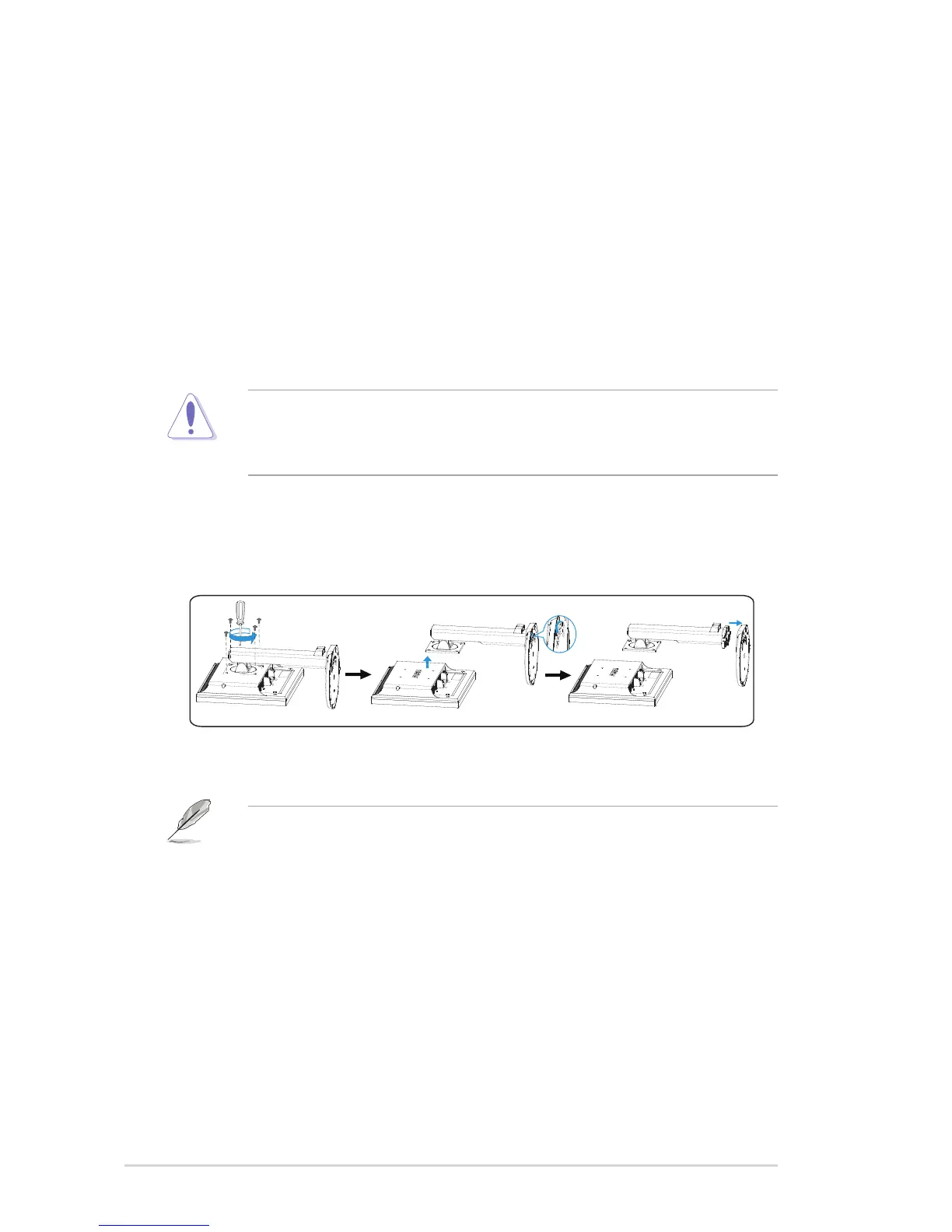
To detach the arm/stand:
1. Lowerthemonitortoitslowestheight,andtheninsetthemonitorheight
adjustment lock.
2. Have the front of the monitor face down on a table.
3. UseascrewdrivertoremovethefourscrewsontheVESAcover,thenslide
outthearm/basetodetachitfromthemonitor.
• Werecommendthatyoucoverthetablesurfacewithsoftclothtoprevent
damage to the monitor.
• Holdthestandofthemonitorwhenyouremovethescrews.
1
• TheVESAwallmountkit(100x100mm)ispurchasedseparately.Foruse
onlywithULListedWallMountBracketwithminimumweight/load14.8kg
(Screwsize:4mmx12mm).


 To Next Page
 Loading...