7
© Baxi Heating UK Ltd 2009
5.0 Setting the Transmitter
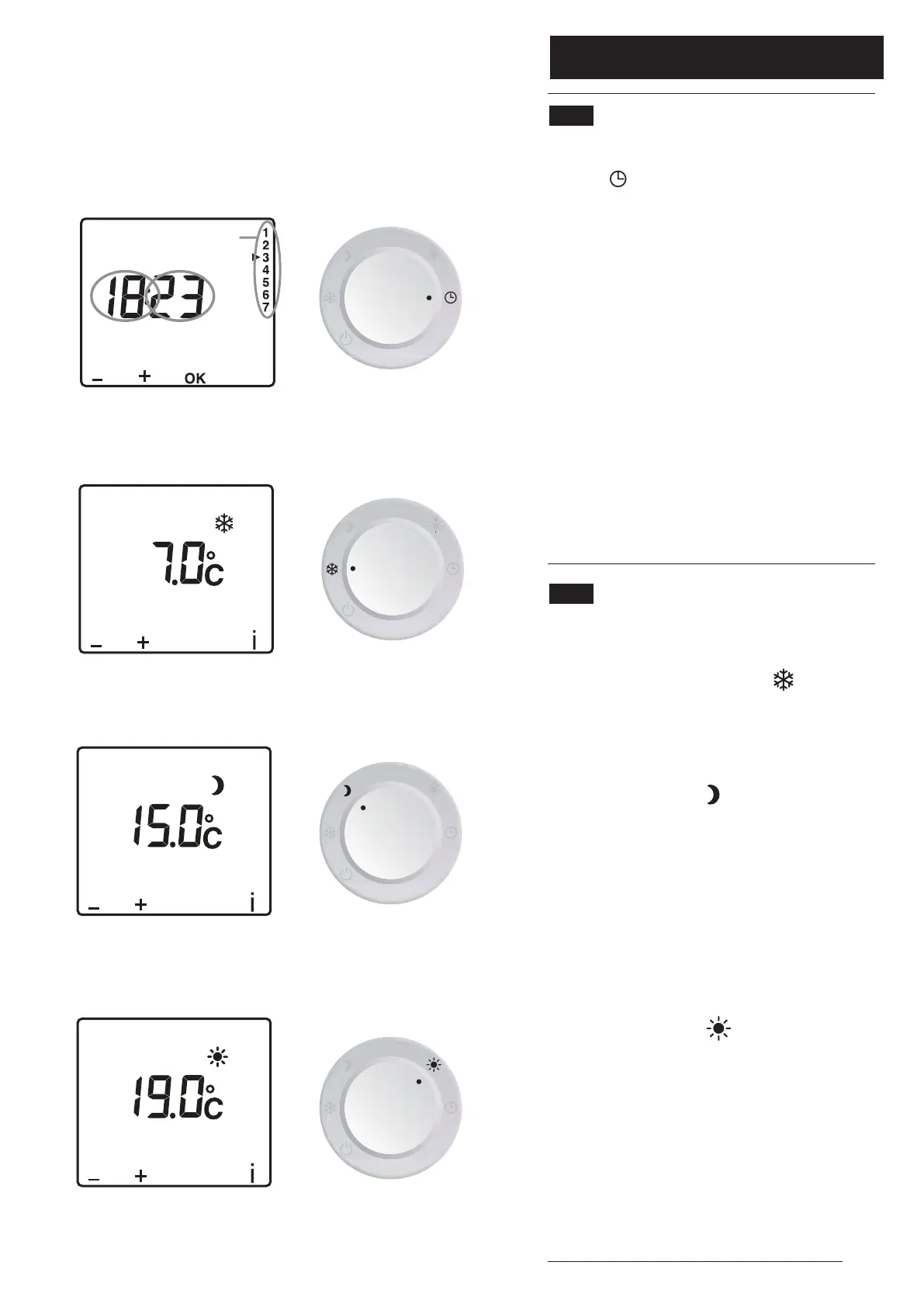
5.1 Setting the Time (Fig. 8)
1.Turn the Selector Knob to the ‘Time
Setting’ position.The day identification
numbers (1 - 7) will flash.
2. Press ‘+’ or ‘-’ to select the required day,
1 = Monday, 2 = Tuesday etc.
3. Press ‘OK’ to confirm the setting.The
‘hour’ will start flashing. Press ‘+’ or ‘-’ to
select the required hour (e.g. 18), and
press ‘OK’ to confirm.
4.When the ‘minute’ starts flashing repeat
the process to set the ‘minutes’ for the
current time.
5.Turn the knob to exit the setting mode.
5.2 Setting the Temperature
Set Points (Figs. 9, 10 & 11)
1.To set the ‘Frost Protection’ temperature
turn the Selector Knob to the position.
7°C is the default setting. Press ‘+’ or ‘-’ to
change the setting between 5°C & 15°C.
2. To set the ‘Lo’ temperature turn the
Selector Knob to the position. 15°C is
the default setting. Press ‘+’ or ‘-’ to change
the setting between 10°C & 30°C.
(N.B. for Ambiflo™ applications do not set
below 14°C).This is the temperature that
will be maintained during the periods of
the day when there is no Central Heating
programme.
3. To set the ‘Hi’ temperature turn the
Selector Knob to the position. 19°C is
the default setting. Press ‘+’ or ‘-’ to change
the setting between 10°C & 30°C. (N.B.
for Ambiflo™ applications do not set
below 14°C).This is the temperature that
will be maintained during the periods of
the day when the Central Heating is
programmed to be ‘ON’ (see below).
4.Turn the knob to exit the setting mode.
Day
Hours
Minutes
Fig. 8
Fig. 9
Fig. 10
Fig. 11


 To Next Page
 Loading...